
Wacom Pen Pressure not working on After Effects (Please address this Adobe AE developers)
Hi everyone! I've seen this topic a lot in the forums but it seems that Adobe has not yet addressed this issue. Wacom Pen Pressure does NOT work with Adobe After Effects brush tool:
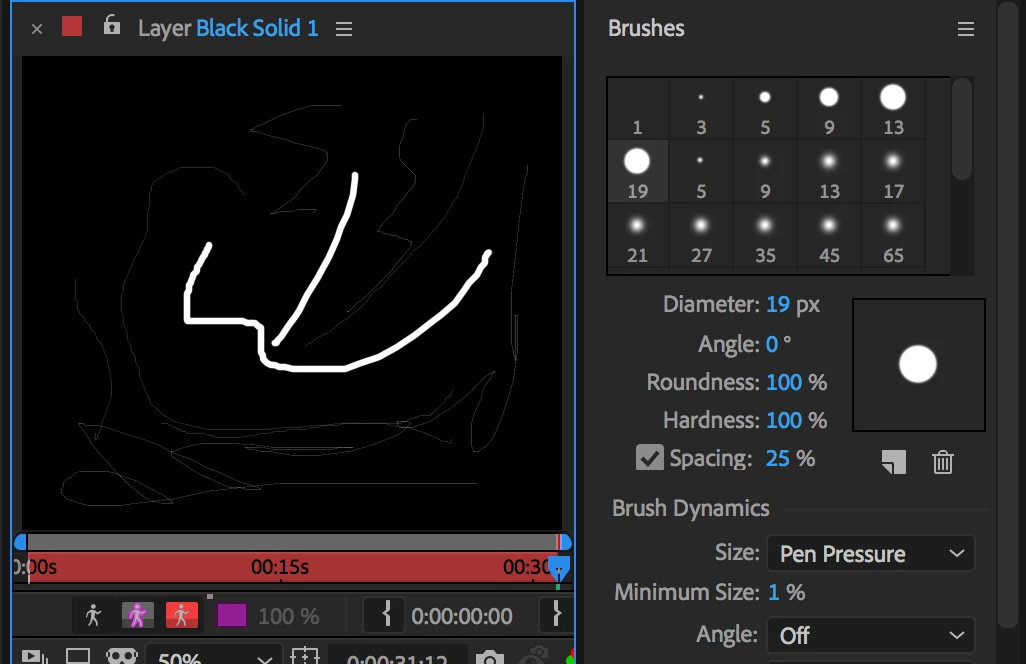
In the above picture I've selected Brush 19. When Size is set to Pen Pressure (as is in the photos), I can only draw those very thin and very faint lines on the left. When the Size is set to Off, I can only draw those two thicker lines in the middle. If you're from Adobe or are a developer from there, please address this as it seems to be a common issue with no fix yet.
Versions used:
Adobe AE: Version 15.1.1 (Build 12)
Wacom Tablet Driver: I've tested the latest Driver 6.3.29-6, as well as the older Driver 6.3.28-2
Device: Macbook Pro, OS Sierra version 10.12.6
UPDATE: Thankfully I still have a copy of my very old Wacom Tablet Driver 6.3.15-3, and the pen pressure is working again. But still, I hope any future versions of this program will be fully compatible with the Wacom drivers.
 AdChoices