
nicoz46977520
Participant
October 9, 2017
解決済み

Adding stroke to path in AE CC

  • October 9, 2017
  • 返信数 1.
  • 10924 ビュー

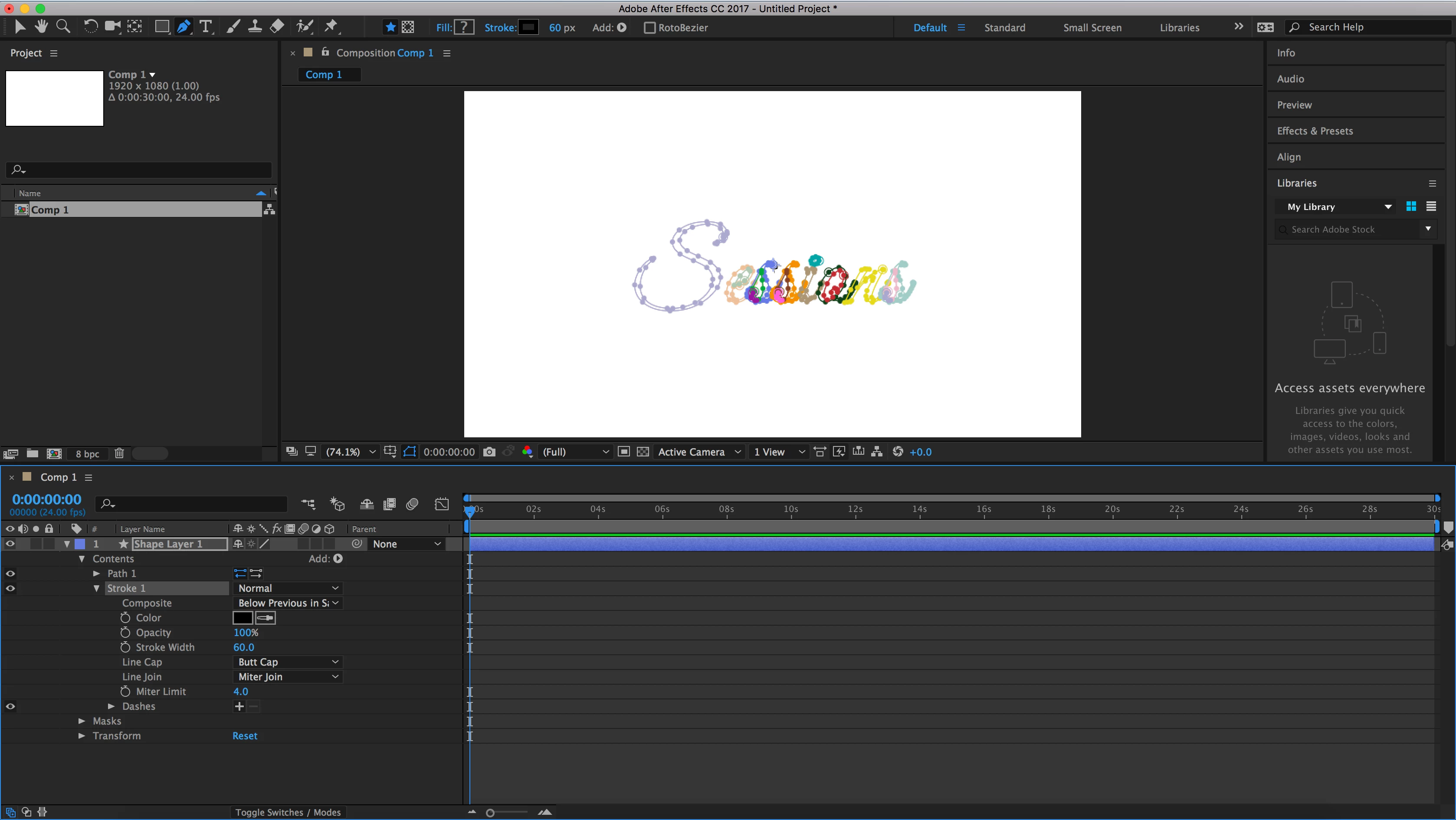
Hey guys, I'm fairly new to AE so I'm trying to figure out what I'm doing wrong. I am trying to add a stroke to a path I made in PhotoShop so that I can animate it via Trim Paths BUT I can't seem to get the stroke to appear. I've attached a screenshot of my project.

My steps to get here were:

1. Create path in PS and copy it

2. Create shape layer in AE

3. Add "Path" to shape layer

4. Paste path from PS

5. Add "Stroke" and adjust color/px width

I don't know where my error is here. What am I doing incorrectly? Thanks!
    このトピックへの返信は締め切られました。
    解決に役立った回答 Rick Gerard

    You are not going to get trim paths to work the way you expect on those paths because they are closed paths. You will end up with filled layers not paths you can simply use trim paths to animate.

    You need an open path that follows the centerline of the text you have created on a separate layer. Then you apply trim paths to that line and use it as a track matte to reveal the layer below. There are a zillion tutorials out there on the technique. Some of them are even pretty good.

    返信数 1

    Roei Tzoref
    Legend
    October 9, 2017

    your paths were pasted as masks:

    that's maybe because you selected more than one or you did not paste in the path parameter itself. you can only select one path at a time, and make sure you paste in the twirled down path parameter

    Rick GerardCommunity Expert解決!
    Community Expert
    October 10, 2017

    You are not going to get trim paths to work the way you expect on those paths because they are closed paths. You will end up with filled layers not paths you can simply use trim paths to animate.

    You need an open path that follows the centerline of the text you have created on a separate layer. Then you apply trim paths to that line and use it as a track matte to reveal the layer below. There are a zillion tutorials out there on the technique. Some of them are even pretty good.

    Participant
    July 19, 2022

    You can get get trim paths on a closed path to animate pretty easily. I think his problem was his import of his paths. If you have properly setup paths, and you use the 'create null from paths' window, selecting the 'trace path' option, It will create a null object that travels along the path. Then you can use trim paths on your original stroke, and parent the end to progression on the null. Then if you add a stroke, it will look like you are drawing the path.