Exit
  • Global community
    • Language:
      • Deutsch
      • English
      • Español
      • Français
      • Português
  • 日本語コミュニティ
  • 한국 커뮤니티
0

After Effects 18.2 (0-00-00-00) in name when Save Frame As

Contributor ,
May 17, 2021 May 17, 2021

When I use Save Frame As to save a still from After Effects 18.2, it automatically puts the timecode (0-00-00-00) at the end of the filename.

Is there a way to make it stop putting the timecode at the end of the filename?

TOPICS
Import and export
1.5K
Translate
Report
Community guidelines
Be kind and respectful, give credit to the original source of content, and search for duplicates before posting. Learn more
community guidelines
LEGEND ,
May 17, 2021 May 17, 2021

It works as it always has. Unless you create your own script that mimics the functionality there is no way to change that.


Mylenium

Translate
Report
Community guidelines
Be kind and respectful, give credit to the original source of content, and search for duplicates before posting. Learn more
community guidelines
Explorer ,
May 11, 2023 May 11, 2023

"It works as it always has"


and it is stupid !


I try to change that, selectiong options in the drop down menu and changing to only "comp name" and setting it by default, it always add the time code without any options to not do that


This is a huge waste of time to always have so set "comp name" each time i have to export a still frame to keep a clean name without that stupid time code which is useless for most of the users

Those whe really need the time code could have it by selecting an option, and every user would be happy


Instead of that, we have to take some time for each still export ... thanks Adobe

Translate
Report
Community guidelines
Be kind and respectful, give credit to the original source of content, and search for duplicates before posting. Learn more
community guidelines
People's Champ ,
May 18, 2021 May 18, 2021

Agree with Mylenium.  You could commission someone who knows scripting (or learn it yourself) to write a script that mimics the behaviour of the "Save to still" function, but eliminates the timecode reference in the file name.  You could even add a button to apply it.  This is quite straightforward stuff for someone who knows what they're doing.


But the built-in functionality is what it is.

Translate
Report
Community guidelines
Be kind and respectful, give credit to the original source of content, and search for duplicates before posting. Learn more
community guidelines
Community Beginner ,
May 18, 2021 May 18, 2021

Hi

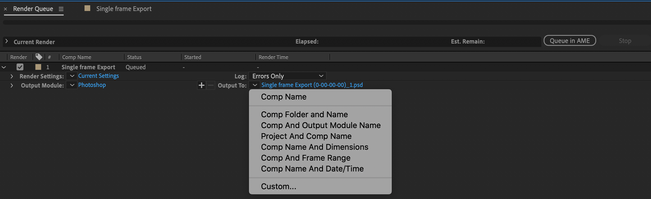
after adding to render queue change the settings in " Output to".

Click on the arrow button you can see some options.

Screenshot 2021-05-18 at 1.53.47 PM.png

Hope this will work for you.

All the best

-Bala

Translate
Report
Community guidelines
Be kind and respectful, give credit to the original source of content, and search for duplicates before posting. Learn more
community guidelines
Community Expert ,
May 18, 2021 May 18, 2021

If this is about being able to export frames really quickly, then you might also want to check out Video Copilot's FX Console: https://www.videocopilot.net/blog/2018/05/fx-console-updated-to-v1-0-3/


This lets you click a button to take a screengrab which you can copy directly to your clipboard.  I use it all the times for making thumbnails for my tutorials.  Way quicker than rendering.

Translate
Report
Community guidelines
Be kind and respectful, give credit to the original source of content, and search for duplicates before posting. Learn more
community guidelines
New Here ,
Sep 30, 2024 Sep 30, 2024
LATEST

I use a Mac Utility called A Better Finder Rename. I created a "Droplet" app to delete the appropriate amount of characters at the end of the file name. It can do it to any amount of files very quickly. I belive they have a ersion for the PC as well. 

Translate
Report
Community guidelines
Be kind and respectful, give credit to the original source of content, and search for duplicates before posting. Learn more
community guidelines