



NordicFilmworks
Known Participant
December 19, 2014
質問

After Effects Mac Issues

  • December 19, 2014
  • 返信数 11.
  • 17999 ビュー

Hello everyone,

I have been asked to create a well documented thread regarding several issues that "I feel" seem to be related in regards to After Effects and memory.  It seems a large amount of Mac users have posted that they have been experiencing troubles with rendering, whether this is a RAM preview or a full render from the render queue. I am not alone in my complaint nor in my request for a full fix; there are many related posts.

I have two identical mac pros to test/render with; one system is on Mavericks and one system is on Yosemite.  This is to prove without a doubt that is has NOTHING to do with the OS.

Mac Pro (Late 2013)
OSX Yosemite 10.10.1 OR Mavericks 10.9.5

3.5 GHz 6-Core Intel Xeon E5

16 GB 1866 MHz DDR3 ECC

Macintosh HD

AMD FirePro D500 3072 MB

The After Effects version is the latest (today I updated): 13.2.0.49

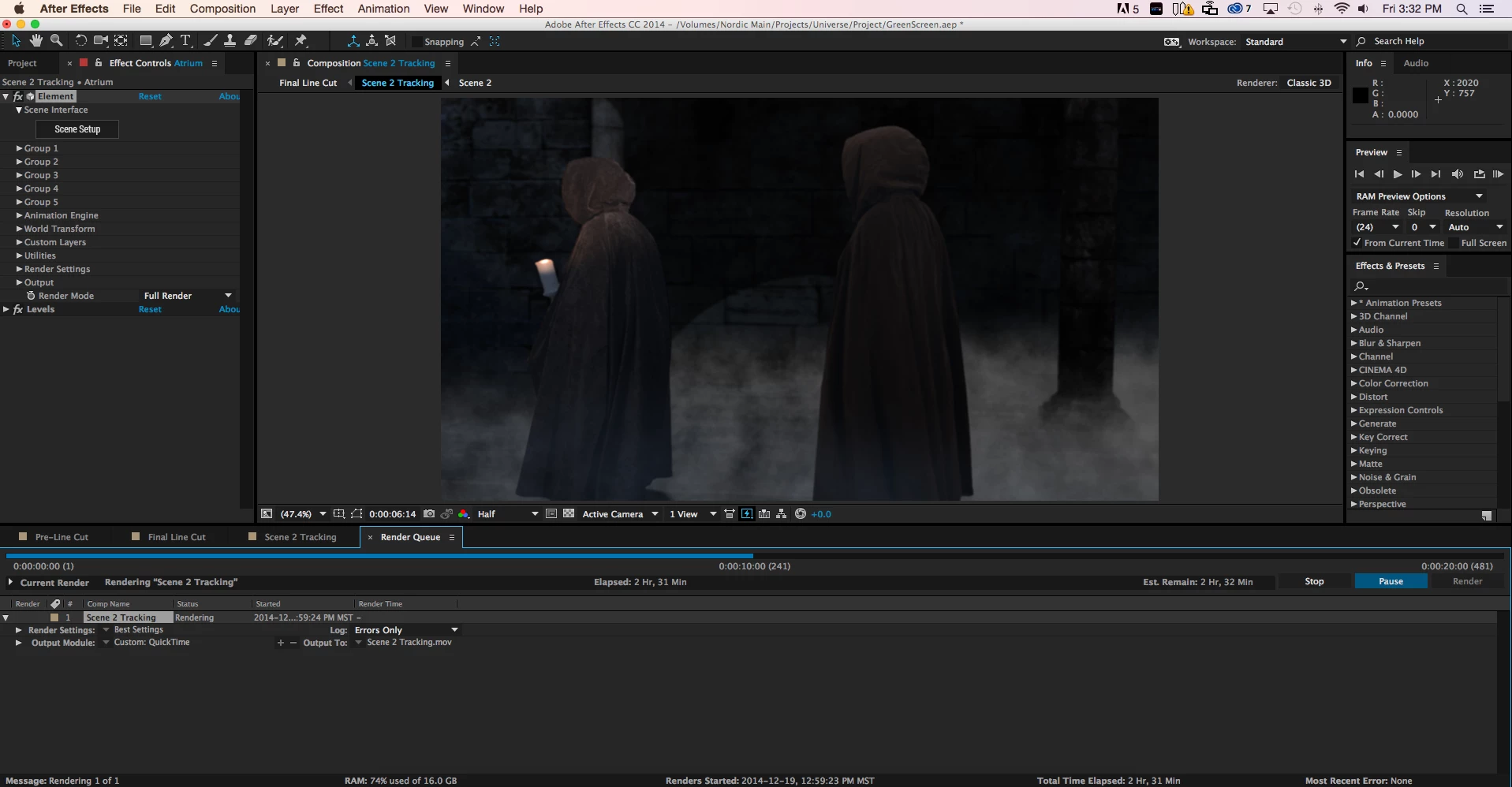
When I attempt to render out a sequence that is short with little effects, it will render out.  Anything that is a bit more complicated, I am getting some serious memory crashes.  It is as if the RAM is not clearing old RAM in the cache.

Step 1

I am rendering out a CG scene for an upcoming short film.  It is taking 4 hours to render out 20 seconds (which again may be related to Adobe not playing nice with RAM and OS X).  About 1.5 hours in it was using 32% of the available system ram.  At 2.5 hours in (as seen below in the screenshot) it is now using 75% of 16 GB.
Step 2

As I am writing this I am simply waiting until the application will eventually crash and it will give me the famous:

"Unable to allocate 0.000 MB of memory, Either decrease the memory requirements for rendering of this frame, or install more RAM...."


Points of Note

  • This RAM error will occur on several difference sequences of the project above; it also occurs on a separate unrelated project that I am trying to render that I created 2 years ago.  This proves that it is not related to a specific project, sequence, or individual effect settings.
  • I have attempted rendering these sequences on both the Mac Pro with Yosemite and the Mac Pro with Mavericks.  The same thing occurs.
  • I have also tried rendering out these sequences with multi frame processing ON and OFF and using research from other posts to try and tweak the RAM per CPU to allow the project to render

Solution

I have been unable at this point to find a satisfactory solution.

Related Posts

One Adobe forum employee, who will remain nameless, has criticzed me for saying that the RAM issues that have gone unresolved for more than a period of one year are related.  Sorry, the issues are RELATED.  These issues seem to be related only to MAC users regardless of their hardware.

Post #1: "Unable to allocate 0.000 MB of memory, Either decrease the memory requirements for rendering of thi

- In this post a user from over a year ago posts initial reports regarding AE CC crashing due to memory requirements while rendering.  This post is related.

- The "correct answer" is not correct as users have stated that the update suggested did not fix the problem

- The problem in this post is 100% mac users reporting

Post #2: "Unable to allocate memory" popup on Quit

- In this post the user reports that he is also having the "unable to allocated" ram message, but when he quits

- This post is over 1 year old

- a MAC user

- Several other posters recently have reported that they are getting a similar memory error

- This post is related because although he is getting a memory error when quitting and NOT when rendering, it is a similar error message on a MAC system and may help Adobe to find the solution

Post #3: unable to allocate enough memory to render current frameunable to allocate enough memory to render current frame

- This post is over 6 months old and also unresolved by Team Adobe

- The user also tried many of the tricks I did to try and render

- This post is intimately related, although he is getting the memory error during ram preview and not when doing a final render the RAM usage by After Effects would likely be very similar; if an Adobe engineer tells me they are not, I will then mark this post as un-related

- the SUGGESTED ANSWER of audio scrubbing UPDATE has NOTHING to do with the original poster's statement; just wanted to point that out

I've seen probably 2-3 dozen related posts regarding RAM issues like mine at the posts above. Most of the "suggested answers" in these posts suggest the original poster to update their After Effects to a latest version.  In the majority of these cases the original poster replies that the update did not solve their issue.

Sincerely,

Matthew

    このトピックへの返信は締め切られました。

    返信数 11

    NordicFilmworks
    Known Participant
    August 8, 2017

    I have been one of the most "vocal" on the MAC failures / issues on the forum.  From 2014 to 2016, things were in a "black box" of functionality.

    I will say with the 2017 versions, there were significant improvements on our Macs when using Adobe products (especially with After Effects).  Nothing major to report, although we have done less compositing this year.

    I will also say that Kevin has a tough job "toeing the company line."  It can't be easy making excuses for the development team as things have been problematic for years.  That being said, Adobe HQ starved them of resources during a time of serious growth to the A/V industries and just this year are they getting things on track.

    I'm hopeful things will continue to improve.

    jackthegiantkiller
    Inspiring
    August 8, 2017

    I am hopeful as well, as I've only been able to use the latest version of AE since they finally nipped the preview disfunction a few months ago. I am serious about reparations though, I'm not spending $50 a month to be a beta tester, and I'm certainly not spending $50 a month to be dicked around by Adobe's inability to adequately empower their development teams. To even hear that Adobe starved them during those years where After Effects became utterly dysfunctional infuriates me. At the very least they owe us an apology, much less a rebate on what we were paying during those two years.

    Dave_LaRonde
    Inspiring
    August 8, 2017

    jackthegiantslayer  wrote

    ... I'm not spending $50 a month to be a beta tester, and I'm certainly not spending $50 a month to be dicked around by Adobe's inability to adequately empower their development teams. To even hear that Adobe starved them during those years where After Effects became utterly dysfunctional infuriates me. At the very least they owe us an apology, much less a rebate on what we were paying during those two years.

    I agree with you completely.  After about 5 years of Creative Cloud, After Effects is still a train wreck.  There's no resolution in sight.  Adobe -- plus gullible users -- keep holding out that carrot on a stick.....  "It'll be LOTS better in the next version!" 

    Yeah, right.  You can count on getting new features that no one asked for, long-standing features that mysteriously have ceased to work properly, and little progress on the one thing that Adobe has been unable to say for almost a decade -- "IT WORKS!"

    Adobe has its user base by the short hairs, and the only thing that will make them wake up is some stiff competition.  I long for that day.

    Participating Frequently
    March 23, 2016

    So as of March 23rd I'm still getting all the issues you list (I'm running Yosemite due to the UI redraw bug in El Capitan).  I'm about to install the 13.7.1 update to see if it fixes the RAM caching issues, and I have co-workers running El Capitan so we'll see if the UI redraw thing is fixed as well.  Just replying here so I can get updates on the effectiveness of bug fixes.  Hopefully they solve this one soon.

    Known Participant
    March 23, 2016

    there's no reason to expect the issue to be fixed by 13.7.1 the memory bug was not even addressed.

    Participating Frequently
    March 23, 2016

    It seems the UI redraw was only partially addressed as well... go figure.  RAM previews will play real time so long as you don't move your mouse cursor

    I haven't seen the RAM preview bug since I updated but I haven't really been doing a lot of RAM previewing today either, so it remains to be seen.

    NordicFilmworks
    Known Participant
    February 21, 2016

    Kevin:  None of us have been vulgar, nor threatening, nor any other issue other than we have been specific in our frustrations and we have been creative in our venting of this frustration.  Respect our right to have full and frank discussions, within a single thread.  Do not disperse our comments into dozens of bizarre locations in order to subjugate our frustrations.  I have begun taking video and image screenshots of the process and I will be updated Adobe customer service through a separate channel.  Consider this a respectful request and a notice of my archiving.

    I have no idea why Kevin has transferred over a dozen posts & replies on this Mac OSx discussion and dispersed them individually across the Premiere Pro - Video Lounge forums.

    Paying customers of Adobe CC and AE.  You have every right, as MAC OSX users, to fully reply and write on the appropriate post which is located here:  After Effects Mac Issues

    This is the correct section for "After Effects Mac Issues" and it makes sense we cleanly utilize a SINGLE THREAD to discuss such issues and not have multiple threads discussion the same issue.  Kevin, please do not disperse and separate our posts into a sloppy mess on the Premiere forum.  Todd originally asked that a single thread was created back in 2014.  We have done just that.

    Known Participant
    February 21, 2016

    I take back everything I said... What an underhand douche bag move!!! They already accidentally deleted a thread with over 30,000 views on this subject last year!!! Complete joke and shows exactly how low they have gone... Like I said last year, they should all lose their jobs! There is no faith left in the user base, all trust in the dev team has gone and this is all they have left to do!

    Utterly shameful, weak and embarrasing!

    Known Participant
    February 21, 2016

    Surely even the true believers must think this move is pretty underhand??? Szalem?

    Known Participant
    February 4, 2016

    This, is an ongoing issue for me. CS6 (which I am forced to use on occasion,) does it quite often, but Every CC version of AE has this problem as well. I have 32 gigabytes of ram. it takes very little for AE of ANY version to eat every drop of free ram, and then when it is doing nothing... crash the entire system, as it continues to allocate more ram to itself, and release NONE of it.

    FrankPostProd
    Participant
    January 6, 2016

    Hi there,

    I've been plagued by similar memory issue since updating to CC 2015 on my Mac. I would get random memory error while working on my comps saying that "AE cannot allocate 0.0010 MB of Ram" or 0.002 MB, and even 0.000 MB of Ram; at which point I would have to Force Quit the App because the message would cascade indefinitely.

    More recently, during renders, the memory usage would go up to 100% before crashing and giving the same message. I assume that this new behavior is do to the length of the comp I'm working on; used to be about 10sec per comp has and now I am working on comps that are more then 1 min long.

    Some time I'm working in AE without a fuss, and other time I literally cannot get any work done at all. The error can occur once a day or so, not so bad. But sometime it popping up every 2 min!

    I also did some experimentation to find the cause of this issue, or at least some hint has to what is going on:

    -My primary workstation is an iMac 27" late 2013 i7-3.5Ghz, 24GB Ram, 4GB GTX780m, OSX 10.10; and my backup workstation is a custom PC from 2009; i7-940 2.93Ghz, 12 GB Ram, 3GB GTX660, Win 7 OS.

    -Both computer use the latest Adobe CC 2015, have the same plugins installed, all plugins on both sides are on the same version.

    -This week I've been working on a 3min long keying comp (pre-edited sequence rendered out has 1 clip in 1080p ProRes422 - 29.97fps). I was in a rush to get the sequence done asap and half way through the project the memory issue started popping up every 2 minutes or so. I tried purging memory in AE, still happened. Tried purging memory in OS, still happened. I managed to complete the chroma key by working "offline" with "Caps Lock" enable and switching live preview render on and off. Really not an ideal solution but it did the trick.

    -Started to render out my comp and that where the memory would start to build up to 100% and crash the App. Not even a quarter of the way thru the render. I was fed-up so I consolidated the project and switched to my PC. Started AE, setup the render to .mov with Animation codec since no ProRes in PC, hit render and 5h later the job was done with an average of 25% out of 12GB ram used! This is insane! I then tried to render to .mov with Animation on my iMac, memory still happen.

    -Even tried to play with the Secret menu option, no change.

    I usually work with heavy 3D comp inside AE with Element 3D and I can understand that at some point AE can't take it anymore since it's sort of a "hack" of the App that normally can't handle true 3D. But this time it was just a simple chroma key job. I only used three simple 3rd party plugins; Neat video's "Reduce Noise v4" and RedGiant's "Matte Feather Sharp" and "Light Wrap". I used "KeyLight+KeyCleaner+AdvSpillSupp" presets for keyer.

    I have to say that I did found a work around that will probably not work for every one. I was desperate to get this issue out of the way so I started scrubbing thru some old Time-Machine backup, found 1 from late 2014 with AE CC 2014 installed. I simply copied the AE sub-folder from the backup Application folder to my computer main Application folder, updated the plugins for AE CC 2014.... and voila!!! I was able to open my AE CC 2015 project in AE CC 2014, make some changes to it and render it without any memory issue!

    My 2 cents in all this, I think Adobe really dropped the ball on this one. After Effects CC 2015 for Mac is the least stable App Adobe came up with ever, and I've been working in the Adobe verse since 2001 (AE v5). Is it solely Adobe's fault, maybe not. Apple probably bare part of the blame for making new OS every year for the past 3-4 years which can be hard to keep up with on the "dev" side. I can image they're spending more time on maintenance then actual development. But denying the existence of such a clear and pretty bad issue serve no one. Stop arguing and get to work Adobe!... Please.

    dissidently
    Inspiring
    January 29, 2015

    It's absolutely astonishing that anyone in here would give this post less than 5 stars. Given that I've just given it 5 stars, and across 4 ratings it's averaging 4 stars, some have given it less than 4 stars. Amazing.

    I'm afraid the answer to your "question" is to consider 3D software on the PC platform, spend years learning and familiarising yourself with that, and relinquishing any soft spots you might have for the Adobe and AE way of doing things.

    EDIT:

    One man's rude is another man's polite.

    I didn't see NordicFilms_Dude being rude anywhere. In point of fact, NordicFilmworks has done considerable service to the end users (CUSTOMERS!) of Adobe.

    Many value contributions of people like NordicFilmWorks far more than the daintiness, deceit, deflection and disingenuousness some others use around here.

    NordicFilmworks has saved users considerable time wondering if they're doing something wrong or if Adobe and AE are doing something wrong. And since Adobe makes a habit of obscuring their failings, NordicFilmworks is/are providing a service to AE users that's otherwise unavailable.

    Brutal, calculated, exacting and precise critique of software and services is an art form of great value to the creative community. AE is a designed and developed tool in need of critique for the reasons stated in this thread, and many others.

    Criticism is not rude, it's just criticism.

    Participating Frequently
    January 13, 2015

    Greetings all!

    I'm on a new mac pro too and see some performance issues when rendering AE comps (dynamically linked) in Premiere when Ae is also open. My CPU usage remains at 98% idle! Closing AE returns expected behaviour and preview renders are fast.


    I'm a bit frustrated as I'd like my new edit machine to be working hard - flames coming out of the top or something! For the time being it feels like Premiere and AE are not taking full advantage of the hardware.


    Also, can someone explain to me what work my expensive dual GPUs are actually doing in terms of playback/rendering/exporting? I've read mixed reports!


    I have seen many Mac pro users reporting the same issue online.

    Can someone from Adobe advise when this will be fixed?

    my specs -

    Late 2013 mac pro

    3ghz 8 core, 32 Gb RAM, Dual AMD firepro D700 GPUs

    media on external RAID0 over thunderbolt 1

    latest AE and Prem builds.

    Participant
    January 13, 2015

    The Dynamic Link issue w/ Premier has gone on for months.  It was supposed to be fixed in the most recent update, but was not!  The issue, as I understand it is, that Dynamic linked AE is sending too many messages to Premiere which seem to paralyze timeline playback.  A work around offered, as you note, is to shut down AE. I have also found that if you toggle to AE then back to Premiere, you get proper playback for a short period of time. (typically enough time to see if recent AE changes work).

    With the NAB looming, one would assume great effort will be made to fixing things.  On can only hope. (and keep eyes open for alternate software)

    Cheers,

    Jim

    Known Participant
    January 13, 2015

    We have also had these RAM issues and found Memory Freer app was the only work around. However annoying it is to sit watching renders and constantly freeing RAM. This was on 2010 Mac pros and iMacs. Posted on here and instead of addressing the issue you are always accused of being negative! The facts speak for themselves, there is some serious gaps in After Effects bug reporting. There seems to be this incessant need to have a big release instead of addressing long running issues. I suggested this before and Adobe completely deny it, but I'm afraid you only have to look on here to see its true!

    NordicFilmworks
    Known Participant
    December 29, 2014

    UPDATE:

    I have put 64 GB of brand new blazing fast RAM into my MAC PRO.  I can render out full MAYA scenes in mere seconds.  AfterEffects is faster at rendering, but:

    1. STILL CRASHES
    2. DOES NOT RELEASE RAM (consecutively builds up RAM usage on SEPARATE renders, until it crashes)

    See screenshot below with Rainbow wheel crash:

    RAM IS 75% used of 64gb.... CMON ADOBE

    LauriAaltio
    Known Participant
    December 31, 2014

    hi! its a software problem . did you make a bug report to adobe?

    I fixed my issue like this:

    -I installed also the older CS6 to my mac (I had CC). then I installed a couple of newer versions to this old CS6 from the updater. started the computer again a couple of times and then it miraculously started to work.

    so: install an older version. update it a couple of times(because there is the bug in the first installation(stupid or what...)). could help?

    also, call the local (your country) distributor, someone has to be responsible in your country. they have a legal company in your country also? try calling them.

    Lauri

    NordicFilmworks
    Known Participant
    December 31, 2014

    Hey Lauri,

    Thanks for the update.  It's pretty sad that older software works better, eh?  I'm afraid with the plugins and such I'm using it would be too challenging to re-create this project with older versions of the plugins.  I'll be stuck on CC.

    In good news, my case has been escalated to an Adobe engineer who wants to look into my problem further.  The most REFRESHING thing is that they KNOW there is a serious problem...  I did report this problem via email probably 1 to 2 months ago, but until I called and started making some serious noise, it wasn't getting anywhere.  Maybe the Adobe team will spend a week or two and crunch us out a fix... I'm hoping, but you never know...

    -insert Todd's dumb comment below-

    NordicFilmworks
    Known Participant
    December 22, 2014

    Still no reply from Adobe team

    Todd_Kopriva
    Inspiring
    December 23, 2014

    A lot of folks are on their Christmas vacation now. This is a user-to-user forum where people (including Adobe staff) help out in their free time.

    If you urgently need help with a specific issue, contact Adobe Technical Support:

    http://www.adobe.com/support/contact

    NordicFilmworks
    Known Participant
    December 20, 2014

    Rick, thank you for replying with a suggesting.  I have tried the secret menu trick as well and told AE to purge every 2 frames.  Did not help and eventually RAM will reach 100% and crash.  You are correct that RAM will never be 100% on 1-2 frames but the problem is After Effects not caching RAM properly during renders.