Exit
  • Global community
    • Language:
      • Deutsch
      • English
      • Español
      • Français
      • Português
  • 日本語コミュニティ
  • 한국 커뮤니티
0

after effects ram preferences

New Here ,
May 19, 2019 May 19, 2019

good after noon

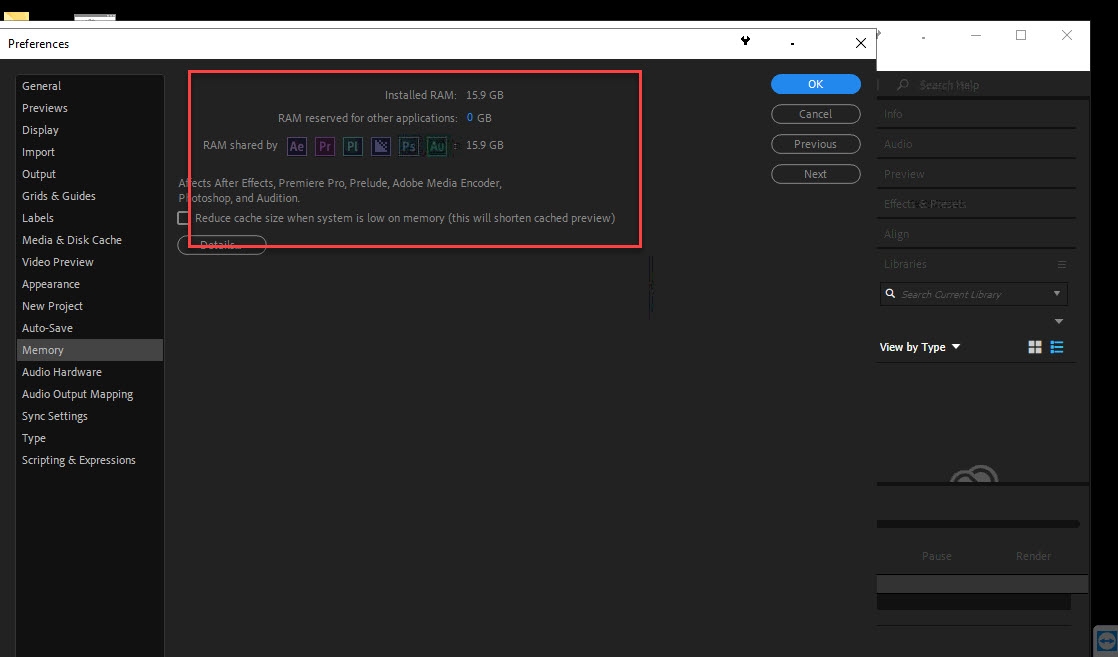
please i have issue in my aftereffects 2019 i cant adjust the ram and He can not find it as per the attached photo.

kindly help

screenshot.jpg

Message was edited by: Moderator

577
Translate
Report
Community guidelines
Be kind and respectful, give credit to the original source of content, and search for duplicates before posting. Learn more
community guidelines
Community Expert ,
May 19, 2019 May 19, 2019

Maybe I'm missing something but what you have to do is assign RAM to other apps. If you set to 5GB, then AE will use 11GB. In fact, in a 16GB of RAM configuration, After Effects default assignment is 11GB for the RAM Shared with other apps (premiere, Prelude, AME, Photoshop and Audition) and 5GB reserved for other apps (OS, internet browser, etc)

Translate
Report
Community guidelines
Be kind and respectful, give credit to the original source of content, and search for duplicates before posting. Learn more
community guidelines
New Here ,
May 19, 2019 May 19, 2019

thanks for reply

but i cant assign RAM every time when change the ram Returns as the attached picture

please check video

Translate
Report
Community guidelines
Be kind and respectful, give credit to the original source of content, and search for duplicates before posting. Learn more
community guidelines
Community Expert ,
May 20, 2019 May 20, 2019

Then try to delete the preferences file. As soon as you launch After Effects, hold CTRL+ALT+SHIFT keys. You will be prompted to delete the preferences file. Click OK, and continue. After Effects preferences will be reseted to their default.

Translate
Report
Community guidelines
Be kind and respectful, give credit to the original source of content, and search for duplicates before posting. Learn more
community guidelines
New Here ,
May 20, 2019 May 20, 2019

thanks Jose Panadero for your kind support i try your solution but Unfortunately it did not work

Jose Panadero           

Translate
Report
Community guidelines
Be kind and respectful, give credit to the original source of content, and search for duplicates before posting. Learn more
community guidelines
Community Expert ,
May 20, 2019 May 20, 2019
LATEST

Could you tell us what version of After Effects are you using? Go to Help > About After Effects.

Translate
Report
Community guidelines
Be kind and respectful, give credit to the original source of content, and search for duplicates before posting. Learn more
community guidelines