Copy link to clipboard
Copied
I am having issues with an after effects multi-machine render of a PNG sequence, I keep receiving this set of errors....
I first get this window
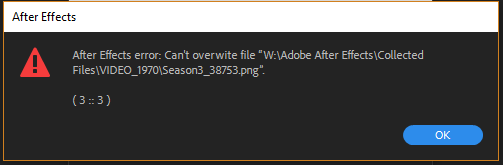
Then this after hitting OK
Followed by this
and this
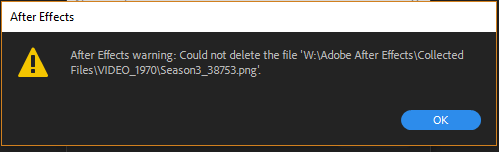
I'm pretty sure the last 2 windows are mostly irrelevant as they seem to be a result of the first 2. However, I wanted to show everything I am receiving.
This is a multi-machine render on a small render farm I recently built with 3 local PCs all connected to a NAS via a gigabit hub. In an attempt to trouble shoot I also attempted a virtual multi-machine render using BGrenderer on my best PC, and I am running into a similar issue, though it seems to take longer for the error to occur this way.
I collected 'ALL' the files to the NAS and I am trying to render to the NAS. While trouble shooting I also attempted a virtual multi-machine render via BGrenderer to a local solid state drive and still ran into this issue, so now I am stumped. I had assumed it was a limitation of my NAS but now having taken that out of the equation and still having the issue I am out of ideas.
Any ideas or suggestions are welcomed!!

I’ve found that multi-machine renders tend to work well when you’re rendering to a SAN. And that’s about it.
When they go sideways and you’re burning through valuable render time to troubleshoot it, I find it works pretty well to set the Work Area to a different segment of the Comp on each machine, allowing the most powerful machine to to a longer segment. So, machine one might do frames 0000 to 0499 while machine two might do 0500 to 0749 while machine three might do 0750 to 09999. Each mach
...Copy link to clipboard
Copied
It pretty much tells you what's wrong - your PNG source file is crooked. It may be damaged, have unknown metadata, color profiles or whatever. Convert it to another format and replace its usage in the project.
Mylenium
Copy link to clipboard
Copied
That isn't a source file it is an attempted render in an image sequence. It seems like the multiple machines are getting hung up on each other and not always skipping like they are suppose to. When I go into the folder and look at the PNG file that one of the machines gets this error on, it is complete and intact, presumably by another of the machines. I'm at a loss.
Copy link to clipboard
Copied
I’ve found that multi-machine renders tend to work well when you’re rendering to a SAN. And that’s about it.
When they go sideways and you’re burning through valuable render time to troubleshoot it, I find it works pretty well to set the Work Area to a different segment of the Comp on each machine, allowing the most powerful machine to to a longer segment. So, machine one might do frames 0000 to 0499 while machine two might do 0500 to 0749 while machine three might do 0750 to 09999. Each machine would go to local storage and then the resulting PNGs can be copied over to whatever type of shared storage is being used (SMB, AFS, NAS, etc.).
-Warren
Copy link to clipboard
Copied
That is exactly what I was thinking of doing if I couldn't find a straight-up solution to the problem.
I'll see if anyone else might have some thoughts or ideas but as of right now this is the plan for the next project.
Thank you.
Get ready! An upgraded Adobe Community experience is coming in January.
Learn more

