Exit
  • Global community
    • Language:
      • Deutsch
      • English
      • Español
      • Français
      • Português
  • 日本語コミュニティ
  • 한국 커뮤니티
0

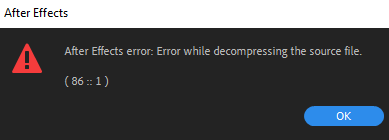
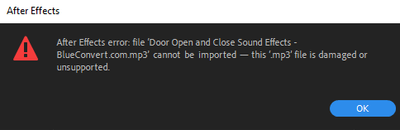
Error: AE decompressing source file/damaged or unsupported

New Here ,
Jun 24, 2020 Jun 24, 2020

I have been using AE for a few weeks and this week ran into an issue trying to import mp3 files. It says there is an error decompressing the file, and that it is unsupported or damaged. I was able to import the same types of files last week, and if I downlaod the files as a video file it will import, which is a fine workaround, but takes more file space. Screenshot (28).png


Screenshot (29).png


TOPICS
Audio , Error or problem , Import and export
13.6K
Translate
Report
Community guidelines
Be kind and respectful, give credit to the original source of content, and search for duplicates before posting. Learn more
community guidelines
LEGEND ,
Jun 25, 2020 Jun 25, 2020

Without any exact info about the file nobody can tell you much. MP3s can have all sorts of atrocious things going on liek variable data rates and sample rates or even "protection". If the files worked before, however, chances are something on your system has changed, so start checking your audio preferences, flush out your cache and so on. Otherwise you will hear it from anyone: AE never was good with MP3s, so converting them to WAV/ AIFF files in Audition or similar programs is strongly advised.


Mylenium

Translate
Report
Community guidelines
Be kind and respectful, give credit to the original source of content, and search for duplicates before posting. Learn more
community guidelines
New Here ,
Oct 29, 2023 Oct 29, 2023
LATEST

I tried .wav format and it worked.

Translate
Report
Community guidelines
Be kind and respectful, give credit to the original source of content, and search for duplicates before posting. Learn more
community guidelines