Exit
  • Global community
    • Language:
      • Deutsch
      • English
      • Español
      • Français
      • Português
  • 日本語コミュニティ
  • 한국 커뮤니티
0

Expression Error HELP

Explorer ,
Dec 09, 2018 Dec 09, 2018

I'm following the steps from this tutorial Use The Force! Create a Star Wars Ship Flying Through Asteroids in After Effects (PART 1/2) - YouTub...

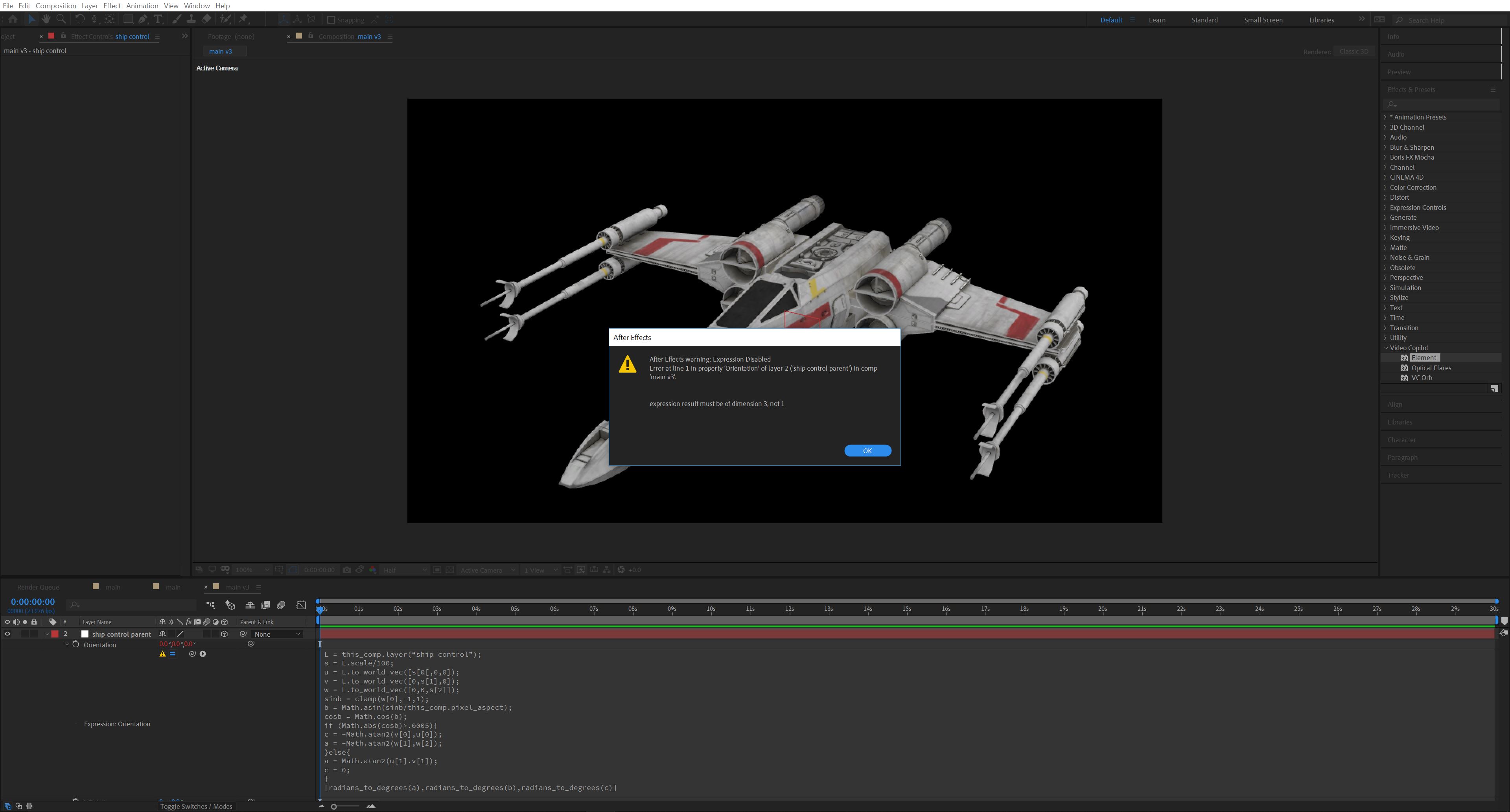
Once I get to 2:44 in the YouTube tutorial I start running into issues. I'm copying the expression word for word, but an error code comes up. I've attached an image so you can have a look at what I'm dealing with.

Let me know if I need to post anything more and please keep in mind I'm not yet proficient in After Effects.

EXPRESSION

l=this_comp.layer(“ship control”);

s=L.scale/100;

u=L.to_world_vec([s[0[,0,0]);

v=L.to_world_vec([0,s[1],0]);

w=L.to_world_vec([0,0,s[2]]);

sinb=clamp(w[0],-1,1);

b=Math.asin(sinb/this_comp.pixel_aspect);

cosb=Math.cos(b);

if(Math.abs(cosb)>.0005){

c=-Math.atan2(v[0],u[0]);

a=-Math.atan2(w[1],w[2]);

}else{

a= Math.atan2(u[1].v[1]);

c=0;

}

[radians_to_degrees(a),radians_to_degrees(b),radians_to_degrees(c)]

ERROR CODE

After Effects warning: Expression Disabled

Error at line 1 in property 'Orientation' of layer 2 ('ship control parent') in comp

'main v3'.

expression result must be of dimension 3, not 1

IMAGE
2.JPG

1.7K
Translate
Report
Community guidelines
Be kind and respectful, give credit to the original source of content, and search for duplicates before posting. Learn more
community guidelines

correct answers 1 Correct answer

Community Expert , Dec 09, 2018 Dec 09, 2018

There were quite a few typos. Try it this way:

L=thisComp.layer("ship control");

s=L.scale/100;

u=L.toWorldVec([s[0],0,0]);

v=L.toWorldVec([0,s[1],0]);

w=L.toWorldVec([0,0,s[2]]);

sinb=clamp(w[0],-1,1);

b=Math.asin(sinb/thisComp.pixelAspect);

cosb=Math.cos(b);

if(Math.abs(cosb)>.0005){

  c=-Math.atan2(v[0],u[0]);

  a=-Math.atan2(w[1],w[2]);

}else{

  a= Math.atan2(u[1],v[1]);

  c=0;

}

[radiansToDegrees(a),radiansToDegrees(b),radiansToDegrees(c)]

Dan

Translate
Community Expert ,
Dec 09, 2018 Dec 09, 2018

There were quite a few typos. Try it this way:

L=thisComp.layer("ship control");

s=L.scale/100;

u=L.toWorldVec([s[0],0,0]);

v=L.toWorldVec([0,s[1],0]);

w=L.toWorldVec([0,0,s[2]]);

sinb=clamp(w[0],-1,1);

b=Math.asin(sinb/thisComp.pixelAspect);

cosb=Math.cos(b);

if(Math.abs(cosb)>.0005){

  c=-Math.atan2(v[0],u[0]);

  a=-Math.atan2(w[1],w[2]);

}else{

  a= Math.atan2(u[1],v[1]);

  c=0;

}

[radiansToDegrees(a),radiansToDegrees(b),radiansToDegrees(c)]

Dan

Translate
Report
Community guidelines
Be kind and respectful, give credit to the original source of content, and search for duplicates before posting. Learn more
community guidelines
Explorer ,
Dec 09, 2018 Dec 09, 2018

Thank you so much, Dan. I'd say I'm embarrassed but I've been frustrated with this for so long I'm just glad it's over! I'll definitely be studying my mistakes and keep learning.

Translate
Report
Community guidelines
Be kind and respectful, give credit to the original source of content, and search for duplicates before posting. Learn more
community guidelines
Community Expert ,
Dec 09, 2018 Dec 09, 2018

There are a bunch of errors that I see right off the top.

The first line should be L= thisComp.layer("ship control");

The 3rd, 4th, and 5th lines use to_world_vec and the syntax is wrong. It should be: toWorldVec

Everything in the brackets in those three lines is wrong. Every time you start an array using a square bracket you need to close it. Look closely ([s[0[,0,0]); includes three opening brackets and one closing. Each opening square bracket needs a closing bracket.

I don't see any reason for a function using pixel aspect and besides that, it is written wrong. It should say pixelAspect and not pixel_aspect.

That's as far as I got. The whole expression is nonsense. You could try and go through each line and compare the methods with the proper syntax using the Expression Language menu in the Timeline, but that would probably be a waste of time. In my humble opinion, any tutorial that uses complex expressions and does not include a way to copy and paste that data to your project is a waste of time. I watched a few minutes of the tutorial and some of the ideas are good, but the explanation of the technique is pretty lousy.

Translate
Report
Community guidelines
Be kind and respectful, give credit to the original source of content, and search for duplicates before posting. Learn more
community guidelines
Explorer ,
Dec 10, 2018 Dec 10, 2018
LATEST

Thank you for your time, Rick. I'm definitely going to be studying and learning JavaScript, so hopefully, this is a good first lesson!

Translate
Report
Community guidelines
Be kind and respectful, give credit to the original source of content, and search for duplicates before posting. Learn more
community guidelines


