
Inspiring
December 30, 2020
Question

How to get an equivalent of the ‘Continuously Raster’ function on the precomposed layers ?

  • December 30, 2020
  • 1 reply
  • 8077 views

Hello to all.

I have a recurrent problem using vector layers, precomps and cameras.
I want to precise before that :

  • 100% of my work in AE provides from vector/illustrator layers
  • I check ‘Continuously Raster’ for each layer, but not for precomps
  • The camera I create are one node cameras, with depth of field inactivated
  • The problem is the same if, instead of using a camera, I create and use a scale property on a general precomp that which includes all of my layers (so it is not a problem of camera, but a general a global understanding that escapes me !).


So the problem is that I get blur on all my layers that are in precomp if I use a zoom effect on my scene.
The precomposed layers are not clear as thez should be, as the others layers (not precomposed) are for instance.

It seems to be normal : there is no ‘Continuously Raster’ on these layers - as it works différently for these precomposed layers.

So my question is : how to get an equivalent of the ‘Continuously Raster’ on the precomposed layers ?

I join a graphics to be more explicite :
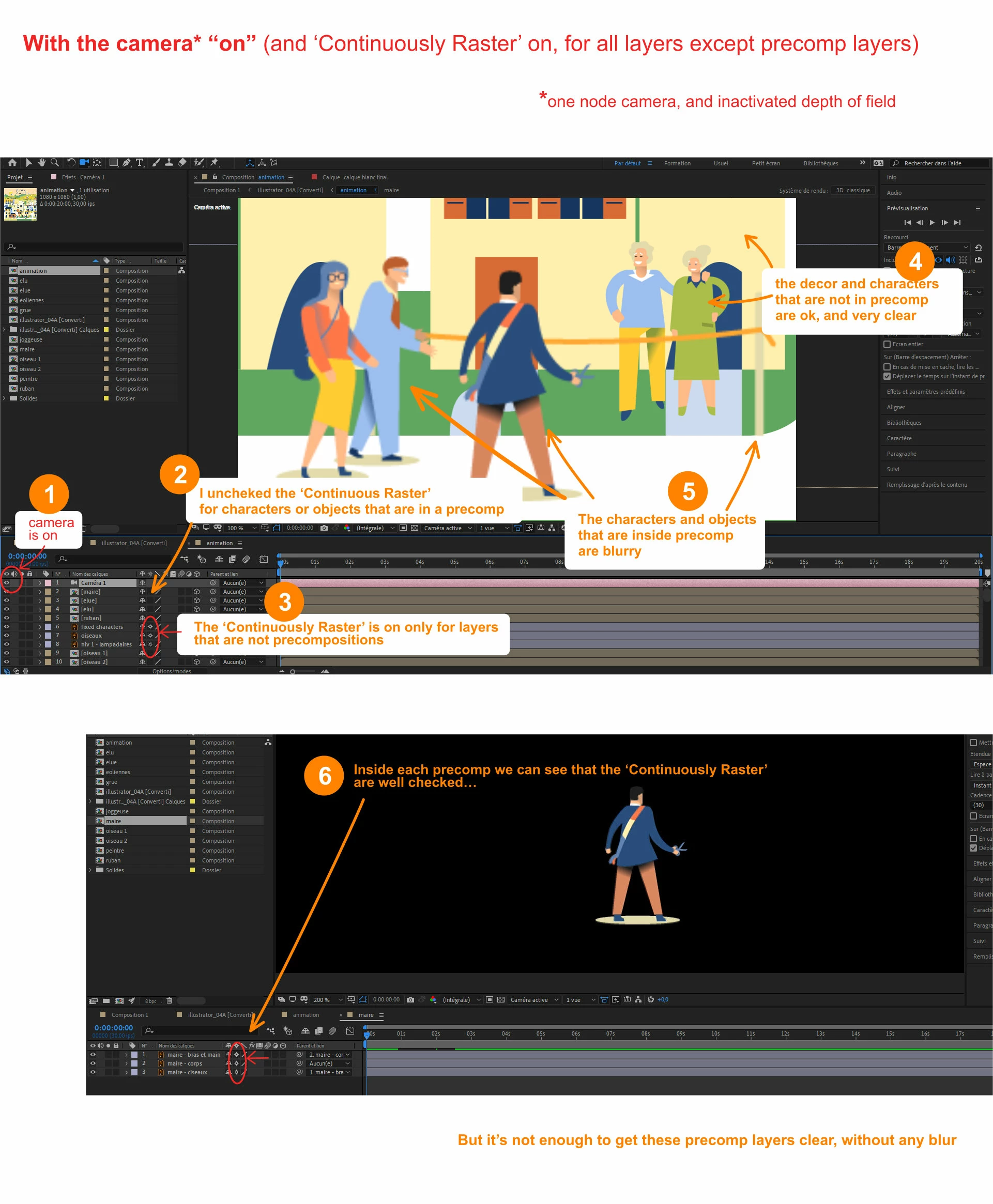
 

Thank you for your help !


This topic has been closed for replies.

1 reply

Ro Hackett
Inspiring
December 30, 2020

Did you try turning off the continuous raster layers inside the pre-comps ... and then turn it on for the pre-comp layers in the main comp (so they should be all switched on in main comp)? 🤔 🤔😮

Inspiring
December 30, 2020

Thank you for your answer.


* I forgot to say I used puppet tool on several layers (but not for all : for some precomp layers I used only scales or position changes)


Your answer : Yes I did that. But turning it on for the pre-comp layers in the main comp creates new strange things (the scales are not the same, for instance), so this is unusable.


I think there is an idea (that I remember I read last year) like : creating a new precomp on each layer, individually. And activate 'continuous raster' only on these new precomp (or on the layers inside ?). But I don't remember exactly, and my tests are not ok yet...

Adobe help center explains that : "Don't animate the position or scale of a continuously rasterized layer with layer transformations if you also animate the layer with the Puppet tools." and "You can precompose the shape layer and use the Puppet tools on the precompose layer, or you can use the Puppet tools to transform the shapes in the layer."

Ro Hackett
Inspiring
December 30, 2020

- Yes I have tried puppet pinning a precomp of layers before and it blurred 😮 In your case i would take the layers out of the precomp into the main comp and parent to a null object which will move the entire character and animations around.

(create new null and position it on or under character then parent the character layers to body and parent body to the null object layer... you can color code each character layers to keep it tidy)... that is wht i would do for now


- is the blur happening without the camera? 


This is a good video

https://www.youtube.com/watch?v=J3ApvB8sqD0