


- Home
- After Effects
- Discussions
- Re: Layer Source Text linking to external text. (n...
- Re: Layer Source Text linking to external text. (n...

Copy link to clipboard
Copied
I've seen linking to text documents with code snippets in it.
So that means the external text document must contain bits of scripting.
I would like to link to txt documents (or csv) that do not contain code.
Total noob users must be able to link a text to a After Effects project.
I have a website data catcher which exports CSV values.
It would be ideal if After Effects can hoover up the text and put certain pieces into certain source texts.
We're talking automated sports cards here.
Is this possible without adding code to a text dump?
Or is this just impossible?


 1 Correct answer
I solved it by using Expressions.
In the JavaScript reference there is a lot of use of the word VAR as the first word in a line of code.
Seems this is what AE doesn't understand.
When I program without that, many commands work fine.
A pity the data website keeps changing its structure.
The copy / paste / expression method worked fine for one day and then I was back to square one.

 15
Replies
15
15
Replies
15


Copy link to clipboard
Copied
This is definitely possible, but not the simplest code. You might want to check out the Templater plugin at aescripts.
http://aescripts.com/templater
I'm part of the project, so please forgive the plug, but It should do what you want and more.
--Arie
Copy link to clipboard
Copied
Sorry I don't want to buy anything.
Just standard After Effects and nothing more: I stopped using third party plugins as they disrupt portability and fast PC recovers after crashes.
Copy link to clipboard
Copied
And I now know the difference between EXPRESSIONS and SCRIPTING
I would like to work with some EXPRESSIONS attached to the text layer properties.


Copy link to clipboard
Copied
The basic idea is to use something like this:
myPath = "/c/test/txt.txt";
$.evalFile (myPath);
The text file does need to contain legal JavaScript code, but it could be as simple as this for a text layer:
"this is a test"
You generally want to wrap the $.evalFile() in a try/catch so that you can have an error string like "Not found." display if your path is bad, like this:
myPath = "/c/badpath/txt.txt";
try{
$.evalFile (myPath);
}catch(err){
"Not found."
}
Dan
Copy link to clipboard
Copied
I got great trouble creating a legal path. But I'll try. Again...
Can you tell me if my CSV file is JavaScript legal as is?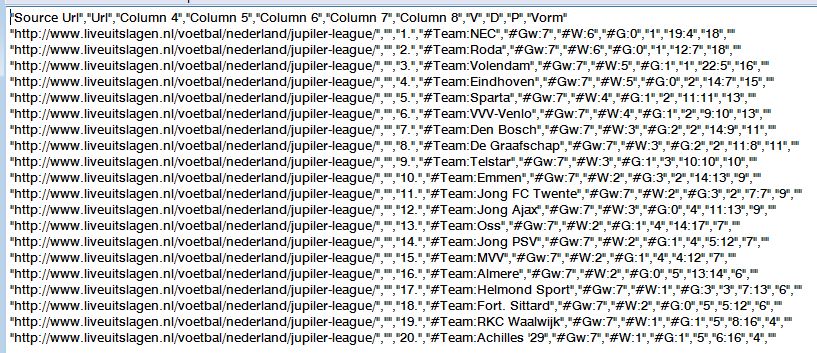
Copy link to clipboard
Copied
I don't think so. One way to tell would be to paste it in as a source text expression and see if it generates errors.
Dan
Copy link to clipboard
Copied
Okay, I got two options here:
A. Paste the stuff in some stub comp text layer and let Expressions hunt for the text parts they need. (although a copy/paste action from my website catches yields TAB delimited data  )
)
B. The CSV is legal JavaScript and After Effects can access it.
The pasted CSV material does noet cause any error when used as Source Text Expression, but it doesn't show up as text either.
Copy link to clipboard
Copied
If I had to guess, I'd say that all you'll get when you evaluate a file like that is the last entry, which appears to be empty (""). When I paste this in:
"abc","def"
"ghi","jkl"
I get jkl.
Is there some reason you don't want to use a script to do this?
Dan
Copy link to clipboard
Copied
Dan, I try to avoid scripting, so the saved text file doesn't need manipulating first.
A user must be able to save the grab, open the AE project and render the result.
Changing a grab into legal JavaScript is too much of a danger: it has to be done every week by several users.
Copy link to clipboard
Copied
With scripting, you wouldn't need to manipulate the "grabbed" CSV as you can always just read from an external file from within a script.
Copy link to clipboard
Copied
True, but I need code to open a CSV file and link each data word to a text layer source text.
if you can show me, I'd be done and go build that.
The project you pointed me to, is too elaborate for me, with all the generation of comps and what not.
I need simple.
Correct answer by
GeoffVane
AUTHOR
Copy link to clipboard
Copied
I solved it by using Expressions.
In the JavaScript reference there is a lot of use of the word VAR as the first word in a line of code.
Seems this is what AE doesn't understand.
When I program without that, many commands work fine.
A pity the data website keeps changing its structure.
The copy / paste / expression method worked fine for one day and then I was back to square one.
Copy link to clipboard
Copied
I think expressions might be overkill here. Scripting is the way to go. If you do not want a third-party solution, have you checked out this web page at creative workflow hacks? I think it eventually uses a CSV file in the example.
Copy link to clipboard
Copied
Arie, I will look at that project.
Copy link to clipboard
Copied
I looked at the project, but rather than alter exsiting data, it builds new comps with new data.
What I need is a template, which can read new texts into existing text layers source texts.
I'm gonna try find codes which let me grab parts of pasted text.
That seems to be the fastest solution now.
The shortest learning curve.
Biggest problem is that commas get replaced by tabs when you cut a selection from the website catcher.


Get ready! An upgraded Adobe Community experience is coming in January.
Learn more
 AdChoices