Exit
  • Global community
    • Language:
      • Deutsch
      • English
      • Español
      • Français
      • Português
  • 日本語コミュニティ
  • 한국 커뮤니티
0

Preview configuration gone?

New Here ,
Jan 24, 2018 Jan 24, 2018

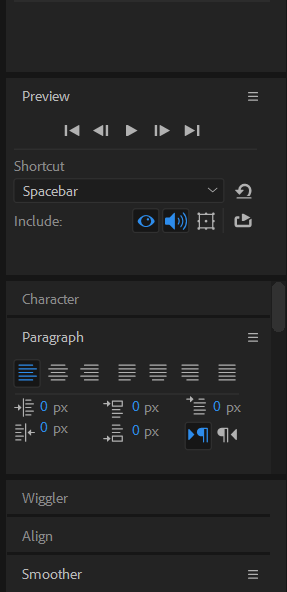
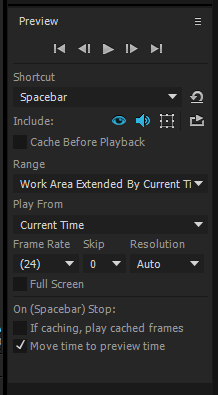
I recently moved to After Effects CC 2018(version 15.0.1), and what I noticed was that I can't configure the preview settings. You can see in my screenshot that there are no options I can configure in the preview panel, unlike the second picture from the user guide(https://helpx.adobe.com/after-effects/using/previewing.html). Anybody could tell me if it was removed, or hidden elsewhere? I googled for a while for this subject but couldn't find any, so couldn't help but ask here..

preview.pngpreview_updated.PNG

6.2K
Translate
Report
Community guidelines
Be kind and respectful, give credit to the original source of content, and search for duplicates before posting. Learn more
community guidelines

correct answers 1 Correct answer

Community Expert , Jan 24, 2018 Jan 24, 2018

It is not gone. Probably, you have stacked panels active. This happens when you have selected the "Default" workspace. Go to Window > Workspace > Standard. Then, you will have unstacked panels and you can change the size of the window to access to all the options of the Preview panel.

Translate
LEGEND ,
Jan 24, 2018 Jan 24, 2018

Whaddaya mean?

You're looking at the Preview pane AND the Character pane AND the paragraph pane is one shot, and just the preview pane in the other!

Translate
Report
Community guidelines
Be kind and respectful, give credit to the original source of content, and search for duplicates before posting. Learn more
community guidelines
New Here ,
Jan 24, 2018 Jan 24, 2018

Well the other panes are not important here. My point is that you cannot see any preview related options(cache before playback, range, etc..) in the preview panel in my screenshot(the first one) while you can see those in the second(from the user guide).

Translate
Report
Community guidelines
Be kind and respectful, give credit to the original source of content, and search for duplicates before posting. Learn more
community guidelines
Community Expert ,
Jan 24, 2018 Jan 24, 2018

It is not gone. Probably, you have stacked panels active. This happens when you have selected the "Default" workspace. Go to Window > Workspace > Standard. Then, you will have unstacked panels and you can change the size of the window to access to all the options of the Preview panel.

Translate
Report
Community guidelines
Be kind and respectful, give credit to the original source of content, and search for duplicates before posting. Learn more
community guidelines
New Here ,
Jan 24, 2018 Jan 24, 2018
LATEST

So theres difference between stacked and unstacked panel, and stacked panels do not show full options, huh? I jumped into 2018 from CS6 so I'm not familiar with this new UI style..

Just Checked on my PC and found your solution works! Now the UI looks familiar Thanks a lot!

Translate
Report
Community guidelines
Be kind and respectful, give credit to the original source of content, and search for duplicates before posting. Learn more
community guidelines