


Participant
December 25, 2019
解決済み

Rendering H.264 with 2 consecutive B frames

  • December 25, 2019
  • 返信数 2.
  • 8651 ビュー

Hello,


I want to render an H.264 project for youtube.


YouTube recommends "2 consecutive B frames" in the exports.
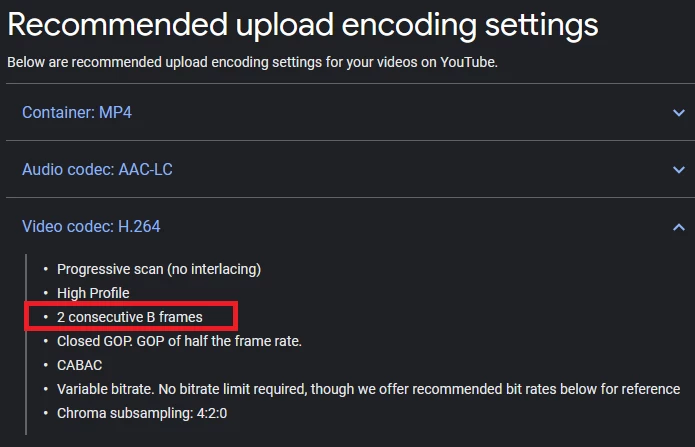


my project is 60fps so what setting i need to type in the "keyframe distance" to get this 2 consecutive B frames?

このトピックへの返信は締め切られました。
解決に役立った回答 Dave_LaRonde

Well, this is pretty easy. Open Adobe Media Encoder. There's a command to open an AE comp. Navigate to the project file, pick the right comp, and then use the YouTube compression preset. Hit the start button. AME takes care of it for you. 

返信数 2

Community Expert
December 26, 2019

Dave hit the nail on the head. Until you completely understand video compression and video formats you really have no business messing with the presets. They are all set up and they will give you the best results almost all projects. It's pretty hard to improve on anything.

JervisFilmz作成者
Participant
December 26, 2019

I understand tha you believe that the YT preset is using the correct "keyframe distance" value to output

2 consecutive B frames. I would like to learn more about it and want know how to calculate it.

JervisFilmz作成者
Participant
December 27, 2019

The keyframe distance does not set the arrangement of the IBP frames. You are not clearly understanding the way the Media Encoder works or the purpose of the keyframes. Both the YouTube and the Vimeo presets produce perfectly compatible files for YouTube and Vimeo according to their standards. Their standards are pretty universal to all streaming services. YouTube and Vimeo both re-compress every video that is sent to them to prepare them for multiple data rate playback. Sending them a video that matches their recommendations does not mean that your original will be served up to users, it means that their system will do the least amount of damage to the file when they re-compress the file. Following their recommendations also will help your video be ready for distribution in less time.


Keyframes in the media encoder have nothing at all to do with the IBP compression. They are automatically set based on the frame rate and you should not mess with them unless you are trying to do something custom with the frame rate. Custom frame rates are not a good idea so that setting should not be messed with unless you are following a template for some kind of specialized media player. The frame rate also has nothing at all to do with IBP frames or their arrangement. IBBP is going to be the same for 23.976 or 24, or 25 or 29.97 or any other frame rate. You will get an intraframe compressed frame (the only one with all of the pixel and color data) then a pair of bi-directional predicted data (color predictions and luminance predictions) and then a predicted frame that is nothing more than a software prediction of where the colors are and where the detail has moved using the AME and there is nothing you can do to change that setting.


Let me say this one more time. The presets in the AME already send the right format video to the streaming services. There is nothing you can do in the AME to change the IBP cadence. That option does not exist. You are obsessing about a setting that you cannot change in the AME.


Check the User Guide. 


alright ,


thank you

Dave_LaRonde
Dave_LaRonde解決!
Inspiring
December 26, 2019

Well, this is pretty easy. Open Adobe Media Encoder. There's a command to open an AE comp. Navigate to the project file, pick the right comp, and then use the YouTube compression preset. Hit the start button. AME takes care of it for you. 

JervisFilmz作成者
Participant
December 26, 2019

I understand tha you believe that the YT preset is using the correct "keyframe distance" value to output

2 consecutive B frames. I would like to learn more about it and want know how to calculate it.