



Copy link to clipboard
Copied
Is it possible to repeat a shape layer (let say a filled square) and have it follow a non-linear motion path (or other shape layer)?
It looks like a shape layer's Repeater can only duplicate in a line?
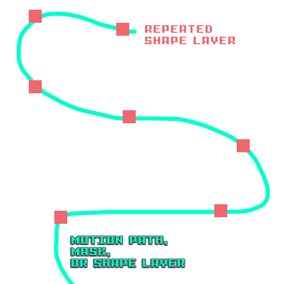


 1 Correct answer


The shape repeater uses offsets based on X and Y parameters for position, anchor point, and scale. Since it's just simple math and based on single values for each frame you can't give a different position for each duplicate.
You can, however do a neat trick that might get you where you want to go.
- Set a keyframe for the mask path you want to use as a motion path
- Copy that mask keyframe
- Press Alt/Option + p to reveal and position property of your shape layer and set a keyframe
- Paste
- The shape layer wi

 6
Replies
6
6
Replies
6


Copy link to clipboard
Copied
To get the curved motion path:
1) Create a separate null object;
2) On the null object, draw a mask in the shape of your motion path;
3) Copy the mask from the "Mask Path" of the null object;
4) Paste that onto the position parameter of the shape layer, and it will generate keyframes for you, which you can then adjust to your preferred length of time.
And one way to repeat the objects is by pre-composing the shape layer:
1) Pre-compose your shape (with the motion applied to the shape layer);
2) Duplicate the pre-comp as many times as you need;
3) Offset the pre-comps in your timeline by however many frames you'd like, and voila!
Copy link to clipboard
Copied
The shape repeater uses offsets based on X and Y parameters for position, anchor point, and scale. Since it's just simple math and based on single values for each frame you can't give a different position for each duplicate.
You can, however do a neat trick that might get you where you want to go.
- Set a keyframe for the mask path you want to use as a motion path
- Copy that mask keyframe
- Press Alt/Option + p to reveal and position property of your shape layer and set a keyframe
- Paste
- The shape layer will now follow the mask path
- Apply Echo to the shape layer
- Move the CTI to the last position keyframe of the shape layer
- Adjust the number of echos to the number of copies you want for your shape layer
- Adjust the time offset to control the distance between shapes
- Animate the offset and timing to make the shapes propegate the way you like
- Precompose your shape layer moving all attributes to the new comp
- Apply time remapping to the pre-comp to adjust timing of the effect.
There you go, a 12 step process for repeating a shape layer along a path.

Copy link to clipboard
Copied
Very nice!

Copy link to clipboard
Copied
I've used a loopOut() expression to rotate on a path without extra steps.

Copy link to clipboard
Copied
Hi Rick, thanks for your instruction - how would you create multiple arrows (with a tail and arrow head) bending and curving along a line as if they are in a line of arrows along that line? - repeater moves them off the line and so does echo - I think it has to be animated as shapes with trim path to bend along the line per this video : iD Mobile | See the light and SAVE YOURSELF an average of £240 a year vs. the major networks. i couldn't follow the steps in your layers from the picture in terms of how the animation happens but in any event I don't think the auto orientate feature will allow the shapes to bend along the line anyway,

Copy link to clipboard
Copied
I know from your work that you have Plexus. Look into lights, custom sprites and spline type beams. Don't bother with any of the longwinded workarounds.
Mylenium


Get ready! An upgraded Adobe Community experience is coming in January.
Learn more
 AdChoices