



ilex_verticillata
Inspiring
May 8, 2019
質問

Convert to DNG fails in Photo Downloader from Bridge CC 2019 Windows 7 Pro

  • May 8, 2019
  • 返信数 2.
  • 2273 ビュー

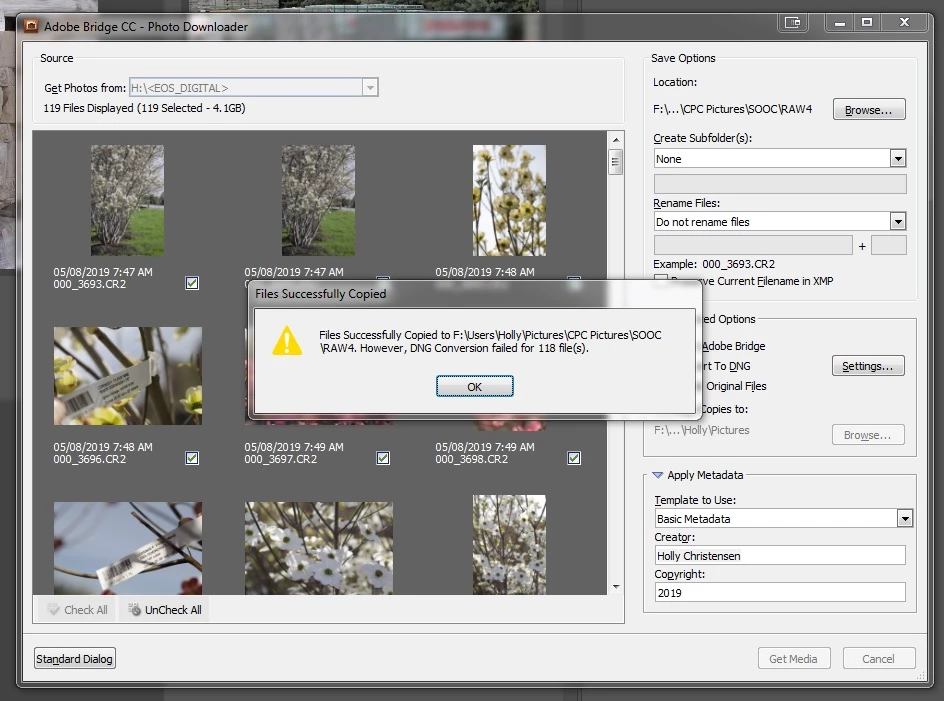
I have had no issues using the Bridge Photo Downloader until recently. I am not sure what changed but now when tick the "convert to DNG" box, my images copy but do not convert. If I open DNG converter I am able to convert the copied files with no error, but this seems an unnecessary second step in my workflow. I have searched the forums but have not found anything to help.

All apps are updated. My Windows photo folders are located on an external drive (USB 3.0) with Full Control permissions set. I am running Windows 7 Pro.
{Thread renamed by moderator}

    このトピックへの返信は締め切られました。

    返信数 2

    Participant
    February 1, 2021

    This exact issue just started happening to me. When I download photos to my computer from my card via Bridge, I select the "convert to DNG" option. The last couple of times I've done that, at the end of all the downloading, I received the same error message @ilex_verticillata received above.

    Was a solution figured out? The problem seems to have started arbitrarily. 

    gary_sc
    Community Expert
    Community Expert
    February 1, 2021

    Just verifying, are all of you trying to convert raw files or JPGs. You can't Convert to DNG with jpg files.


    If the answer is raw files, than please think back as to what has changed in the last week or so when things were working just fine.

    Participant
    February 2, 2021

    Thanks for replying! Yes, correct, they were raw files. 

    I did get a new camera months ago (Canon EOS R), though I don't recall any issues the first time I downloaded my images. Then the pandemic hit and I didn't use it for a while. So the issue is cropping up with my second/third use of the camera, though it IS my first thorough use of it. Interestingly, these last two times, I was also unable to preview the files in Bridge's download window. Could the issues be connected? That's never happened before either. 

    (And I do keep all my Adobe products up to date.)

    Sahil.Chawla
    Adobe Employee
    Adobe Employee
    May 8, 2019

    Hi there,

    That should not be happening, let's make this right.

    • Could you try copying few images to the local drive and then try converting them through Bridge?
    • Have you tried re-setting your preferences by launching Bridge with the Option key held down? Troubleshoot Adobe Bridge for freezes and performance issues
    • Please let us know the make and model of the camera.

    Regards,
    Sahil

    ilex_verticillata
    Inspiring
    May 13, 2019

    Sahil, we seemed to be off to a good start when you replied to my post right away - then you evaporated. Do you have any help to offer me?

    Sahil.Chawla
    Adobe Employee
    Adobe Employee
    May 14, 2019

    Sorry for a delay in my response, and thanks for providing the information.

    Could you please try installing the Camera Raw plugin from this link and let us know if it helps? Camera Raw plug-in installer