


Participant
July 15, 2021
解決済み

Illustrator 2021 files are not opening from Bridge. What is AISniffer??

  • July 15, 2021
  • 返信数 1.
  • 733 ビュー

I have the latest version of both, Bridge 11.1, and Ill 2021.

When I click on Illustrator files in Bridge, nothing happens. When I right-click, it shows the default app as AISniffer version 25.3.1- what is that???

When I looked at the file type associations, .ai is not listed, so I can't associate it. 

Tried re-installing Bridge, same situation. Any ideas??

このトピックへの返信は締め切られました。
解決に役立った回答 gary_sc

Hi Chip,


You are doing this from the wrong starting point. Go into Bridge's Preferences.


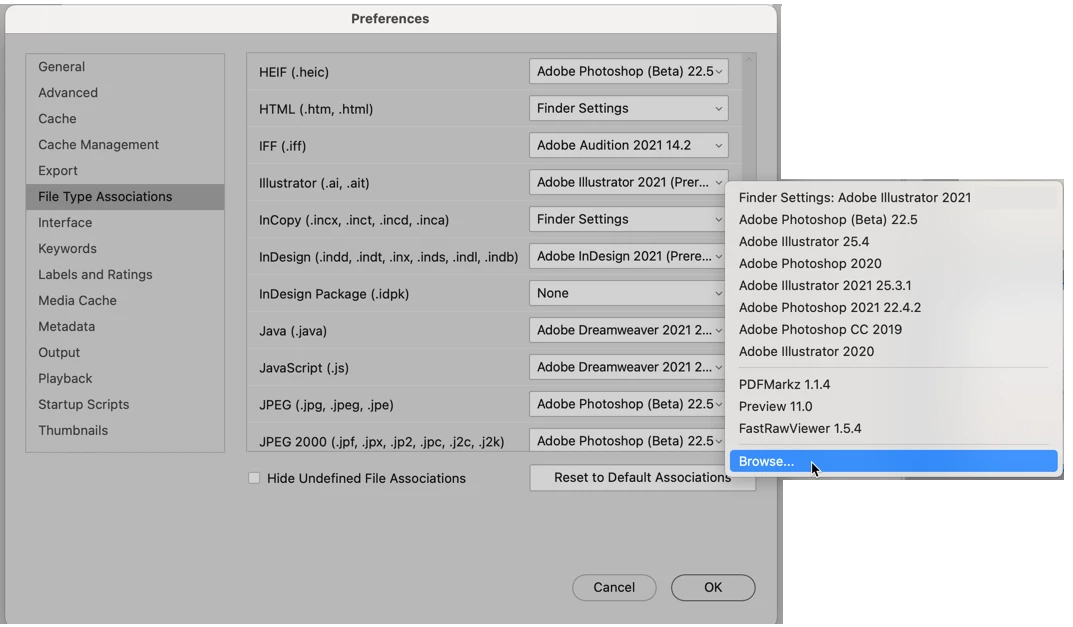
Then go to File Type Associations, drag down to Illustrator files and from the dropdown menu on the right, either select Adobe Illustrator or select it from the Browse option at the bottom.


Let us know if that solves your problem,
 

返信数 1

gary_sc
Community Expert
gary_scCommunity Expert解決!
Community Expert
July 15, 2021

Hi Chip,


You are doing this from the wrong starting point. Go into Bridge's Preferences.


Then go to File Type Associations, drag down to Illustrator files and from the dropdown menu on the right, either select Adobe Illustrator or select it from the Browse option at the bottom.


Let us know if that solves your problem,


chipbray1作成者
Participant
July 15, 2021

thanks, that worked