


Participating Frequently
August 23, 2021
解決済み

Can we limit the range of a shadow in an area?

  • August 23, 2021
  • 返信数 7.
  • 3768 ビュー

Hello !

I would like a lower face shadow cast on my character's neck. The problem is, when my character's head rotates, the shadow also rotates and it sticks out of the neck. Is it possible to limit the casting of shade to one area? I tried with a clipping mask but the shadow disappears.
Thanks for your help !

émilie
 

このトピックへの返信は締め切られました。
解決に役立った回答 k_oshiro

Thank you for sharing your puppet.
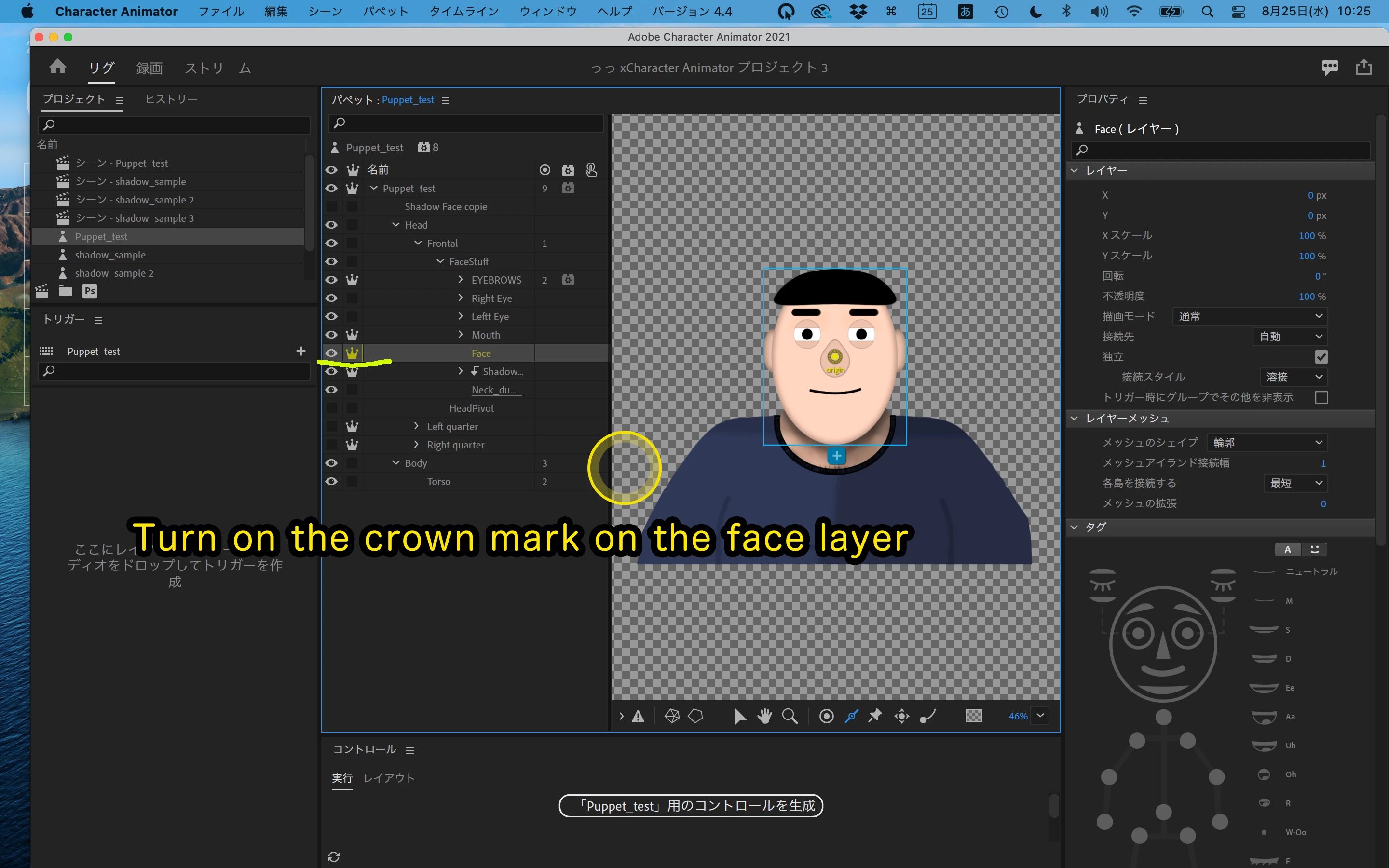
Turn on the crown mark on the face layer.
That way your face won't be distorted.
Did this answer help you?


Puppet link I modified.

https://www.dropbox.com/s/nkjesq4z9hmradt/oshiro_edit_Puppet_test.puppet?dl=0

Commentary video

https://youtu.be/pSykvxpbzfA

返信数 7

k_oshiro
Community Expert
k_oshiroCommunity Expert解決!
Community Expert
August 25, 2021

Thank you for sharing your puppet.
Turn on the crown mark on the face layer.
That way your face won't be distorted.
Did this answer help you?


Puppet link I modified.

https://www.dropbox.com/s/nkjesq4z9hmradt/oshiro_edit_Puppet_test.puppet?dl=0

Commentary video

https://youtu.be/pSykvxpbzfA

k_oshiro(AdobeCommunityExpert)
Emilie5F9A作成者
Participating Frequently
August 25, 2021

Hello !

Thank you again for your help ! what i wanted was for the neck not to be twisted, but i dont think you could do better with the clipping mask.
Thanks again for your efforts.

émilie


k_oshiro
Community Expert
Community Expert
August 24, 2021

Sorry!

I accidentally deleted the YouTube video earlier.
I'll re-link it.

https://youtu.be/Z6Q1gzEH4-8


How to share a puppet
Select the source puppet.
2. File→Export→Puppet
3. Upload the exported Puppet file to your DropBox, GoogleDrive Creative Cloud Files, etc.

Set up a link so that others can download it.

Be careful not to let others see the other files.
https://youtu.be/KeIVU0knZ2U

Thank You.

k_oshiro(AdobeCommunityExpert)
Emilie5F9A作成者
Participating Frequently
August 24, 2021

Hello !


my puppet : https://we.tl/t-VESEOLv431 

Thank you again for your help !

émilie

k_oshiro
Community Expert
Community Expert
August 24, 2021

Hello !

Turn off the frontal crown mark.

Probably it works fine.
If that doesn't work, let me export and share your puppet. I will take a closer look.

https://youtu.be/6yh2iq_ewQU

Thank You.

k_oshiro(AdobeCommunityExpert)
Emilie5F9A作成者
Participating Frequently
August 24, 2021

@k_oshiro You are my hero! a huge thank you! it works great!

Emilie5F9A作成者
Participating Frequently
August 24, 2021

@k_oshiro in fact i just realized that it still doesn't work. (Sorry I also specify that I am a French woman who speaks English poorly. Long live google translate! And that this is my first puppet). The neck is well attached but the head no longer turns on its own. Suddenly, it turns by deforming the neck. How could I give you my puppet in private? if, of course you don't mind taking a look ...

k_oshiro
Community Expert
Community Expert
August 23, 2021

Hello. KONNICHIWA!


I used translation software.


I took Alan-SENSEI recommendation.

I made a sample puppet using case 3 as a test.
You can find it at


https://www.dropbox.com/s/eru3rj888eef2bp/shadow_sample.puppet?dl=0


I have uploaded the explanation on YouTube in Japanese.


https://youtu.be/6ndpsPyXtSg


I usually choose case 1 as well as Alan-SENSEI.
This is because it is simple. In case 3, it's hard to see the effect of the effort.


Thank You.


k_oshiro(AdobeCommunityExpert)
alank99101739
Legend
August 23, 2021

Very cool video!!! I think it shows exactly what you are trying to do!

k_oshiro
Community Expert
Community Expert
August 23, 2021

Alan-SENSEI
Thank you very much.

I have made a sample based on your suggestion.

I think the use of clipping masks can be applied in many ways other than using it in the neck shadow.

k_oshiro(AdobeCommunityExpert)
alank99101739
Legend
August 23, 2021

For the level of precision it looks like you are after, some suggestions to explore.


1. Make the shadow a part of the neck and put up with it not matching the chin exactly as it moves


2. I am not sure if you pick a different color mode (like subtract) for the shadow layer and whether that will only impact the puppet and not the background.


3. Clipping mask might be possible, but will be tricky. E.g. have the mask a part of the necl (so it tracks chin), then have a sibling independent layer that is attached to the head. It makes my brain hurt thinking about how to get it right.


I think 1 is most practical

TheOriginalGC
Community Expert
Community Expert
August 23, 2021

I know it's not the same thing, but you might find some good information on shading in this video on Head Turns and Parallax. Head Turns & Parallax (Adobe Character Animator Tutorial) - YouTube

alank99101739
Legend
August 23, 2021

Some screenshots of the artwork and rigging hierarchy could help. Sometimes you can do things like make the shadow independent and hinge (or even possibly free - not sure), but it is hard to give advice without seeing the effect you are trying to achive.

Emilie5F9A作成者
Participating Frequently
August 23, 2021

Hello !

Sure ! here are illustrations:


Emilie5F9A作成者
Participating Frequently
August 23, 2021
Shadow2.jpg