



SharonfromMD
Inspiring
April 10, 2018
解決済み

Help-My characters' arm behaviors aren't working correctly etc in 1.5

  • April 10, 2018
  • 返信数 2.
  • 553 ビュー

After I downloaded the latest version, my characters, who had previously walked with correct arm motions, no longer do that. Their arms at the elbow go completely in the wrong direction, as though their elbows are broken. In one scene the character's head is turned backward. Bottom line-the behaviors aren't the same.

I'm a beginner to this program, but my puppets are done through a 3rd party and suddenly aren't working correctly. I would love to show you, but haven't figured out how people attach the CA file to this forum and haven't been able to convert it yet to an MP4.
このトピックへの返信は締め切られました。
解決に役立った回答 DanTull

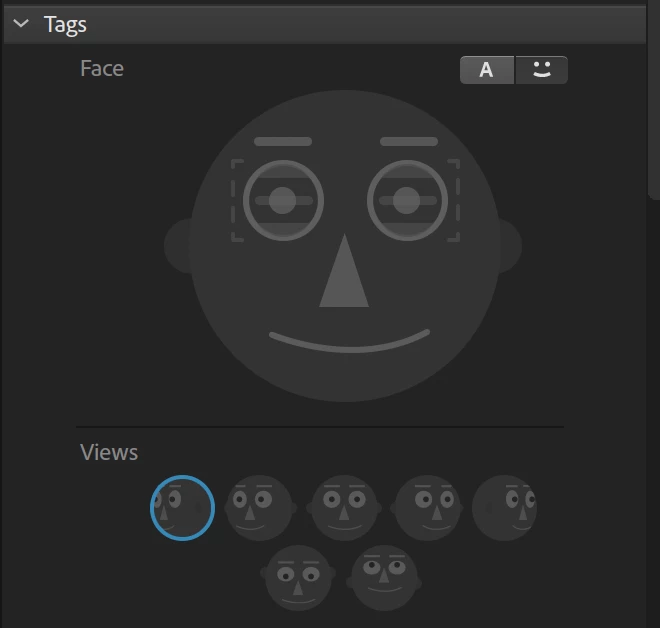
Ok, with the puppet files I can easily confirm the 1.5 misbehavior (probably would have seen it earlier but inverted elbows is such a common challenge with draggable handles that I forgot that you'd specifically said it was while walking that the issue occurred). There was a fix in 1.5 so it only required the left/right profile tags for a walk and no longer required using the toe/heel tags to figure out the proper facing direction.

However, it seems that the left/right profile tags on the puppet are inverted. In your case, the old logic was managing to get the right behavior regardless of the inversion of those tags. The updated version that just looks at the tags winds up walking backwards.

Luckily, that's a fairly easy rigging change to make. Just select the left profile group and invert its tag (left to right) and then the right profile group and change it (right to left). Hopefully that still works as expected with your recordings. You could also rename the groups to match, though I'm not totally sure that when the artwork was reconciled it might confuse the rigging (since the two would have appeared to be swapped), so the tag changes alone might be the simplest/safest.

DT

返信数 2

DanTull
Adobe Employee
Adobe Employee
April 10, 2018

If you wouldn't mind sharing the puppet/project, I'd be interested to look at this behavior change.

Thanks!
Dan Tull

SharonfromMD
SharonfromMD作成者
Inspiring
April 10, 2018
DanTull
Adobe Employee
DanTull解決!
Adobe Employee
April 11, 2018

Ok, with the puppet files I can easily confirm the 1.5 misbehavior (probably would have seen it earlier but inverted elbows is such a common challenge with draggable handles that I forgot that you'd specifically said it was while walking that the issue occurred). There was a fix in 1.5 so it only required the left/right profile tags for a walk and no longer required using the toe/heel tags to figure out the proper facing direction.

However, it seems that the left/right profile tags on the puppet are inverted. In your case, the old logic was managing to get the right behavior regardless of the inversion of those tags. The updated version that just looks at the tags winds up walking backwards.

Luckily, that's a fairly easy rigging change to make. Just select the left profile group and invert its tag (left to right) and then the right profile group and change it (right to left). Hopefully that still works as expected with your recordings. You could also rename the groups to match, though I'm not totally sure that when the artwork was reconciled it might confuse the rigging (since the two would have appeared to be swapped), so the tag changes alone might be the simplest/safest.

DT

alank99101739
Legend
April 10, 2018

To share any files you need to upload to Google Drive, DropBox, OneDrive etc and share a link - the forums don’t have that built in. If you don’t want to share publicly, you can wait to see if an Adobe staff member jumps on this thread and send them a direct message - but they will ask you to upload the files so they can access them. So you may as well get that stage done when you can! ;-)

I had something similar with hand positions when brought recorded scenes from 1.1 over to 1.5. But when I recorded a new scene, it all worked. Have you tried recording a new scene? Or just looked at the old scene after upgrading?