



Aaron Sugar
Inspiring
May 24, 2017
質問

Six Arms, Four Eyes, and a Bunch of Questions

  • May 24, 2017
  • 返信数 1.
  • 3854 ビュー

Relative noob here...

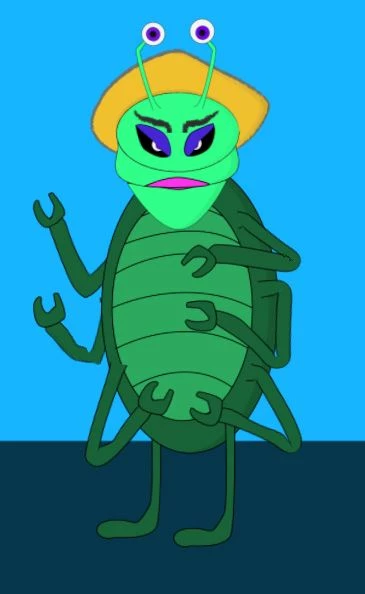
I've been working my way through the tutorials and tips and tricks.  I have created a fairly basic alien bug looking puppet with six arms, two eyes, and a nutcracker jaw.  I have keyboard triggers to make the claws pinch, make the hair go from solid to an animated psychedelic looking gradient, and change the eyebrows.  I've rigged the puppet to walk and that seems to work quite well.  I'm almost ready to have it do a scene.  I do however have a few questions.

- I tried adding profile shots for the head (created them as additional groups within the head group).  However, if those layers are present in the puppet, the walk feature will not work (even if I deactivate the layers and the head turner behavior).  Is there a step I missed?

- With the six arms, I can only rig one of the left and one of the right arms to animate during the walk behavior.  Is there a way to rig the other arms to move during walk as well, or will I need to animate them individually?

- Similarly with the second set of eyes (on the antennae stalks).  Is there a way to rig them to be controlled as a second pair of eyes, or should I just group them together and drag them around.

- Finally, is there an index to the subjects covered on the various tips and tricks videos.  While I watch them in my spare time to gain knowledge, when I'm down the rabbit hole rigging a puppet to do something, I tend to find myself wasting time searching through the videos to find the one that talked about what I need?  .
    このトピックへの返信は締め切られました。

    返信数 1

    oksamurai
    Legend
    May 25, 2017

    1. The most likely issue is that head turn and walk are both looking for the "left profile" and "right profile" tags, and where you add those tags can create issues. See the Maddie puppet at Character Animator Examples  - she successfully does walk and head turn. Check against that and see where she added her Walk and Headturner tags and behaviors and if they're in the same place as you.

    2. Yes, I'll show this in the next tips video, but check out Aquavella here: http://okaysamurai.com/puppets/ - basically walk is only looking for the first instance of a tag it sees, so if you have 6 right elbows it only cares about the first one. The way around this is to add extra walk behaviors for extra limbs. Note how Aquavella has extra walk behaviors added to his second right and left tentacles - this is for the legs but the same idea applies to the arms.

    3. For multiple eyes to work the best thing to do is add an extra views. Again, like the walk behavior, face is only looking for the first instance of a tag - so you have to trick it into thinking those eyes are in a different view. At the same link as Aquavella check out Shmarlop for an example of how to do three eyes.

    4. There isn't a full index - great idea - but this is a list I've made that I often copy and paste from when helping people out: FAQ: What are some video examples of common issues?

    Aaron Sugar
    Aaron Sugar作成者
    Inspiring
    May 27, 2017

    Re: #2 - I followed the Aquavella pattern and put a Walk behavior on the overall puppet, then added the walk behavior separately in the puppet panel to 2 of the other arms, but they still won't move during the walk animation.

    oksamurai
    Legend
    May 30, 2017

    Could you share here or DM me your .puppet file (File > Export > Puppet) via a shared link on Google Drive, Dropbox, or Creative Cloud to take a closer look?