


質問
I need help about Error 146
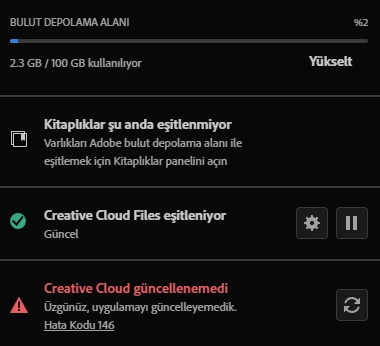
Hi, yesterday my creative cloud opened with an issue. It's Error 146. I can't download anything in creative cloud because that error, I can't see the log because it's directly creative cloud app's error. I tried to delete c:/adobetemp and used creativecloudcleaner and deleted everything but still this error pops up.
That's a log came from Illustrator app. Do you have recommendations to what to do?
Exit Code: 146
-------------------------------------- Summary --------------------------------------
 - 3 fatal error(s), 8 error(s), 15 warnings(s)

FATAL: Fatal Error '113' occurred while download
FATAL: Error (Code = 146) executing in command 'MoveFileCommand' for package: 'CCX-Process-mul-x64', version:6.1.0.9
FATAL: Error occurred in install of package (Name: CCX-Process-mul-x64 Version: 6.1.0.9). Error code: '146'
ERROR: Path:C:\adobeTemp already exists
ERROR: Path:C:\adobeTemp already exists
ERROR: Path:C:\adobeTemp already exists
ERROR: Path:C:\adobeTemp already exists
ERROR: Path:C:\adobeTemp already exists
ERROR: CreateProcess failed! Error: 2
ERROR: CopyPrimitiveEx | GetAnyOperationsAborted failed with error: 0
ERROR: CopyPrimitiveEx | GetAnyOperationsAborted failed with error: 0
WARN: GetIEProxyInfo - Failed to get proxy for the url, error:12180
WARN: GetIEProxyInfo - Failed to get proxy for the url, error:12180
WARN: GetIEProxyInfo - Failed to get proxy for the url, error:12180
WARN: GetIEProxyInfo - Failed to get proxy for the url, error:12180
WARN: GetIEProxyInfo - Failed to get proxy for the url, error:12180
WARN: GetIEProxyInfo - Failed to get proxy for the url, error:12180
WARN: GetIEProxyInfo - Failed to get proxy for the url, error:12180
WARN: GetIEProxyInfo - Failed to get proxy for the url, error:12180
WARN: GetIEProxyInfo - Failed to get proxy for the url, error:12180
WARN: GetIEProxyInfo - Failed to get proxy for the url, error:12180
WARN: GetIEProxyInfo - Failed to get proxy for the url, error:12180
WARN: GetIEProxyInfo - Failed to get proxy for the url, error:12180
WARN: Unable to run program "C:\Program Files\Adobe\Adobe Creative Cloud Experience\libs\node.exe"
WARN: Warning (Code = 183) executing command RunProgramCommand
WARN: Unable to move file at "C:\adobeTemp\ETR385C.tmp\2\x64\js\node_modules\uuid\CHANGELOG.md" to "C:\Program Files\Adobe\Adobe Creative Cloud Experience\js\node_modules\uuid\CHANGELOG.md" Error 1392 Dosya veya dizin bozuk ve okunamaz durumda.. Try setting correct permissions to the specified file/folder or parent folder, so that admin has rights to modify it.
-------------------------------------------------------------------------------------
(I scanned my disc to see If that's a problem about my drive, I think it isn't because my drive is OK)
 AdChoices