


Exit
  • Global community
    • Language:
      • Deutsch
      • English
      • EspaƱol
      • FranƧais
      • PortuguĆŖs
  • ę—„ęœ¬čŖžć‚³ćƒŸćƒ„ćƒ‹ćƒ†ć‚£
  • ķ•œźµ­ ģ»¤ė®¤ė‹ˆķ‹°
0

How to turn off Auto Update?

Participant ,
Apr 21, 2025 Apr 21, 2025

Hi.

I'm trying to turn off Auto Updates in creative Cloud for all my apps, but when I uncheck  "Auto Update", and "remove older versions" , after clicking done, nothing happens, they are all still checked as Auto.

I really don't want this, I like to manually choose to update etc.

Any idea how to actually turn this off?

I'm running Win 11

Cheers.

Steve.
995
Translate
Report
Community guidelines
Be kind and respectful, give credit to the original source of content, and search for duplicates before posting. Learn more
community guidelines

correct answers 1 Correct answer

Community Expert , Apr 21, 2025 Apr 21, 2025

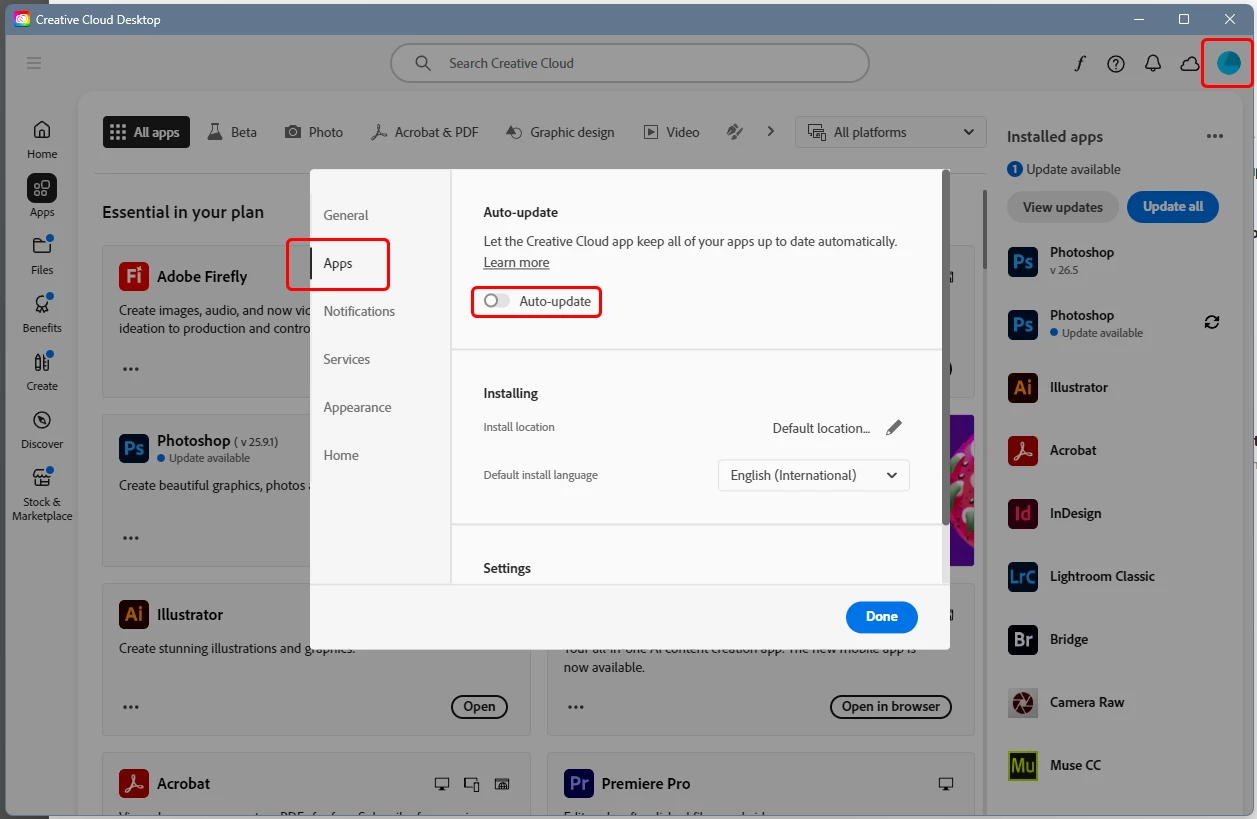
This is where you turn it off:


update.png


If it doesn't stick, sign out and back in. If that doesn't do it either, I'd reinstall the CC app.

Translate
Community Expert ,
Apr 21, 2025 Apr 21, 2025

This is where you turn it off:


update.png


If it doesn't stick, sign out and back in. If that doesn't do it either, I'd reinstall the CC app.

Translate
Report
Community guidelines
Be kind and respectful, give credit to the original source of content, and search for duplicates before posting. Learn more
community guidelines
Participant ,
Apr 21, 2025 Apr 21, 2025

Thanks šŸ™‚

Yeh, that's what I've been trying, it just goes back to Auto.

Tried logging out then back in, no luck there either.

Just had a CC update, I wonder if that's the problem?

Next thing is I will try a re-install.

Cheers.

Steve.

Translate
Report
Community guidelines
Be kind and respectful, give credit to the original source of content, and search for duplicates before posting. Learn more
community guidelines
Participant ,
Apr 21, 2025 Apr 21, 2025

Ok.

I tried repair first, still the same.

Then it won't let me un-install because there's other apps that use it.

There's no way I want to delete all those and re-install. I've recently had to doo that because my old PC died and had to get a new one.  SO many problems getting everything to work properly again.

Translate
Report
Community guidelines
Be kind and respectful, give credit to the original source of content, and search for duplicates before posting. Learn more
community guidelines
Participant ,
Apr 21, 2025 Apr 21, 2025

I may have done it.

Found it under "File - Preferences" in the top left dropdown box.

Fingers crossed.

Cheers.

Translate
Report
Community guidelines
Be kind and respectful, give credit to the original source of content, and search for duplicates before posting. Learn more
community guidelines
Community Expert ,
Apr 21, 2025 Apr 21, 2025

Do you think this overides the Manage auto-updates panel?

image.png


Accessing via File > Preferences


image.png

Translate
Report
Community guidelines
Be kind and respectful, give credit to the original source of content, and search for duplicates before posting. Learn more
community guidelines
Participant ,
Apr 23, 2025 Apr 23, 2025

All sorted now.

Translate
Report
Community guidelines
Be kind and respectful, give credit to the original source of content, and search for duplicates before posting. Learn more
community guidelines
Explorer ,
Dec 06, 2025 Dec 06, 2025

@ Trevor.Dennis

I'm confused. Are you asking a question or are you giving instructions (instructions as to where one goes to "disable" Auto-updates)? If providing instructions, could you possibly elucidate a bit? Which "switches" would  you recommend one turns OFF and which "switches" would you recommend leaving ON? Like most everything in the computer world, there could be adverse repercussions as a result of turning off any one (of ALL) of these Apps. For example if by turning off all Auto-dates could this prevent something like a "Security" up-date from Adobe or an important feature required by a particular Application?

Translate
Report
Community guidelines
Be kind and respectful, give credit to the original source of content, and search for duplicates before posting. Learn more
community guidelines
Explorer ,
Dec 06, 2025 Dec 06, 2025

You found it under "File > Preference" where? Which File-Preferences?? There certainly is no "Preferences" under File menu when in Photoshop 2025! Are you referring to Creative Cloud...........or the Mac OS Finder...........or where???

Translate
Report
Community guidelines
Be kind and respectful, give credit to the original source of content, and search for duplicates before posting. Learn more
community guidelines
Community Expert ,
Dec 06, 2025 Dec 06, 2025

@AppleAddict001 

This is all done in the Creative Cloud desktop app, not in Photoshop.


Start at the top of the thread and look at the posted screenshots. They show you where to do this.

Translate
Report
Community guidelines
Be kind and respectful, give credit to the original source of content, and search for duplicates before posting. Learn more
community guidelines
Explorer ,
Dec 06, 2025 Dec 06, 2025

@D Fosse
Sorry - I missed it. Not too familiar with this CC Desktop "thing". Btw - my window looks somewhat different.    PS: I took a Screen shot of the panel in question and uploaded it but mine doesen't show up in this thread. What am I doing wrong?

Translate
Report
Community guidelines
Be kind and respectful, give credit to the original source of content, and search for duplicates before posting. Learn more
community guidelines
New Here ,
Dec 16, 2025 Dec 16, 2025

The auto-update selection for certain apps in CC doesn't show on mine either. Maybe they removed it?? I can't find anything online about it.

Translate
Report
Community guidelines
Be kind and respectful, give credit to the original source of content, and search for duplicates before posting. Learn more
community guidelines
Community Expert ,
Dec 17, 2025 Dec 17, 2025
LATEST

did you check your cc desktop app preferences?

Translate
Report
Community guidelines
Be kind and respectful, give credit to the original source of content, and search for duplicates before posting. Learn more
community guidelines