

Participant
April 12, 2021
解決済み

どなたか助けてください。Adobe CCをダウンロードできましたが、アプリをインストールできません。

  • April 12, 2021
  • 返信数 2.
  • 928 ビュー

Premiere Proなどのアプリをインストールしようと試みていますが、毎回、

「インストール」を押した後、Creative Cloudが立ち上がり、その後

「アプリケーションを読み込み中」となり、その表示が消えた後、インストールが始まるかと思いきや無反応です。


Windows10 Pro 34ビットを使用しています。


どなたか詳しい方、おしえてください。

お願いします。

このトピックへの返信は締め切られました。
解決に役立った回答 kglad

あなたの指示の通りにはできませんでしたが、この表示は正しいですか?


アプリのバージョンはCreative Cloud 4.9.0.504と書いてあります。
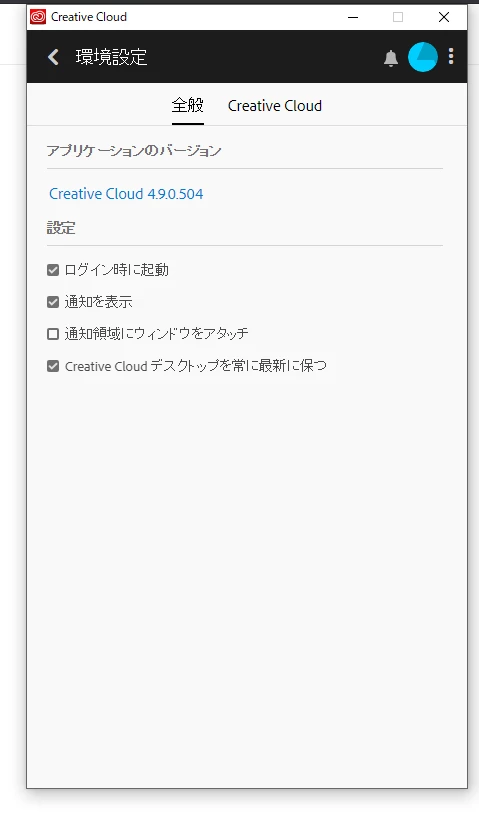


that's an old version of the creative cloud because your computer (which i assume has a  32 bit os) is not compatible with many of the current adobe programs including premiere pro.  


https://helpx.adobe.com/creative-cloud/system-requirements.html

返信数 2

assause
Community Expert
Community Expert
April 18, 2021

OSのほうを変更してはいるようですが、ハードウェアスペック、足りてるものなのでしょうか。

32bit版Windows 10がインストールされているハードの場合、古いPC・タブレット系などになるはずで、Premiere Proが正常動作するだけのスペックを有しているとは思い難いためです。

できればその点もチェックした方がいいでしょう。


なおジャパンコミュニティ自体はありますが、いったん解決してしまったこともあるので、このままこちらに残すことになるでしょう。

(話があまり進んでない場合にはモデレータによって移動処理が行われることが多いです)

kglad
Community Expert
Community Expert
April 12, 2021

click your start button>type winver>enter


what win 10 version is displayed?

Participant
April 12, 2021

バージョン 20H2 (OS ビルド 19042.867)

kglad
Community Expert
Community Expert
April 12, 2021

first, reset the cc app:

to reset the cc desktop app, make sure it's in the foreground, then press:

Win: Ctrl + Alt + R
Mac: Cmd + Opt + R

if that fails, try to repair
https://helpx.adobe.com/download-install/kb/creative-cloud-install-stuck.html

if that fails go ahead and uninstall/reinstall per the above link

if that fails, do a clean cc install following each applicable step:

uninstall every cc app including preferences, https://helpx.adobe.com/creative-cloud/help/uninstall-remove-app.html
then uninstall the cc desktop app, https://helpx.adobe.com/creative-cloud/help/uninstall-creative-cloud-desktop-app.html
clean your computer of cc files per http://www.adobe.com/support/contact/cscleanertool.html
check for, and if available, update your os
repair all ms visual c++ versions that can be repaired.
update your ms visual c++, if it can be updated
restart your computer (don't skip this)
reinstall the cc desktop app, https://helpx.adobe.com/uk/download-install/kb/creative-cloud-desktop-app-download.html
if you're unable to install the cc desktop app at this stage, use the link at the bottom of the page at https://helpx.adobe.com/uk/download-install/kb/creative-cloud-desktop-app-download.html
use the desktop app to install your cc programs/trials