

解決済み
どなたか助けてください。Adobe CCをダウンロードできましたが、アプリをインストールできません。
Premiere Proなどのアプリをインストールしようと試みていますが、毎回、
「インストール」を押した後、Creative Cloudが立ち上がり、その後
「アプリケーションを読み込み中」となり、その表示が消えた後、インストールが始まるかと思いきや無反応です。
Windows10 Pro 34ビットを使用しています。
どなたか詳しい方、おしえてください。
お願いします。

Premiere Proなどのアプリをインストールしようと試みていますが、毎回、
「インストール」を押した後、Creative Cloudが立ち上がり、その後
「アプリケーションを読み込み中」となり、その表示が消えた後、インストールが始まるかと思いきや無反応です。
Windows10 Pro 34ビットを使用しています。
どなたか詳しい方、おしえてください。
お願いします。
あなたの指示の通りにはできませんでしたが、この表示は正しいですか?
アプリのバージョンはCreative Cloud 4.9.0.504と書いてあります。
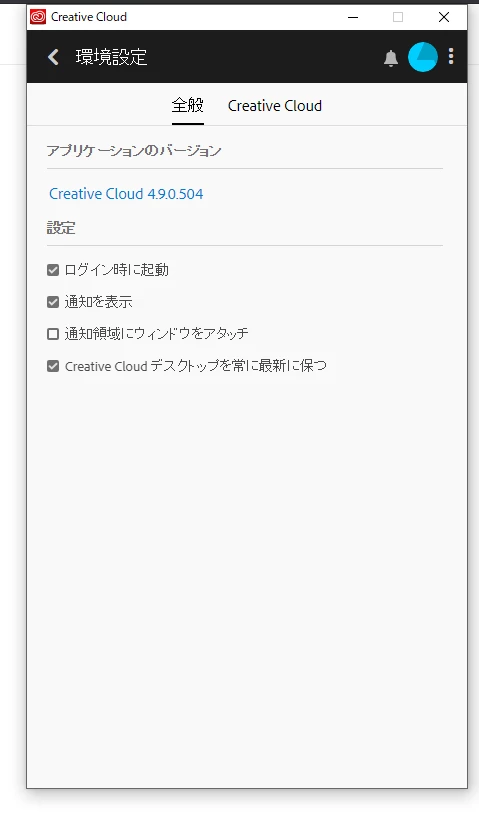
that's an old version of the creative cloud because your computer (which i assume has a 32 bit os) is not compatible with many of the current adobe programs including premiere pro.
https://helpx.adobe.com/creative-cloud/system-requirements.html
Enter your E-mail address. We'll send you an e-mail with instructions to reset your password.
 AdChoices