Inspiring
June 1, 2025
解決済み

Help please! Animate ate up almost all of my storage
  • June 1, 2025
  • 返信数 2.
  • 2038 ビュー


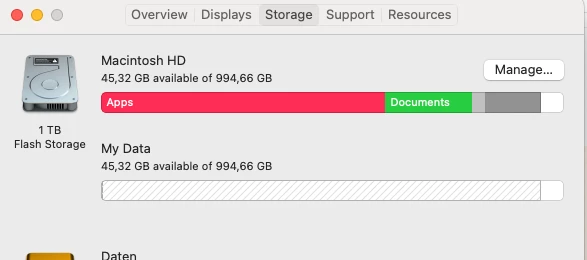
Just got a message, that my memory is almost full. So I checked the system info and found out, that apps is using a huge amount of space. I started using animate for a client's project, but since the beginning this app seems to bring me nothing but trouble. 

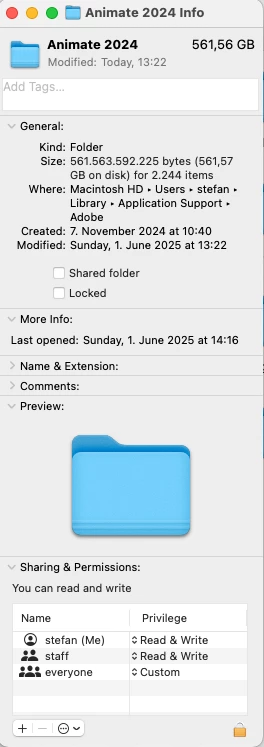
In my finder window I searched for the library folder. In the library folder I opened up Application support, Adobe and right-clicked "get info" on the animate folder. 

I'd very much appreciate, if anybody could help me out with freeing my storage again. 

Inside the animate 2024 folder are only small files; I'm neither a programmer nor IT-expert...

解決に役立った回答 glutamat-design

be sure to update this.


After some further research, I think the problem with was, that my animation was longer than 11 minutes with a frame rate of 25. I separated the scenes into new files and could export them easily this way.

Nonetheless thank you very much.

返信数 2

Inspiring
June 1, 2025

Hi kglad,

the folders content looks like this:

Inspiring
June 1, 2025

Each of the files is only a few KB's, I honestly don't know where the 500GB's are coming from...

kglad
Community Expert
Community Expert
June 1, 2025

I installed a fresh version of animate, loaded my project in tried to export it as a quicktime for the client to have a preview. The export stopped at 98% and this time my system data got flodded...


open ame, then export from animate.

kglad
Community Expert
Community Expert
June 1, 2025

what's in that folder?