Participant
October 28, 2020
解決済み

Roll back to previous Photoshop version

  • October 28, 2020
  • 返信数 3.
  • 548 ビュー

I have a $5,000 Canon printer that won't print because of Adobe.  The Canon print program won't work with Photoshop 22.0.0 and Canon told me to roll back to a previous version of Photoshop.  I attempted to unintall version 22 and reinstall an older version but there's no option to do that.  I've tried contacting Adobe customer support at least a half-dozen times.  I gave up on "chat" option after 45 minutes with no response.  A number of phone calls have all ended with silence on the other end of the phone line.  Adobe has set a new standard for awful customer service!
このトピックへの返信は締め切られました。
解決に役立った回答 Just Shoot Me

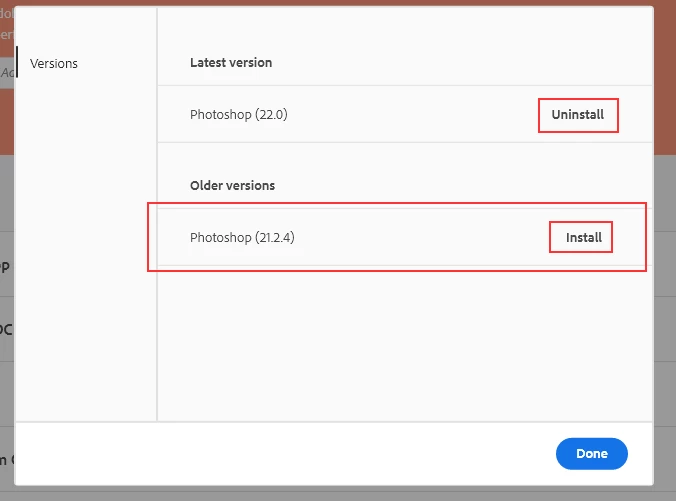
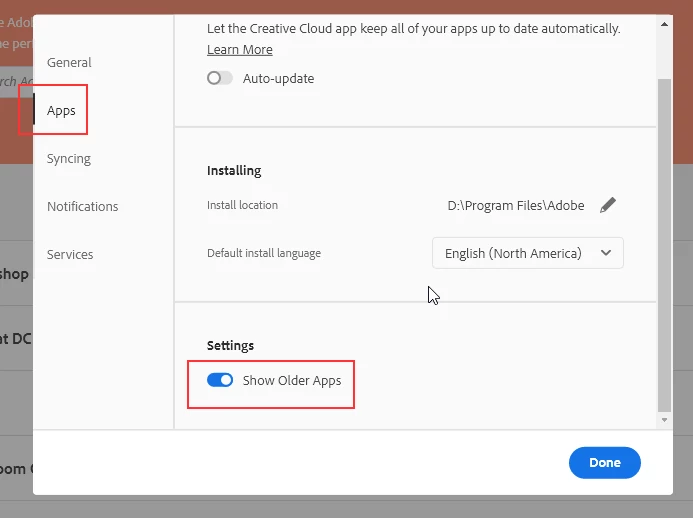
You have to enable the showing of older version in the CC Desktop app Preferences and then click the 3 dots next to the program you want to uninstall and then reinstall the older version.


返信数 3

Just Shoot Me
Just Shoot Me解決!
Legend
October 28, 2020

You have to enable the showing of older version in the CC Desktop app Preferences and then click the 3 dots next to the program you want to uninstall and then reinstall the older version.


Participant
October 28, 2020
I agree
Peru Bob
Community Expert
Community Expert
October 28, 2020

Can you print the files from a different program after you edit them in Photoshop?

What file type(s)?