



Roxane Bay
Participant
March 10, 2016
質問

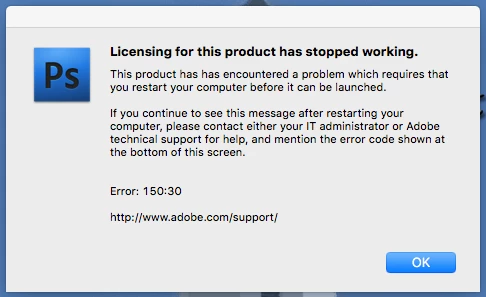
Can anyone tell me what to do about this message: Licensing for this product has stopped working. This product has encountered a problem which requires that you restart your computer before it can be launched.... Error: 150:30
  • March 10, 2016
  • 返信数 1.
  • 306 ビュー

I use this version of PS because I have an Action for Passport photos and a designated laptop for Passport photos and today it embarrassed me in front of a client, and decided not to play nice.  I still have to produce the passport photo but my action only worked in this version.  Adobe Photoshop CS4.

    このトピックへの返信は締め切られました。

    返信数 1

    John T Smith
    Community Expert
    Community Expert
    March 10, 2016

    When you ask a question you need to provide some basic information

    Mac or Windows, and EXACTLY which version of the operating system?

    Recent Mac AND Windows operating systems have been known to cause "odd" problems

    Are you using a computer Administrator account with full read/write permission?

    Error 150:30 License fix https://helpx.adobe.com/x-productkb/global/error-licensing-stopped-mac-os.html may help

    Roxane Bay
    Roxane Bay作成者
    Participant
    March 10, 2016

    Mac OS X El Capitaine Version 10.11.3

    I do not know if I am using a computer Administrator account with full read/write permission?

    This is my computer and not a company computer... I own my photography studio and the equipment.  I hope that is what you mean.  I am not incorporated.

    Thank you.  I will check on the error help link you sent.

    Roxane

    John T Smith
    Community Expert
    Community Expert
    March 11, 2016

    >my action only worked in this version.  Adobe Photoshop CS4.

    Did this work BEFORE you upgraded your Mac operating system, and stop working AFTER you upgraded to El Capitan?

    Since CS4 was written LONG before El Capitan, and will NOT be upgraded by Adobe, I will guess (about 99% sure) that your problem is upgrading your Mac to El Capitan

    If the license link I provided does not help, you will have two choices

    1-wipe your hard drive and install everything fresh, starting with a Mac operating system that is compatible with your old software

    2-buy a Cloud subscription that is compatible with El Capitan