Exit
  • Global community
    • Language:
      • Deutsch
      • English
      • Español
      • Français
      • Português
  • 日本語コミュニティ
  • 한국 커뮤니티
1

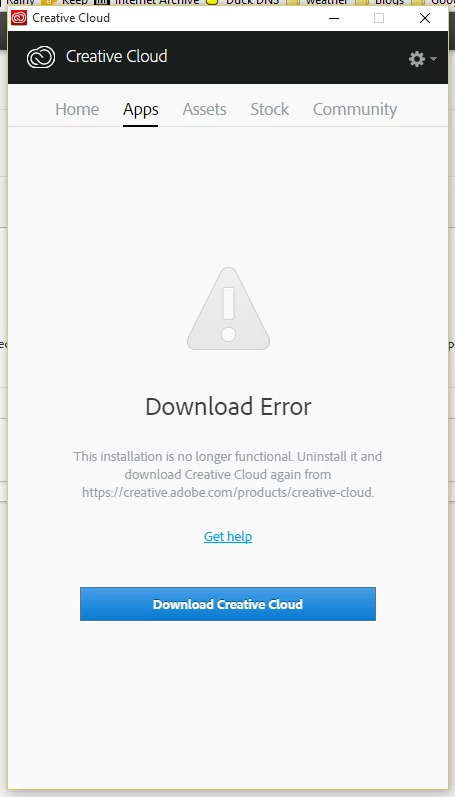
This installation is no longer functional.

Community Beginner ,
Oct 07, 2015 Oct 07, 2015

My creative cloud app stopped working.  I tried to update it and got "this installation is not functional".  I followed every suggestion and removed, cleaned, deleted folders, uninstalled Windows 10 updates, and still "this installation is no longer functional".  What next?

TOPICS
Creative Cloud
11.7K
Translate
Report
Community guidelines
Be kind and respectful, give credit to the original source of content, and search for duplicates before posting. Learn more
community guidelines

correct answers 1 Correct answer

LEGEND , Oct 09, 2015 Oct 09, 2015

If you havent tried below steps , try it once.

Follow below steps :

Uninstall Adobe Creative Cloud .

Creative Cloud Help | Uninstall the Creative Cloud desktop app

Disable Firewall Temporarily.

Step 1 :

Open C:drive and navigate to C:\Program Files (x86)\ " Common Files" \Adobe.

Open Adobe folder and delete folders named Adobe Application Manager and OOBE.

Step 2:

Navigate to C:\Program Files (x86)\Adobe.

Open Adobe folder and if present delete Adobe Creative Cloud folder. [**important]

Unable to delete?

...
Translate
Adobe Employee ,
Oct 07, 2015 Oct 07, 2015
Translate
Report
Community guidelines
Be kind and respectful, give credit to the original source of content, and search for duplicates before posting. Learn more
community guidelines
Community Beginner ,
Oct 07, 2015 Oct 07, 2015

Been there.  Done that.

So, here is what I did this last time. 

Uninstalled all of Creative Cloud, including Bridge, Lightroom, Photoshop from Control Panel.  Same error.

Went into task manager and stopped everything Adobe.  Same error.

Went into users/app data and deleted both the AAMupdater and OOBE folders.  Same error.

Used Adobe cleaner tool, option 3.  Same error.

Used Revo Uninstaller and ran the uninstall and did the advanced cleanup to get rid of registry entries and all files and folders.

Cold start reboot.  Same error.

What am I missing.

Translate
Report
Community guidelines
Be kind and respectful, give credit to the original source of content, and search for duplicates before posting. Learn more
community guidelines
Community Beginner ,
Oct 09, 2015 Oct 09, 2015

Well, I completely wiped Adobe from my Win10 desktop.  Checked and ensured the AAMupdater and OOBE folders no longer existed and no Adobe processes were shown in Task Manager.  Still the exact same error - this installation is no longer functional.

C'mon - short of fdisk the system drive and a clean install of Win10, anyone have any ideas?

Translate
Report
Community guidelines
Be kind and respectful, give credit to the original source of content, and search for duplicates before posting. Learn more
community guidelines
Community Beginner ,
Oct 09, 2015 Oct 09, 2015

Nothing else?  Am I missing something?

Translate
Report
Community guidelines
Be kind and respectful, give credit to the original source of content, and search for duplicates before posting. Learn more
community guidelines
LEGEND ,
Oct 09, 2015 Oct 09, 2015

If you havent tried below steps , try it once.

Follow below steps :

Uninstall Adobe Creative Cloud .

Creative Cloud Help | Uninstall the Creative Cloud desktop app

Disable Firewall Temporarily.

Step 1 :

Open C:drive and navigate to C:\Program Files (x86)\ " Common Files" \Adobe.

Open Adobe folder and delete folders named Adobe Application Manager and OOBE.

Step 2:

Navigate to C:\Program Files (x86)\Adobe.

Open Adobe folder and if present delete Adobe Creative Cloud folder. [**important]

Unable to delete??? rename it to Adobe Creative Cloud-old.

Step 3 :

Press Windows button (located between Ctrl and Alt buttons) along with R button together at a time , you will get a run command window.

Type in below command and hit 'Enter' key.

appdata

Then navigate to Local>Adobe.

Open Adobe folder and delete folders named AAMUpdater and OOBE.

Step 4 :

Make sure Adobe Creative Cloud is not listed under Control Panel > Program and Features. list.

Then download and install Adobe Creative Cloud application and check.

https://ccmdls.adobe.com/AdobeProducts/KCCC/1/win32/CreativeCloudSet-Up.exe

Also make sure , Automatic Proxy settings detect is ON>
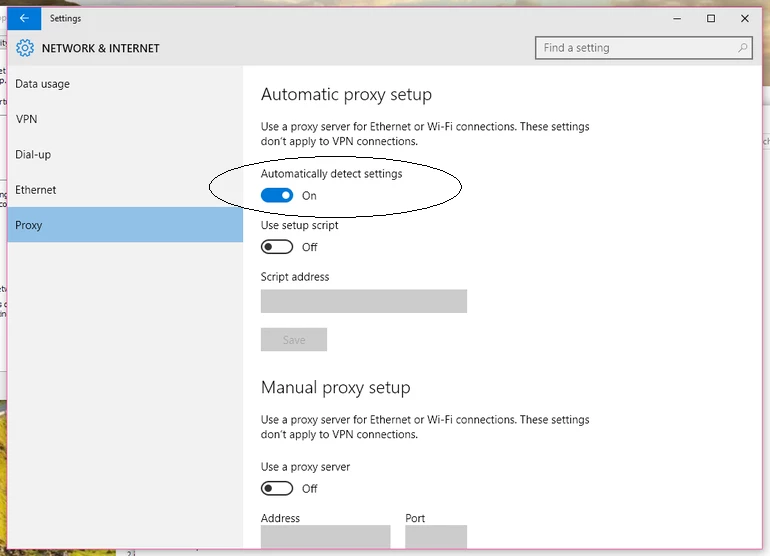
network-proxy.png

Translate
Report
Community guidelines
Be kind and respectful, give credit to the original source of content, and search for duplicates before posting. Learn more
community guidelines
Community Beginner ,
Oct 10, 2015 Oct 10, 2015

OMG!  It worked and my PS and LR are downloading right now.  Such a relief.  YOU ROCK!

There were some entries in Hosts from Spybot which had the word Adobe so I deleted them.  Turned on the proxy and deleted the Adobe Application Manager folder in Common Files.  I don't know which one was the key but all that matters is it worked.

Thank you for sharing your brilliance.

Translate
Report
Community guidelines
Be kind and respectful, give credit to the original source of content, and search for duplicates before posting. Learn more
community guidelines
LEGEND ,
Oct 10, 2015 Oct 10, 2015

Splendid ! Glad to hear that .

You are welcome

Translate
Report
Community guidelines
Be kind and respectful, give credit to the original source of content, and search for duplicates before posting. Learn more
community guidelines
Community Beginner ,
Oct 18, 2015 Oct 18, 2015

this also worked for me with a similar problem

After days of loops and hoops, I can enjoy the products again thanks

Translate
Report
Community guidelines
Be kind and respectful, give credit to the original source of content, and search for duplicates before posting. Learn more
community guidelines
New Here ,
Oct 28, 2015 Oct 28, 2015

Thanks. Solved the issue for me!
Really appreciate it.

Translate
Report
Community guidelines
Be kind and respectful, give credit to the original source of content, and search for duplicates before posting. Learn more
community guidelines
New Here ,
Nov 22, 2015 Nov 22, 2015

it keeps saying that i can't delete the folder 'cause it's open in another window but i don't have any other windows opened?? tried renaming it. same problem.

Translate
Report
Community guidelines
Be kind and respectful, give credit to the original source of content, and search for duplicates before posting. Learn more
community guidelines
LEGEND ,
Nov 22, 2015 Nov 22, 2015

Launch Task Manager and then end all Adobe related processes like Creative Cloud , CoreSync, AAMUpdater , Acrotray , Armsvc............................etc

Then try to rename and check .

You will get that error message, when Adobe related process is still running in background.

Translate
Report
Community guidelines
Be kind and respectful, give credit to the original source of content, and search for duplicates before posting. Learn more
community guidelines
New Here ,
Jan 15, 2016 Jan 15, 2016

LEGEND!!! Thank you so much for posting this. Two seperate technicians took charge of my PC for over an hour today and managed to solve nothing.

Adobe - give this man a job.... and if you already have, give him a payrise!! Thanks again!

Translate
Report
Community guidelines
Be kind and respectful, give credit to the original source of content, and search for duplicates before posting. Learn more
community guidelines
New Here ,
Feb 14, 2016 Feb 14, 2016

OMG THANK YOU SO MUCH! I was going insane trying literally everything and this works! You sir a a god damn genius I love you

Translate
Report
Community guidelines
Be kind and respectful, give credit to the original source of content, and search for duplicates before posting. Learn more
community guidelines
Explorer ,
May 27, 2016 May 27, 2016

Thanks this worked for me as well...

This is at least the second time I've had to manually remove creative cloud from my computer just so that I can update it to install the apps. Cleative Cloud app is a serious pain.

Translate
Report
Community guidelines
Be kind and respectful, give credit to the original source of content, and search for duplicates before posting. Learn more
community guidelines
New Here ,
Nov 07, 2016 Nov 07, 2016

THANK YOU. I just spent the last 2.5 hours trying to fix this.

Translate
Report
Community guidelines
Be kind and respectful, give credit to the original source of content, and search for duplicates before posting. Learn more
community guidelines
New Here ,
Nov 09, 2016 Nov 09, 2016

Thank you soooooo much for this post, your advice worked a treat. Excellent :0)

Translate
Report
Community guidelines
Be kind and respectful, give credit to the original source of content, and search for duplicates before posting. Learn more
community guidelines
LEGEND ,
Oct 09, 2015 Oct 09, 2015

Also check for any Adobe entries in Hosts file with loop back address 127.0.0.1 :

1)Navigate to C:\Windows\System32\drivers\etc and look for file named hosts inside etc folder.

2)Copy the hosts file to Desktop and open the same with notepad.

Check whether you can see any Adobe related entries inside Hosts file like 127.0.0.1 activate.adobe.com.......etc??

Translate
Report
Community guidelines
Be kind and respectful, give credit to the original source of content, and search for duplicates before posting. Learn more
community guidelines
New Here ,
Jan 17, 2016 Jan 17, 2016

Thanks for the lead to this. I had deleted anything that remotely resembled something from Adobe and did not even know about this file. Cleaned it up and presto, it is working. Kudos!

Translate
Report
Community guidelines
Be kind and respectful, give credit to the original source of content, and search for duplicates before posting. Learn more
community guidelines
New Here ,
Feb 06, 2016 Feb 06, 2016

Wow!!!

It worked! Thank you so much. I was suffering of this problem for two days. Really thank you for your help

Translate
Report
Community guidelines
Be kind and respectful, give credit to the original source of content, and search for duplicates before posting. Learn more
community guidelines
New Here ,
Oct 16, 2015 Oct 16, 2015

This is not the same error.

Is there an OSX equivalent to Brucgovn's solution?

Please help this is very frustrating...reformatted a computer and am unable to install any CC apps.

Translate
Report
Community guidelines
Be kind and respectful, give credit to the original source of content, and search for duplicates before posting. Learn more
community guidelines
LEGEND ,
Oct 17, 2015 Oct 17, 2015

Can you post screenshot of the error ?

Translate
Report
Community guidelines
Be kind and respectful, give credit to the original source of content, and search for duplicates before posting. Learn more
community guidelines
New Here ,
May 12, 2016 May 12, 2016

THANK YOU SOOOO MUCH!!!!!!!!!!!! Been looking for a solution for the past 5 hours!!!!

Translate
Report
Community guidelines
Be kind and respectful, give credit to the original source of content, and search for duplicates before posting. Learn more
community guidelines
New Here ,
Nov 08, 2016 Nov 08, 2016

Do you have a OSX version?

Translate
Report
Community guidelines
Be kind and respectful, give credit to the original source of content, and search for duplicates before posting. Learn more
community guidelines
New Here ,
Nov 08, 2016 Nov 08, 2016

Sorry, I have Windows 10.

Translate
Report
Community guidelines
Be kind and respectful, give credit to the original source of content, and search for duplicates before posting. Learn more
community guidelines