


Exit
  • Global community
    • Language:
      • Deutsch
      • English
      • Español
      • Français
      • Português
  • 日本語コミュニティ
  • 한국 커뮤니티
0

Creative Cloud Update Error 1002

New Here ,
Jun 26, 2016 Jun 26, 2016

Hallo!

I receive the #1002 Error when the Creative Cloud App tries to update.Bildschirmfoto 2016-06-27 um 08.20.53.png
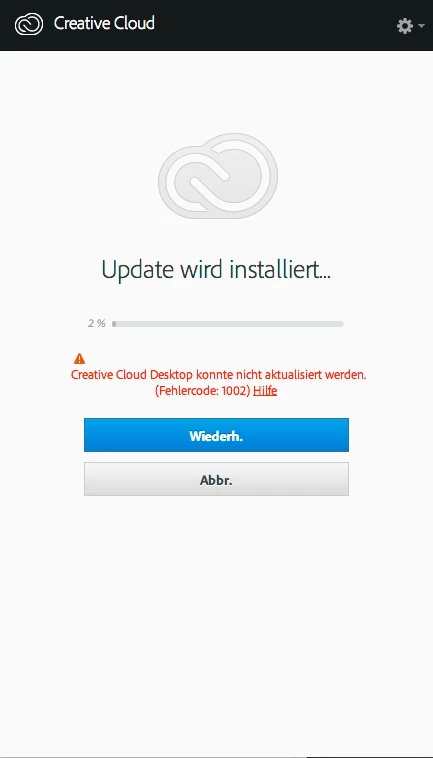
After reading a bit here on the forums I tried to unistall the app, used the cleanup utility and then tried to reinstall. But when trying to reinstall the Creative Cloud App it did not work. So I was left with an unusable Computer (Mac Pro, 10.10.5). All there was left was to set my Computer back via Time Machine to be able to work again.

So, I also tried to disable may Mac´s Software Firewall, checked the router and cables, logged in as an admin and so on. The weird thing is that the Problem occured just for two weeks now. Before everything worked as it should.

Normal Internet traffic such as Emails, FTP and browsing works like a charm so I highly doubt that there is a problem with my Internet Connection. What should I do to resolve the issue?

Regards, Tom

TOPICS
Creative Cloud
2.6K
Translate
Report
Community guidelines
Be kind and respectful, give credit to the original source of content, and search for duplicates before posting. Learn more
community guidelines

correct answers 1 Correct answer

Adobe Employee , Jun 28, 2016 Jun 28, 2016

If you are using Mac OS 10.10.5 and receiving Exit Code 123 please contact our support team directly at Contact Customer Care  so the error can be resolved.  Alternately upgrading to Mac OS 10.11 will also resolve Exit Code 123.

Translate
Adobe Employee ,
Jun 27, 2016 Jun 27, 2016

Hi Thomasu36567697,

As you have mentioned that you have already tried all the basic troubleshooting steps, i would recommend you to follow the steps mentioned in the below thread as well and see if that helps:

Re: Creative Cloud desktop failed to update - Error 1002

Let us know if this helps resolve your issue, awaiting your response.

Translate
Report
Community guidelines
Be kind and respectful, give credit to the original source of content, and search for duplicates before posting. Learn more
community guidelines
New Here ,
Jun 27, 2016 Jun 27, 2016

Hi Bani Verma,

thanks for your reply!

As I mentioned in my opening post I did read about this problem

with error #1002 here on the adobe forums. Of course I found

your reply to user unforgettablecc in your linked thread before.

And I tried the possible solution number 1 - 3 (okay, I tried

solution number 3 but the link is broken).

So all there was left for me to do, while uninstalling, cleaning up

an reinstalling did not work, was to set back my machine via

Time Machine.

Ok, last chance was to move to http://prodesigntools.com/adobe-cc-2015-updates-links-mac.html

and download the ACCCx3_7_0_272.dmg-Installer package and hope for the best.

Bildschirmfoto 2016-06-28 um 07.48.55.png

To come to an end: it did work. I was able to install the new Creative Cloud App

WITHOUT uninstalling and cleaning up and immediately new versions were

shown in the app-window.

Bildschirmfoto 2016-06-28 um 07.53.01.png

Now the only problem is that Photoshop and Illustrator won´t

update because of server issues:

Bildschirmfoto 2016-06-28 um 07.36.16.png

Exit Code: 123

-------------------------------------- Summary --------------------------------------

- 1 fatal error(s), 0 error(s), 0 warnings(s)

FATAL: Fatal Error '123' occurred while download

-------------------------------------------------------------------------------------

Indesign DID update sucessfully!

Regards, Tom

EDIT: I forgot to mention that I installed my Creative Cloud on a different Mac last Week.

Macbook Pro Early 2011, OS X Yosemite as well. Everything worked out of the box.

Translate
Report
Community guidelines
Be kind and respectful, give credit to the original source of content, and search for duplicates before posting. Learn more
community guidelines
Adobe Employee ,
Jun 28, 2016 Jun 28, 2016

If you are using Mac OS 10.10.5 and receiving Exit Code 123 please contact our support team directly at Contact Customer Care  so the error can be resolved.  Alternately upgrading to Mac OS 10.11 will also resolve Exit Code 123.

Translate
Report
Community guidelines
Be kind and respectful, give credit to the original source of content, and search for duplicates before posting. Learn more
community guidelines
New Here ,
Jun 28, 2016 Jun 28, 2016

Hi Bani Verma,

thanks for your reply. But I have to say: I will NOT upgrade to Mac OS X 10.11 because

I don´t want to. I´m working with my machine and I don´t have the time and money to try

"possible" solutions. Neither do I want that somebody gets on my machine online because

the data on my Harddisks is sensitive. Get your things together at the developement

department and create an installer/updater for all OS X Systems supported by Adobe.

These are: Mavericks, Yosemite and El Capitan. Because of that I bought the CC.

Regards, Tom

Translate
Report
Community guidelines
Be kind and respectful, give credit to the original source of content, and search for duplicates before posting. Learn more
community guidelines
Adobe Employee ,
Jul 25, 2016 Jul 25, 2016
LATEST

Hi Tom,

For updated details on how to resolve Exit Code 123 see Error: Exit Code 123 .  You are welcome to update this discussion if you have any questions regarding the steps listed in the document.

Translate
Report
Community guidelines
Be kind and respectful, give credit to the original source of content, and search for duplicates before posting. Learn more
community guidelines