


정휘조44807317
Participant
September 20, 2015
質問

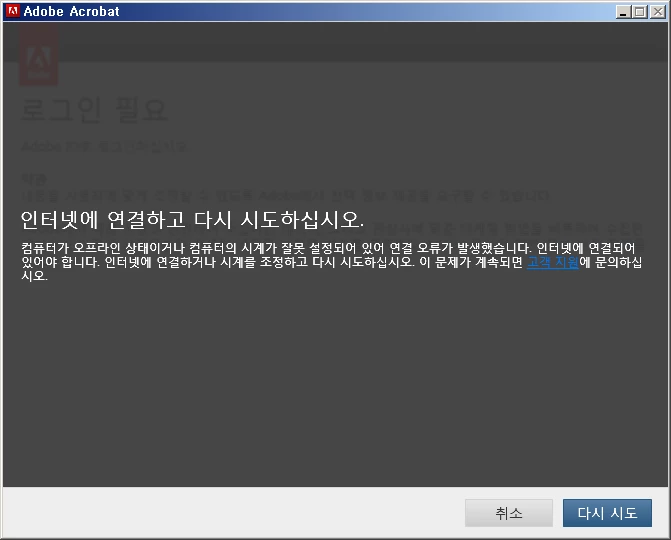
I've got internet connection already, and the clock is pretty accurate. But I still get this error message.
  • September 20, 2015
  • 返信数 2.
  • 1932 ビュー

It translates:

Please connect to the Internet and retry.

Either your computer is offline or the clock on your computer is set incorrectly, causing a connection error. An Internet connection is required. Please connect to the Internet or adjust your clock and try again. If this continues, ask 'Customer Support' for more helps.

It's after I downloaded the 30-days trial version of Acrobat DC on Adobe website and successfully installed that I got this message. It asked me to log in for the activation and It required me to rearrange the internet connection for it. I can swear that my connection and clock cannot be more descent than now. I checked everything to be fine and even tried every single step of troubleshooting stuffs provided on https://helpx.adobe.com/x-productkb/policy-pricing/activation-network-issues.html‌‌ only to find nothing to be changed. Can you find out what can be the source of the problem?

    このトピックへの返信は締め切られました。

    返信数 2

    RahulTyagi_
    Community Manager
    Community Manager
    September 20, 2015

    HI James,

    Are you able to connect to internet using other programs/ Browser?

    If yes, Your antivirus or firewall might be blocking Internet access to Acrobat,

    If no, Please retry after switching to a different network.

    Regards,
    Rahul

    정휘조44807317
    Participant
    September 20, 2015

    How can I unblock them? I've tried permitting acrobat.exe and PDapp.exe(It was the file on the process when I open the program.) to communicate through the firewall on the firewall settings, and nothing changed. Can you instruct me what should be the very program to be allowed?

    /

    Edit: As an aid I 've shutted off whole firewall and tried to execute the program to see if it can start communicating well. It failed. I think there must be a problem on the network itself I use.

    /

    Edit(2): Changed to another network and saw the same problem... well... Maybe my computer is wicked or something.

    jbm007
    Community Expert
    Community Expert
    September 20, 2015

    Check your firewall settings.