sewn
Known Participant
August 9, 2018
質問

How do I save as PNG without showing alpha channels?

  • August 9, 2018
  • 返信数 2.
  • 6342 ビュー

I may not be referring to alpha channels correctly, but here the situation:

I have an EPS from a stock-image service that contains a white starburst image (with lots of gradient internal transparency) on a transparent background.  I've got it opened in Illustrator, and I see a black/gray background around the white image piece in each of the layers (is that the alpha channel?)  How can I save this as the flat white starburst on a transparent background?  "Export as PNG" retains the black/gray backgrounds that I see in the layers. (I used "Export as" rather than "Save as" because "Save as" did not have PNG as a choice.  The image is CMYK, but doesn't need to be --  I don't know how to change it to RGB.)

Here is a screen shot of what I see in Illustrator, and the "Export as PNG" file (the little picture).

The third picture is the preview JPG provided with the EPS by the image service, so you can what the starburst is supposed to look like. (I was able to find and remove the checkerboard layer in AI.)
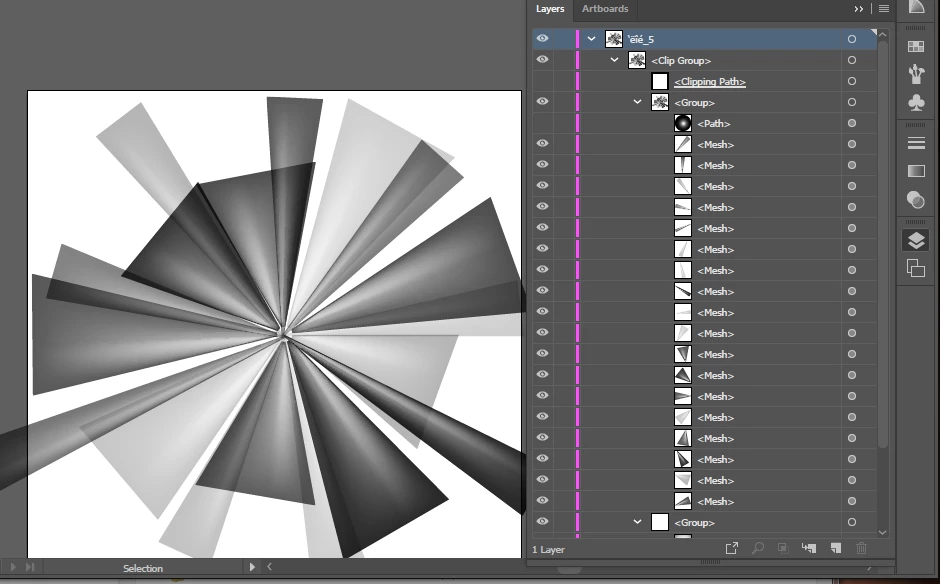
  Export as PNG: Starburst

    このトピックへの返信は締め切られました。

    返信数 2

    Doug A Roberts
    Community Expert
    Community Expert
    August 9, 2018

    these things are usually designed to work on a background, because they depend on blending modes for some of the transparency. that's why the checkerboard layer is there.

    sewn
    sewn作成者
    Known Participant
    August 9, 2018

    Hi Doug ... same reply to you (see my reply to Monica).

    Any clues?

    Monika Gause
    Community Expert
    Community Expert
    August 9, 2018

    Problem with these images is that the checkerboard is there to deceive you. They need it technically for the effect to work and the checkerboard suggests a certain document structure that isn't there.

    So pratically what you want is impossible with this file as it depends on blend modes.

    The file needs to be rebuilt using reduced opacity.

    sewn
    sewn作成者
    Known Participant
    August 9, 2018

    I made the checkerboard visible again, and got this result when exporting as PNG.  Does that affect your analysis of the problem?

    BTW, Depositphotos is selling EPS files like this for images on transparent background, so it seems there MUST be a way to actually get a usable image from it.  I contacted their support and they told me to try using Illustrator and figure it out myself -- they don't provide Illustrator help.

    Thanks for any clues you can think of !

    Monika Gause
    Community Expert
    Community Expert
    August 9, 2018

    The image works like so:

    you can put your own backgrounds behind it.

    you cannot use it without background.