


Participant
December 16, 2009
Question

How to rotate a grouped artworks in the same way as Rotate Tool ?

  • December 16, 2009
  • 2 replies
  • 1007 views

I have made some code that rotates a grouped artwork.

ASErr rotate( AIArtHandle ah, AIReal radians, AIRealPoint const& center )
{
    ASErr             err = 0;
       
    AIRealMatrix    mtx;
    sAIRealMath->AIRealMatrixSetTranslate   ( &mtx, -center.h, -center.v );
    sAIRealMath->AIRealMatrixConcatRotate   ( &mtx, radians );
    sAIRealMath->AIRealMatrixConcatTranslate( &mtx, center.h, center.v );
       
    err = sAITransformArt->TransformArt( ah, &mtx, 1, kTransformObjects );

    return err;
}

    ..................

    ASErr err = kNoErr;


    //--------------------------------------- ah_selection
    AIArtHandle ah_selection = ..................

    AIRealRect  rect = ..............

    AIRealPoint center;
    center.h = (rect.right+rect.left) / 2;
    center.v = (rect.top+rect.bottom) / 2;

    AIReal  radians = sAIRealMath->DegreeToRadian(30);

    //---------------------------------------
    AIArtHandle     child   = NULL;
    err = sAIArt->GetArtFirstChild(ah_selection, &child);
    err = rotate( child, radians, center );

    while (1)
    {
        err = sAIArt->GetArtSibling(child, &child);

        if ( err || child == NULL)
            break;

        err = rotate( child, radians, center );
    }
    

It works but with one difference. When I select a grouped artworks and apply to it,  it's bounding box does not rotates.
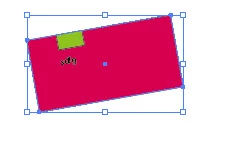
This is same as " Object > Transform > Transform Each" menu way that individual are having their own origin points.

How can I  rotate with bounding box also rotated ?

Thanks in advance.

This topic has been closed for replies.

2 replies

sergey_ak
Participant
October 10, 2018

If someone still looking for answer to this question. You need to update your art BBAccumRotation dictionary entry.

Something like this: sAIDictionary->SetStringEntry(artDict, m_artBBAccumRotation, angle);.

Community Expert
May 23, 2022

I know, this is an old thread, but a concrete answer is given here:


[ ExtendScript ] How to rotate a text frame properly? Just like the GUI does it.
sttk3
https://community.adobe.com/t5/illustrator-discussions/extendscript-how-to-rotate-a-text-frame-properly-just-like-the-gui-does-it/m-p/12959835#M322599


Regards,
Uwe Laubender
( Adobe Community Professional )

A. Patterson
Inspiring
December 16, 2009

This is honestly a good question. I don't know how you get the control bounds to also rotate. When I'm working with AI, sometimes they do and sometimes they don't, and I'm not sure which is which. You might try calling AIArtSuite::SetArtBounds() -- that updates the bounds cache, maybe that does it? I'm not really sure though, this isn't something that's really covered in their documentation unfortunately.


Though I did notice yesterday that you can 'reset control bounds' on one of the menus. That takes the rotates bounding box and resets it to the way you're getting it now. Now that I think about it, its probably more likely that's what SetArtBounds() does than the reverse, but its still worth a try.