


chrish2016
Participant
February 16, 2019
解決済み

Adobe InDesign: can't add hex color by "new swatch" at the bottom of the palette…

  • February 16, 2019
  • 返信数 3.
  • 2057 ビュー

So, is there a valid reason why in Adobe InDesign you cannot add a hex color through the palette option of "new swatch" but instead have to go through the side menu of "new color swatch"? And is there suppose to be a reason why on the bottom of the palette it's called "new swatch" but in the side menu it's called "new color swatch"? Anyone feeling me?
このトピックへの返信は締め切られました。
解決に役立った回答 rob day

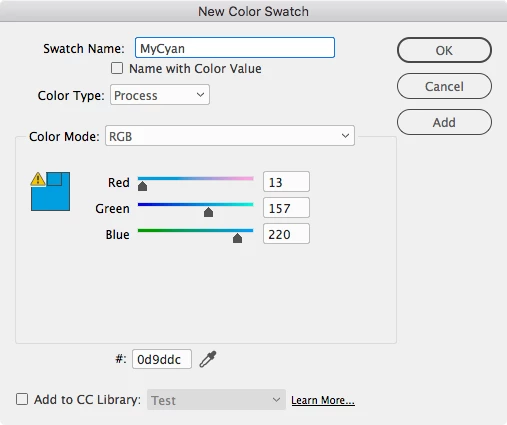
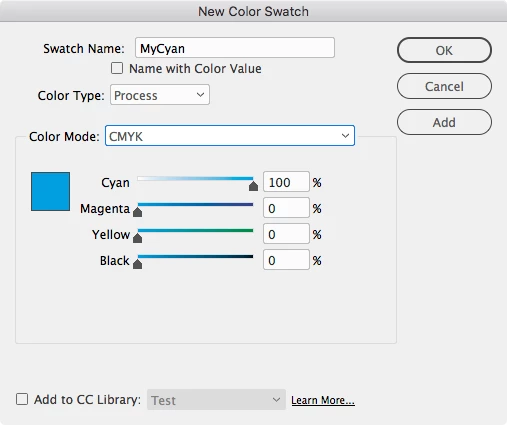
To get the Hex field in the New Color Swatch dialog the Color Mode has to be RGB:

If you want to edit when clicking the New Swatch icon at the bottom of the Swatches panel hold down the Option key when you click

返信数 3

rob day
Community Expert
Community Expert
February 16, 2019

And is there suppose to be a reason why on the bottom of the palette it's called "new swatch" but in the side menu it's called "new color swatch"?

The flyout menu has New Tint Swatch, New Gradient Swatch, New Mixed Ink Swatch, as well as New Color Swatch. Without the Option key pressed, the New Swatch button creates a swatch that matches the current fill or stroke color set in the Color Picker or Color panel.

rob day
Community Expert
rob dayCommunity Expert解決!
Community Expert
February 16, 2019

To get the Hex field in the New Color Swatch dialog the Color Mode has to be RGB:

If you want to edit when clicking the New Swatch icon at the bottom of the Swatches panel hold down the Option key when you click

Steve Werner
Community Expert
Community Expert
February 16, 2019

Screen captures of what you're seeing would be helpful. Also, what version of InDesign? What operating system?