
CallMeC
Participating Frequently
January 7, 2022
Question

Blank box over colon when exporting PDF from Indesign

  • January 7, 2022
  • 5 replies
  • 1796 views

Hi,


I've been doing some troubleshooting on a particular problem: I get a blank box over the colon when exporting a PDF from Indesign. See screenshot. This happens only with the websafe Heebo font and only when exporting to PDF (tested other exports like Jpeg, the font exports properly then). Same issue when displaying in other PDF readers (apple preview and PDF expert) so I am assuming it's an issue when exporting the font. I am not sure how to fix this tho? Any advice?
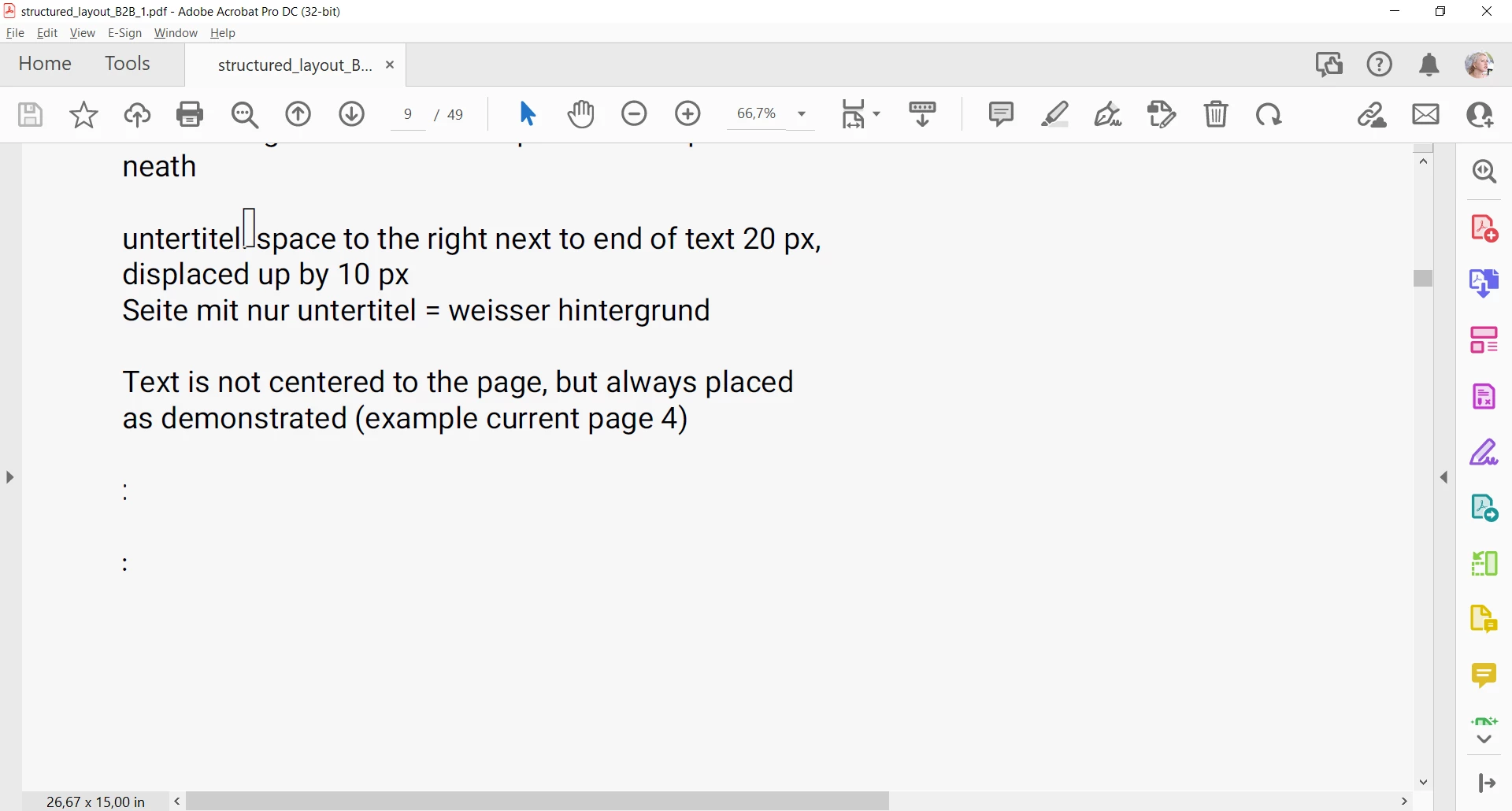


Thank you all!


This topic has been closed for replies.

5 replies

Community Expert
February 3, 2022

I'd like to know if this issue still persists with InDesign version 17.1.0.50 or if it is finally fixed.


Thanks,
Uwe Laubender

( ACP )

Community Expert
January 7, 2022

Vote for a fix at InDesign UserVoice:


Missing Glyphs on PDF export in InDesign v17.0
Cole Nov 1, 2021
https://indesign.uservoice.com/forums/601180/suggestions/44385984


Regards,
Uwe Laubender

( ACP )

Community Expert
January 7, 2022

Hi CallMeC,

what could also help:

Uninstall the font. Reinstall it in your system.


If this will not work, uninstall it and move the font files to the Fonts folder of InDesign's Application folder.


There are a lot of discussions in the forum with similar problems on a variety of fonts.

Just to list some of them:


Umlauts generate small square after export
SayMyNameSayMyName, Nov 22, 2021
https://community.adobe.com/t5/indesign-discussions/umlauts-generate-small-square-after-export/m-p/12542323#M454655


Can't export quotation marks in an open source font to PDF
Irrumba, Nov 23, 2021
https://community.adobe.com/t5/indesign-discussions/can-t-export-quotation-marks-in-an-open-source-font-to-pdf/td-p/12546830


Export to pdf destroys font
Robert21919741ecwv, Nov 24, 2021
https://community.adobe.com/t5/indesign-discussions/export-to-pdf-destroys-font/m-p/12547575#M455019


Plairfay display font is giving troubles
Studio Blom, Dec 01, 2021
https://community.adobe.com/t5/indesign-discussions/plairfay-display-font-is-giving-troubles/m-p/12631169#M459814


Problème police
stephanie22074081kb82, Dec 03, 2021
https://community.adobe.com/t5/indesign-discussions/probl%C3%A8me-police/m-p/12568514#M456312


Quote marks displaying incorrectly in exported PDF from InDesign
fosforuscw, Dec 05, 2021
https://community.adobe.com/t5/indesign-discussions/quote-marks-displaying-incorrectly-in-exported-pdf-from-indesign/m-p/12572502#M456513


Italicized semicolons not exporting into pdf!
Kay22114038dk60, Dec 06, 2021
https://community.adobe.com/t5/indesign-discussions/italicized-semicolons-not-exporting-into-pdf/m-p/12574173#M456628


Colons changing to squares when exporting to PDF from InDesign
aphilli7, Dec 09, 2021
https://community.adobe.com/t5/indesign-discussions/colons-changing-to-squares-when-exporting-to-pdf-from-indesign/m-p/12583002#M457259


Black Lines Appear After PDF Export
Cr_burch, Dec 17, 2021
https://community.adobe.com/t5/indesign-discussions/black-lines-appear-after-pdf-export/m-p/12602721#M458378


PDF-error in Font "Lora"
default7ielhl4ghxd9, Dec 17, 2021
https://community.adobe.com/t5/indesign-discussions/pdf-error-in-font-quot-lora-quot/m-p/12601086#M458223


Strange rectangles appear exporting the document
Nicolo5F91, Jan 04, 2022
https://community.adobe.com/t5/indesign-discussions/strange-rectangles-appear-exporting-the-document/td-p/12632967


Character appearing as squares in PDF
Summayah5FC7, Jan 04, 2022
https://community.adobe.com/t5/indesign-discussions/character-appearing-as-squares-in-pdf/m-p/12633538#M459964


EDIT 4 Jan 21, 2022:

( Added other discussions. )


Issue with Google Font Karla
defaultyj6f9au8sfex, Jan 10, 2022

https://community.adobe.com/t5/indesign-discussions/issue-with-google-font-karla/m-p/12647721#M460833


InDesign to PDF Playfair display font issues
serena22658619n7jz, Jan 14, 2022
https://community.adobe.com/t5/indesign-discussions/indesign-to-pdf-playfair-display-font-issues/td-p/12661462


Indesign '22 does not export the semi-court stroke for the fonts "Robot Slab" and "Montserrat"
pmfh, Jan 19, 2022
https://community.adobe.com/t5/indesign-discussions/indesign-22-does-not-export-the-semi-court-stroke-for-the-fonts-quot-robot-slab-quot-and-quot/td-p/12693068


Font export glitch: Inter Light colon ':'
Johnathan Montelongo, Jan 21, 2022

https://community.adobe.com/t5/indesign-discussions/font-export-glitch-inter-light-colon/td-p/12696114


As far as I can see there is no issue with InDesign on Windows.

The issue began with InDesign 2022 on Mac OS.

Please correct me if I'm wrong.


Regards,
Uwe Laubender

( ACP )

jmlevy
Community Expert
Community Expert
January 7, 2022

I will add to (excellent) Alexandre answer: 

In May 2020, the family has been updated to a variable font family

Don't use variable fonts with InDesign, you'll get a lot of trouble.

Alexandre Becquet
Community Expert
Community Expert
January 7, 2022

Hello, can you show us the settings for the exported PDF?

And when i see the infos for the font i've this : 

About Heebo

Heebo is a Hebrew and Latin typeface family, which extends Christian Roberton's Roboto Latin to Hebrew. The Hebrew was drawn by Oded Ezer and the font files were mastered by Meir Sadan.

Since the Hebrew design of this family is primary, the vertical metrics are different to the original Roboto family. This family is auto-hinted, whereas Roboto is hand-hinted, so the rendering quality of Roboto may be better on older Windows machines.

In May 2020, the family has been updated to a variable font family.

The Heebo project is led by Oded Ezer, a type designer based in Tel Aviv, Israel. To contribute, see github.com/odedezer/heebo


Is it the right font? 
What's the result if you use a similar font?

CallMeC
CallMeCAuthor
Participating Frequently
January 7, 2022

Hi,


I've used the default print high quality print (compatibility acrobat 5) export settings and the default interactive PDF settings. I have played around with the settings but no dice until now. And yes that is the right font. With any other somilar font no issues. I'd love to be able to change fonts but I have to stick to this one as it's a branding project so the choice is final.


Thank you so much!