



dublove
Legend
April 12, 2021
解決済み

Can script be used to add a row at the beginning and end of the table and apply styles?

  • April 12, 2021
  • 返信数 2.
  • 282 ビュー

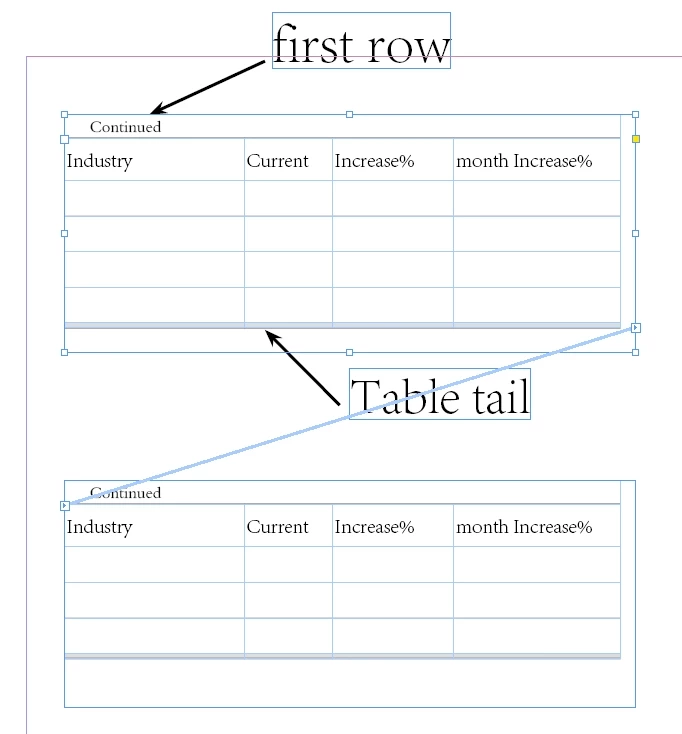
Due to work needs, I often need to add the word "continuation table" to the first line of a long table. I need to set the unit style of the first line as "tab con", the accurate line height is 5mm, the upper and lower space is 0mm, and the left and right space is 0.5mm, and apply the paragraph style "con-p".


In addition, I also need to set the last row end of the table, apply the "tab tail" L cell style, the exact row height is 1.06mm, and apply the paragraph style tail-p (this may not be necessary, because the row height is too small).


Can these two be implemented by script?
The file is here


このトピックへの返信は締め切られました。
解決に役立った回答 Peter Kahrel

And you can read about it and watch how it's done here:

https://creativepro.com/continued-heading-table/

https://creativepro.com/free-lynda-com-video-packaging-files-printer/


返信数 2

Peter KahrelCommunity Expert解決!
Community Expert
October 21, 2021
Community Expert
October 20, 2021

Hi dublove,

this could be done without scripting as well. Here we go:


[1] Add an additional header row to your table.

[2] Use the "Continued" text in the first header row.

Use "Industry", "Current" etc.pp. in the second header row.

[3] Add you usual header row as the first body row to the table.


[4] In the Table options you can skip the first frame or you can skip the first column for all header rows.

The result is this:


From:


To Skip the First Frame or Text Column:


My sample document from InDesign 2021 can be downloaded from my Dropbox account:

https://www.dropbox.com/s/j9mm1kefjak13oj/TableWithContinuedHeaderRow-2021.indd?dl=1


Regards,
Uwe Laubender

( ACP )