Participating Frequently
July 7, 2021
解決済み

Can you add "Annex I, Annex II, Annex III..." text to page number prefix in a table of contents?

  • July 7, 2021
  • 返信数 5.
  • 5707 ビュー

I have an automatically generated TOC and I have 3 annex sections setup each section starts at page 1.


For example: Annex. I, Page 1,2,3... Annex II, Page 1, 2, 3 ect..


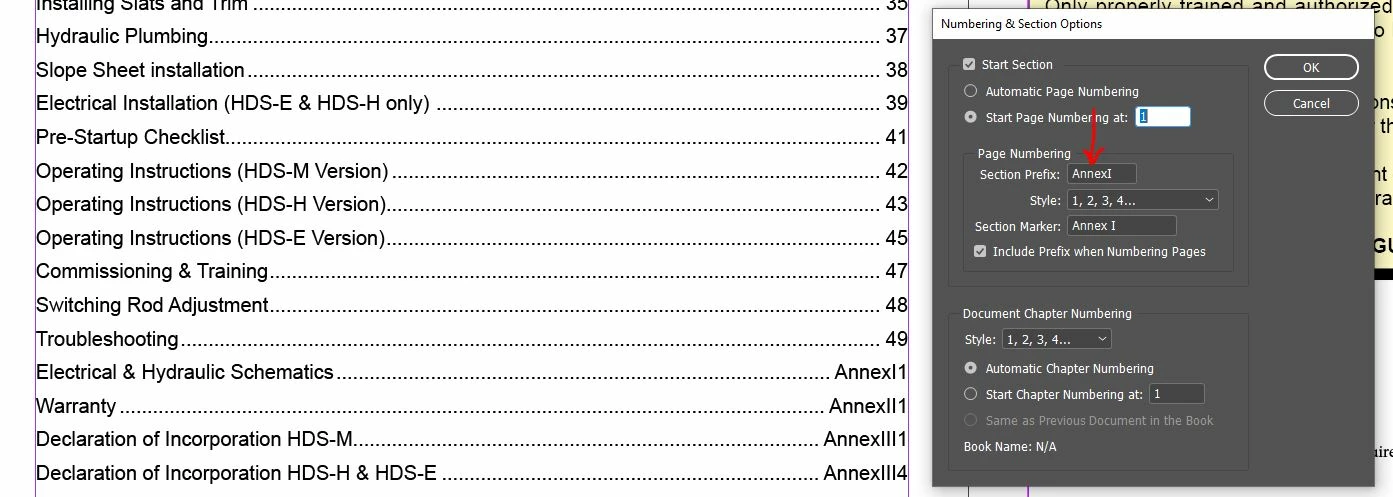
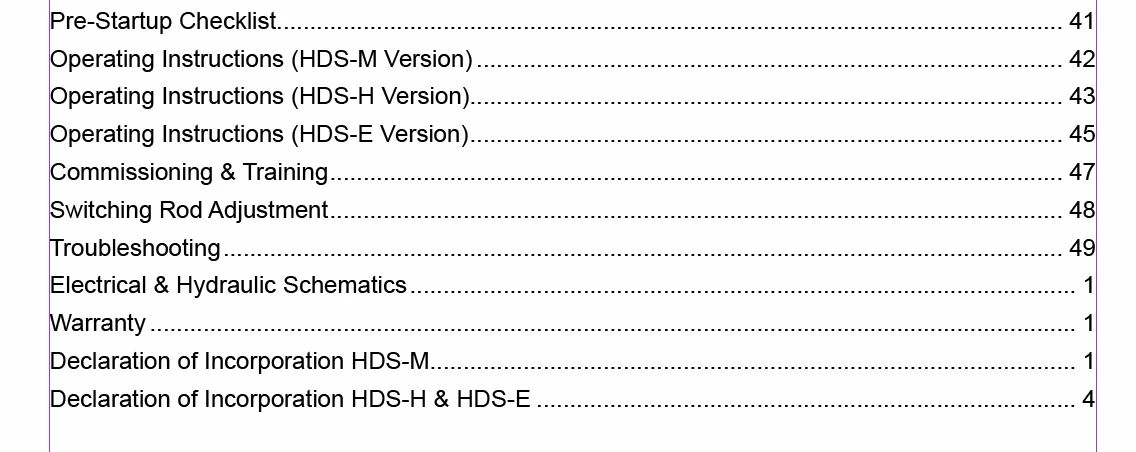
The problem is my TOC just shows the page 1 without the Annex I text. So I now have multiple page 1's in my TOC without any way to disinguish between them. I tried using the section prefix but it won't allow spaces (red arrow in photo below)so it looks like this AnnexI1, AnnexI2 ect...


Maybe there's a better way to approach numbering Annex pages?


Here's a couple photos to illustrate my question:


このトピックへの返信は締め切られました。
解決に役立った回答 Barb Binder

Darn! A totally different approach—that I use—is to add the words at the beginning of the paragraph and run the numbers continuously. You could either add them to the titles in the body of the document or add them using auto-numbers in the TOC, assuming they have their own style names.


Last chapter title here..............49

Annex I: Annex Title here.......51

Annex II: Annex Title here......55

Annex III :Annex Title here....57


Just a thought!


~Barb 

返信数 5

Barb Binder
Community Expert
Community Expert
July 8, 2021

Hi @J E L:


I am familiar with calling hidden text into a TOC, but not sure how that would add the required Annex I, II or III in front of the page number, automatically. I think you'd have to give it a try and let us know!


~Barb

~Barb at Rocky Mountain Training
Dave Creamer of IDEAS
Community Expert
Community Expert
July 8, 2021

This is what I was able to do:

In the Annexes, I created a based-on subhead style from the regular chapters.

I manually inserted a tab and then a text variable into the header. (The variable can be assigned a keyboard shortcut.)

In the Annex subhead style, I added a nested style to make the variable "disappear". 

I added the listing to the TOC with a TOC based-on style from the chapter entries--mainly to address the tab settings.

David Creamer: Community Expert (ACI and ACE 1995-2023)
Barb Binder
Community Expert
Barb BinderCommunity Expert解決!
Community Expert
July 7, 2021

Darn! A totally different approach—that I use—is to add the words at the beginning of the paragraph and run the numbers continuously. You could either add them to the titles in the body of the document or add them using auto-numbers in the TOC, assuming they have their own style names.


Last chapter title here..............49

Annex I: Annex Title here.......51

Annex II: Annex Title here......55

Annex III :Annex Title here....57


Just a thought!


~Barb 

~Barb at Rocky Mountain Training
J E L
Community Expert
Community Expert
July 7, 2021

@Barb Binder Would a summary text TOC method work where the text on a hidden (non-printing) or offset text box had the Annex TOC text with a current page number marker? I'm too tired right now to think that one through! But I'm thinking of a method like one of these I use when a chapter has a summary text I want in the TOC but don't want it to appear on the chapter page itself:


(1) Hide the TOC title from document pages by placing it off the pasteboard but leave a piece of the text box touching the frame (it's okay if the text turns to overset).

(2) Put the text box right on the document but hide the box by Window, Output, Attribute, and set to non-printing (this can also be pre-set in an object style for summary text). Be sure to use a unique paragraph style. In the Edit TOC Style Dialogue, add the style as a TOC item anywhere in the list. (If you don't want page numbers to show, under More, turn off page numbering.)

(3) Put the text box right on the document but place it on a non-printing layer by turning off print layer in the layer options.

Barb Binder
Community Expert
Community Expert
July 7, 2021

Use Type > Insert White Space > Non-breaking space (or the listed keyboard shortcut).


~Barb 

~Barb at Rocky Mountain Training
Barb Binder
Community Expert
Community Expert
July 7, 2021

Good question. I played around a bit and was able to get it to work by typing Annex on the page, followed by a hard space. I then cut the text of the page and pasted it in as the Prefix. I wasn't able to add the space directly into the dialog box. 


~Barb 

~Barb at Rocky Mountain Training
cbuckthree作成者
Participating Frequently
July 7, 2021

OOOOH! That's what I'm looking for! One question what do you mean by "hard space" and how do I do that?


Thanks so much!

Dave Creamer of IDEAS
Community Expert
Community Expert
July 7, 2021

Hard space is another term for non-breaking space.

David Creamer: Community Expert (ACI and ACE 1995-2023)
J E L
Community Expert
Community Expert
July 7, 2021

@cbuckthree If you want the page numbers in the TOC to reflect the page numbering in the document (as applied by the page Master) create a new paragraph style for the Annex section and add that style to your TOC set up. Make sense? I can create an example for you if needed.

cbuckthree作成者
Participating Frequently
July 7, 2021

Hi Jain, I think I understand what you're saying but I have done that already. I'm using a paragraph style called "Listed in TOC" that is what is showing the "Electrical & Hydraulic Schematics", "Warranty", "Declaration..." ect.


My problem is each of those sections start with new page numbering. So now each section in the table of contents shows "1" for page. What I need it to say is Annex I, 1


OR do you have a better way to have 3 Annexes (in my case, Schematics, Warranty and Delcaration) that start over with page numbers but are clearly shown in the table of contents?


I struggle to properly explain what I'm trying to do but I do appreciate any advice.

J E L
Community Expert
Community Expert
July 7, 2021

@cbuckthree No worries, I see now what you are after and @Barb Binder has come to the rescue. That is a set up I wouldn't have imagined myself. Glad she could help!