
Creating then placing a textfile with script
Hello,
I am trying to understand the behavior of a script I wrote.
The goal of this sample is to generate a temporary text file and then place it in a text frame. I understand that there are significantly better ways to move a string into a text frame, but I want to understand why this in particular is not working.
On the first run, I get error 29446 saying the file does not exist, I do not have permission, or it may be in use by another application.
On the second run—after the file has clearly been generated—it works fine.
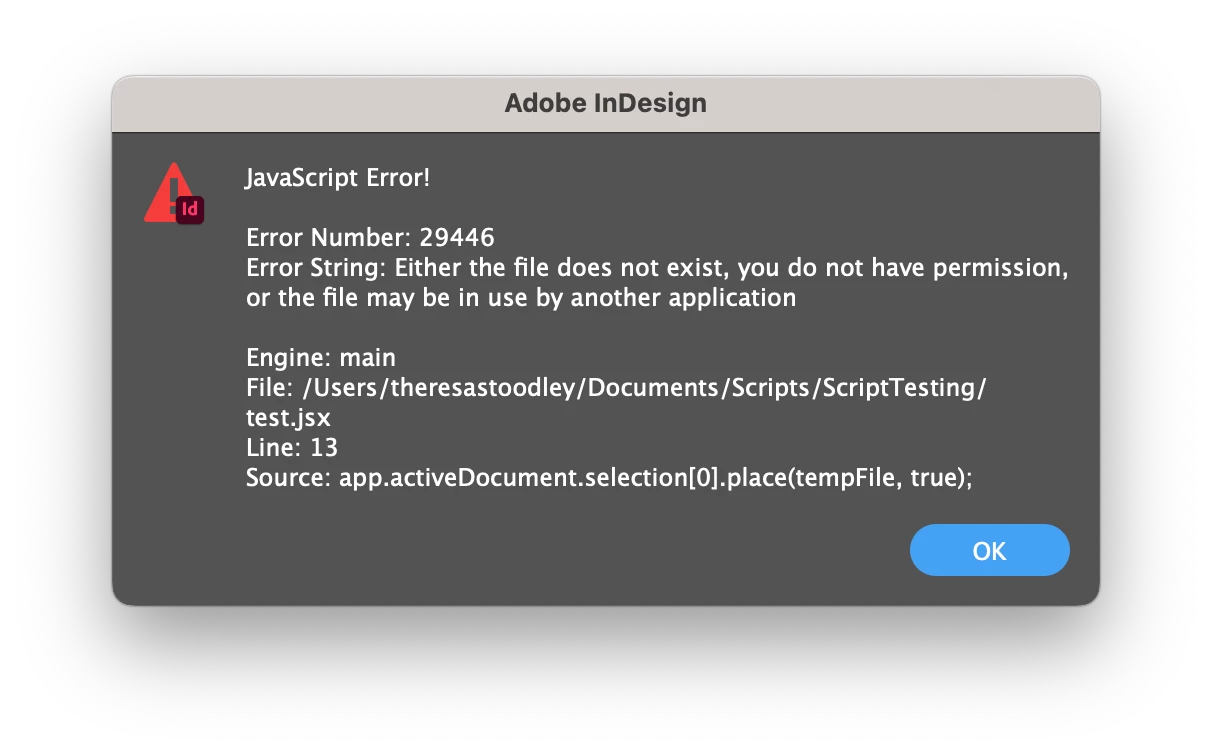
I checked to see if the file exists, and If I could open it via the script before placing it with the following snippit.
    // Check if the file exists
    if (tempFile.exists) {
        // Try to open the file for writing
        if (tempFile.open("w")) {
            tempFile.write("Test");
            tempFile.close();
            //Place Throws error
            myFrame.place(tempFile);
        } else {
            alert("Could Not open.");
        }
    } else {
        alert("File not found.");
    }
Please help me understand why the place function is being disagreeable with my file.
Script below
var myDocument = app.activeDocument;
var tempFile;

tempFile = stringToTextFile("Hello world!","myTempFile");
resultFrame = app.activeWindow.activePage.textFrames.add();
resultFrame.properties =
{
    geometricBounds : [0,0,10,10],
    contents : ""
};
resultFrame.place(tempFile, true);

function stringToTextFile(str, fileNameStr){
    //Takes a string and creates a  text file on the desktop. Returns File
    var desktopPath = Folder.desktop;
    var myPath = desktopPath + "/" + fileNameStr + ".txt";
    var textFile = new File(myPath);
    // write the contents of the text file
    textFile.open("w");
    textFile.write(str);
    textFile.close();
    return textFile;
    }
 AdChoices