


Inspiring
July 20, 2023
解決済み

ePub output of numbered lists has unwanted gaps between levels

  • July 20, 2023
  • 返信数 2.
  • 802 ビュー

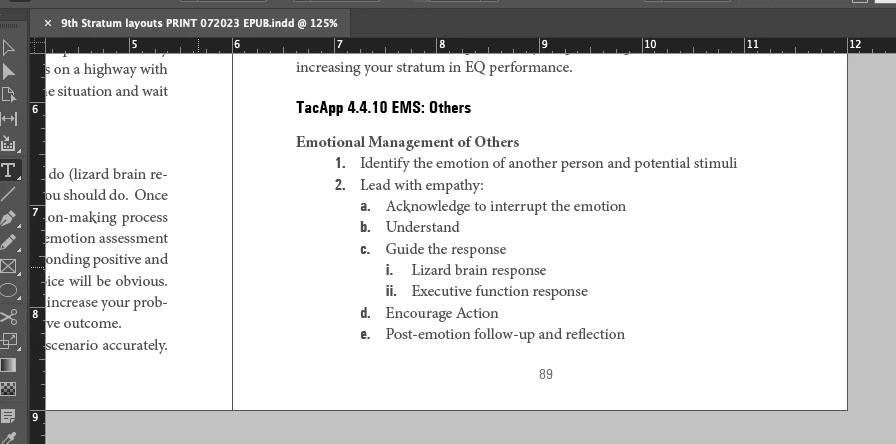
I have a few instances of ordered lists in my book, and they're outputting with gaps in ePub which I cannot determine why. I have no spacing settings in my paragraph styles to cause this. Here is my InDesign layout with an example of a group set up correctly
 

... and here is an ePub output in Apple Books...
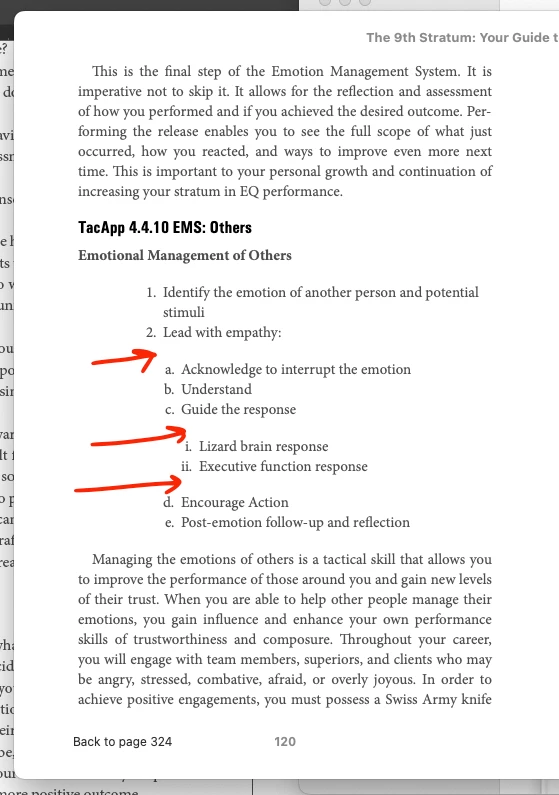


... which of course shows up the same in Kindle Previewer...



What would be the cause of the output error since my INDD paragraph styles are correctly set up?

このトピックへの返信は締め切られました。
解決に役立った回答 James Gifford—NitroPress

Part of this may be the EPUB reader you're using. View it in Calibre or Thorium and see if the gaps persist there; if not, it's an artifact of how the reader you're using chooses to style HTML list elements.


You can control formatting to some extent by using unique styles for each level, but for the most part, close control of lists with consistency across readers needs at least a little CSS assistance at export. Oddly, InDesign does not define the <ol> or <ul> elements, so sometimes a simple CSS definition for those can fix these problems. (each of those levels will be wrapped in an <ol> pair, for example).


Try this — add the following line to a plain text file, save it as ListFix.css, and include that CSS file in your export.


ol, ul { margin:0; padding:0; }


This will probably get rid of your gaps but may also kill your level indents. If so, try this instead: (OOPS - edited this later)


ol, ul {
margin-top:0;
margin-bottom:0;
padding-top: 0;
padding-bottom: 0;
}


返信数 2

James Gifford—NitroPress
Legend
July 21, 2023

Part of this may be the EPUB reader you're using. View it in Calibre or Thorium and see if the gaps persist there; if not, it's an artifact of how the reader you're using chooses to style HTML list elements.


You can control formatting to some extent by using unique styles for each level, but for the most part, close control of lists with consistency across readers needs at least a little CSS assistance at export. Oddly, InDesign does not define the <ol> or <ul> elements, so sometimes a simple CSS definition for those can fix these problems. (each of those levels will be wrapped in an <ol> pair, for example).


Try this — add the following line to a plain text file, save it as ListFix.css, and include that CSS file in your export.


ol, ul { margin:0; padding:0; }


This will probably get rid of your gaps but may also kill your level indents. If so, try this instead: (OOPS - edited this later)


ol, ul {
margin-top:0;
margin-bottom:0;
padding-top: 0;
padding-bottom: 0;
}


David Borrink作成者
Inspiring
July 21, 2023

Great. I was starting to think something like that but I wasn't sure if I went global or specific with the classes. That worked.

James Gifford—NitroPress
Legend
July 21, 2023

It's one of my boilerplate lines to add to EPUB CSS files. You rarely want to have any spacing around the 'box,' although you can selectively enable it when needed.

Community Expert
July 21, 2023

Not my wheelhouse at all - but I'm guessing because the levels are inheriting some sort of html setting for numbered lists which the reader/browser is shoehorning it's own setting.

Just a guess.

But @James Gifford—NitroPress is quite good at this sorta thing and probably has a better (correct) explanation and solution.