


Mac Brown Media
Inspiring
March 4, 2017
Answered

Error When Trying to Open or Place EPS File in InDesign

  • March 4, 2017
  • 6 replies
  • 15477 views

I've read thru the threads, tried File>New then Place>file and I get this error message.  Suggestions?
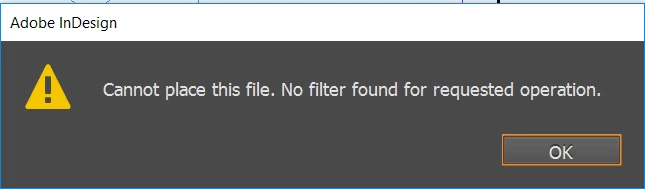


<Title renamed by MOD>

This topic has been closed for replies.
Correct answer Mac Brown Media

I had a similar situation with a customer.

Their design house sent weird eps files so the customer could not take over the design or edit them without paying the design agency.

Contractually, they fulfilled their obligations by sending the eps (workable or not).

If the design house created an InDesign file, that's what they should send you. Check the agreement signed with them


Thanks to all for your help and guidance.  I really appreciate your help.  Turns out it was an iD10t issue.  I was trying to place the files in a zipped folder and when I moved the folder from a zipped folder to my desktop I was able access all of my files.  Sorry to waste everyone's time.

6 replies

New Participant
September 16, 2024
BobLevine
Community Expert
September 16, 2024

This post is more than seven years old and you have not told us what kind of help you want. I suggest starting a new discussion with full details.


I'm going to lock this to avoid any future confusion.

New Participant
September 16, 2024
newspaper2.eps
Sandee Cohen
Brainiac
March 4, 2017

Have you tried placing a different EPS file? One created by Photoshop? One created by Illustrator? One created by InDesign? It's very possible that it is your copy of InDesign that is behaving badly.

BobLevine
Community Expert
March 4, 2017

InDesign EPS files are notorious for use for anything other than archaic print workflows. Trying to place or open them often results in this type of behavior.

Try distilling it into a PDF.

Jongware
Community Expert
March 4, 2017

Did your designer maybe use "Save as" to change the name to ".eps" whilst still saving as a regular InDesign file?

Brainiac
March 4, 2017

Also (and just FYI), you can't open an eps with InDesign. It's a graphic file format, so you need to place it (as soon as we can help you figure out how to do that) the way you would place other types of graphic images.

Steve Werner
Community Expert
March 4, 2017

> Sorry.  The designer just said he created them in indesign 2017 cc, which

is exactly what I am trying to open/place them with

Why would the designer take something created in InDesign CC 2017, and intended to be opened by you in InDesign CC 2017, save the file as an EPS file? It should just be saved as an InDesign (.indd) file, and open it in your copy of InDesign.

Sandee Cohen
Brainiac
March 4, 2017

I have a feeling that the designer created something like a logo or chart or map or something that he/she didn't want the OP (layout/production) to be able to change.

But, the designer has gotten "stung" by the eps getting corrupt (or saved incorrectly).

Obviously the layout person needs to have the designer change the format of the exported file.

However, as has been my experience with outside agencies, the designers there are reluctant to send native files to lowly production people as they are afraid their precious work will be modified. (Sarcasm included as I've had a bad morning.)

Steve Werner
Community Expert
March 4, 2017

How was the EPS file created? What version of InDesign? What operating system?

Mac Brown Media
Inspiring
March 4, 2017

eps file was created by the graphic designer at the agency i'm using.

version of indesign = 2017.0 release.  have only had it for a few weeks.

OS = Windows 10

Thanks,

Mac

[Personal information removed by moderator - please don't post on a public forum]

Steve Werner
Community Expert
March 4, 2017

I meant, what kind of EPS file is it? What program created it? InDesign should be able to place an EPS file unless it has been damaged.