


Participant
May 17, 2024
解決済み

Failed to Export the PDF file in Windows

  • May 17, 2024
  • 返信数 2.
  • 1680 ビュー

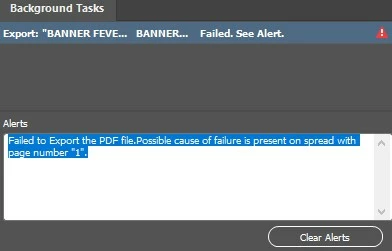
When attempting to export the PDF file on Windows 10 22H2 using InDesign, I encounter the following error: "Failed to Export the PDF file.Possible cause of failure is present on spread with page number "1"."

I've found solutions to this issue on forums, but they were all for Mac users. I'm seeking guidance on how to resolve this on Windows.

このトピックへの返信は締め切られました。
解決に役立った回答 Robert at ID-Tasker
quote

When attempting to export the PDF file on Windows 10 22H2 using InDesign, I encounter the following error: "Failed to Export the PDF file.Possible cause of failure is present on spread with page number "1"."

I've found solutions to this issue on forums, but they were all for Mac users. I'm seeking guidance on how to resolve this on Windows.


By @darlang


You have to "divide and conquer" in order to find the culprit.


Go to the first page - delete rest of the pages.

Then delete top/bottom half - or left/right - of this page and export.

If you don't have an error - then the problem is in the half that you've deleted.

You have to keep deleting in half till you get to the last element.


返信数 2

Robert at ID-Tasker
Legend
May 17, 2024
quote

When attempting to export the PDF file on Windows 10 22H2 using InDesign, I encounter the following error: "Failed to Export the PDF file.Possible cause of failure is present on spread with page number "1"."

I've found solutions to this issue on forums, but they were all for Mac users. I'm seeking guidance on how to resolve this on Windows.


By @darlang


You have to "divide and conquer" in order to find the culprit.


Go to the first page - delete rest of the pages.

Then delete top/bottom half - or left/right - of this page and export.

If you don't have an error - then the problem is in the half that you've deleted.

You have to keep deleting in half till you get to the last element.


HARSHIKA_VERMA
Community Manager
Community Manager
May 29, 2024

Hi @darlang,

We would like to follow up on your issue. Are you able to resolve the issue? Please feel free to update the discussion if you need further assistance from us.


We would be happy to help.


Thanks,

Harshika

Participant
September 16, 2024

Hello - 

I am having major export issues, even after deleting the "Spreads with errors", even after saving as an IDML and reopening, even after running updates on my Indesign app to make sure I am up to date.   HELP! 


BobLevine
Community Expert
Community Expert
May 17, 2024

It's telling you where the problem is. Try exporting the rest of the file without that page.