


Inspiring
October 10, 2015
質問

Font mapping generic solution

  • October 10, 2015
  • 返信数 1.
  • 703 ビュー

In my document has two kind of font faces primary and secondary fonts.

The primary font is (Minion Pro ) and the secondary is Univers LT Std.

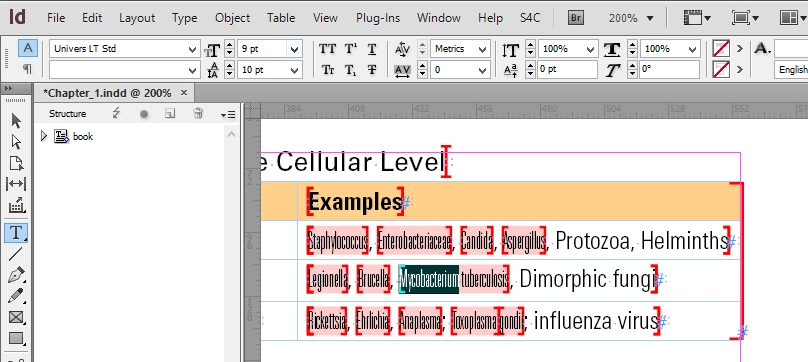
While import the docment in to indesign template the secondary font italic style is substituted with [Italic] instead of 47 Light Condensed

How to fix this issue via scripting.
このトピックへの返信は締め切られました。

返信数 1

Participant
October 10, 2015

Hello,

if I understand this correctly, you have easier alternatives to scripting.

Since it seems by the red highlighter that no such font as "Univers LT Std_ Italic" exists (note that it is also stated in brackets) , you can use the Find Font option under the Type menu to substitute the "missing" font.

Other than that you could use a GREP query to find all characters currently having the Univers LT Std font family and then format them accordingly.

You can specify formatting properties while looking for text by using the "Find Format:" option in the lower part of the GREP tab in the Find/Change window.

In your case, you can specify the Font Family in the Basic Character Formats tab.

Note that all options are best after you have imported all your text, so as not to repeat the process.

My question though would be why is the font substituted in the first place, since it is available and installed in your system...

Hope it helped,

Best regards,

O.C.

sreekarthik_k作成者
Inspiring
October 12, 2015

The word file is having italic and bold style. But some fonts having different names for bold/italic styles in the design file.


For example : 56 italic, 47 Light Condensed Oblique.  While flow the word file I noticed that Bold/Italic styles are not applied correctly in the  Indesign files because of the different bold italic style name in the font.