


Participating Frequently
November 13, 2024
解決済み

GREP – % symbol to show to the left of any number

  • November 13, 2024
  • 返信数 2.
  • 1299 ビュー

I'm assisting a client who wants the percentage symbol to show on the right of any set of numbers. The scenario is as follows… Arabic text going from right to left that has Arabic numerals within the text, when the percentage symbol is typed, it normally goes to the right of the numerals eg. 2.5%.

The client is deleting the % symbol manually, then type it to show as follows… %2.5 which is what they need.

Is there a way to use GREP search to shift the % position from right to left? Note, the number of digits varies such as 12.07%, or 1%.
解決に役立った回答 Peter Kahrel

Strange, the four Arabic fonts I have installed (Adobe Arabic, Lotus Linotype, Myriad Arabic, and Adobe Naskh) place the %-sign before the number:

Maybe check whether all the character settings are corect.


If you do need to move the %-signs, use this GREP query:


Find what: ([\d\.]+)%

Change to: %$1


返信数 2

Peter Kahrel
Community Expert
Peter KahrelCommunity Expert解決!
Community Expert
November 13, 2024

Strange, the four Arabic fonts I have installed (Adobe Arabic, Lotus Linotype, Myriad Arabic, and Adobe Naskh) place the %-sign before the number:

Maybe check whether all the character settings are corect.


If you do need to move the %-signs, use this GREP query:


Find what: ([\d\.]+)%

Change to: %$1


Zaid Al Hilali
Community Expert
Community Expert
November 13, 2024

Thank you Peter. The GREP query worked like a charm.

With regards to your experience when you type, you get the percentage symbol to the left by default. Well, the client and myself didn't have the issue explained in my original post till we updated to the latest InDesign Middle Eastern version v.20.0 so my guess is that Adobe changed something in the text engine.


Note. I posted this case from another machine, I didn't notice that I wasn't using this Adobe profile!

Community Expert
November 13, 2024

I typeset ME languages almost every day and do this percentage numbering regularly - I can't get it to behave how you describe - but then again it might be a separate setup or font or another issue. 


You seem to have solved it with the GREP solution - but I would say it's likely some other ME setting that needs to be adjusted. 

Zaid AlHilali作成者
Participating Frequently
November 13, 2024

text sample here…

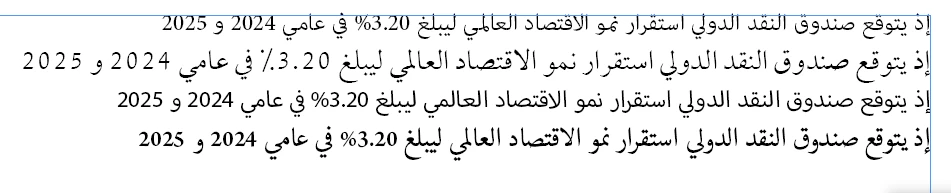
إذ يتوقع صندوق النقد الدولي استقرار نمو الاقتصاد العالمي ليبلغ %3.20 في عامي 2024 و 2025

Community Expert
November 13, 2024

In ME version of InDesign you need to go to the Paragraph Style Options

and for Middle East Character Formats setting set it from Default to Arabic


For individual cases - you may need to adjust the Character Pallet setting in the flyout menu - there should be Character Direction and with 25% selected changed the Character Direction from Right to Left.


Zaid AlHilali作成者
Participating Frequently
November 13, 2024

I first thought about the character direction, however it provies to be risky in this case as the 3.10% will display %01.3

In this case, the user must visit each number then retype each in reverse manner.