
InaLandCalledHonahlee
Known Participant
January 20, 2017
解決済み

How Do You Format the Spacing Between a Bullett Point and the Begining of the Text?

  • January 20, 2017
  • 返信数 2.
  • 24352 ビュー

I am creating a bulleted list in InDesign and the default indent between the bullet and the first character of the text is a bit large. I have opened the bullets and numbering panel and I thought that the "first line indent" or "tab position" would have been what I needed but changing those values didn't do anything. I just want to decrease it by about half. What is the easiest way to do this?
このトピックへの返信は締め切られました。
解決に役立った回答 Barb Binder

I thought that the "first line indent" or "tab position" would have been what I needed but changing those values didn't do anything:

My two cents:

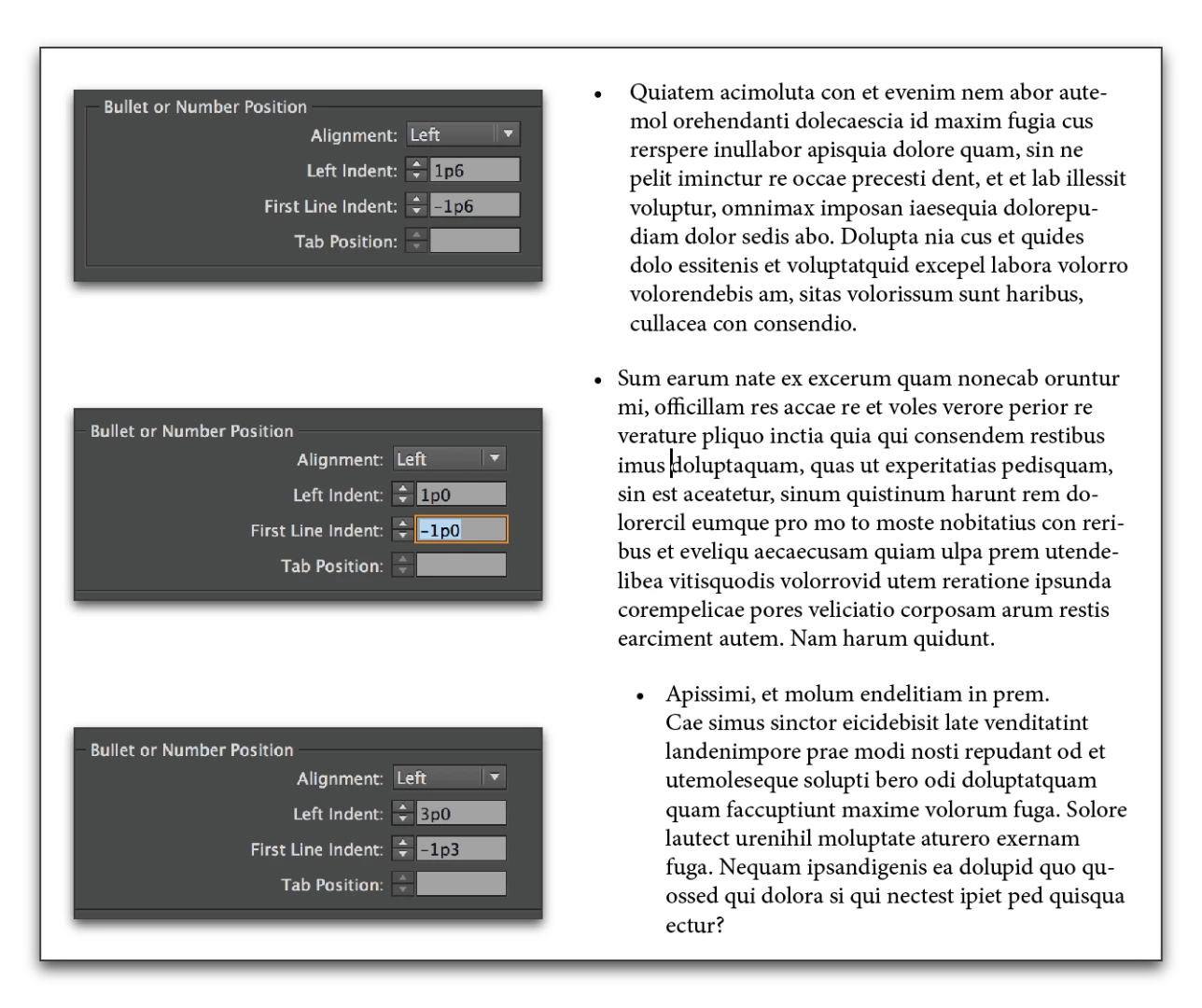
  • remember that Left Indent and First Line Indent work together. winterm​'s examples are pretty typical of values a lot of us of use—the first and left indent values are identical—but first line indent is always a negative number so that it moves to the left of the other lines in the paragraph.

In the screen cap below, the paragraphs to the right are using the settings shown at left. Note that I left the tab position blank—InDesign just quietly sets it to match the Left Indent, so it works automatically.

EDIT: Again, thinking about the novice InDesign user—note that I'm using picas & points, winterm is using millimeters and you might be using inches. It doesn't matter—just follow the same relationship of the Left Indent and First Line indent. And keep making the numbers smaller until you are happy with them.

返信数 2

Barb Binder
Community Expert
Barb BinderCommunity Expert解決!
Community Expert
January 21, 2017

I thought that the "first line indent" or "tab position" would have been what I needed but changing those values didn't do anything:

My two cents:

  • remember that Left Indent and First Line Indent work together. winterm​'s examples are pretty typical of values a lot of us of use—the first and left indent values are identical—but first line indent is always a negative number so that it moves to the left of the other lines in the paragraph.

In the screen cap below, the paragraphs to the right are using the settings shown at left. Note that I left the tab position blank—InDesign just quietly sets it to match the Left Indent, so it works automatically.

EDIT: Again, thinking about the novice InDesign user—note that I'm using picas & points, winterm is using millimeters and you might be using inches. It doesn't matter—just follow the same relationship of the Left Indent and First Line indent. And keep making the numbers smaller until you are happy with them.

~Barb at Rocky Mountain Training
winterm
Legend
January 20, 2017

It works just as you said:

or:

I strongly recommend to create special Paragraph style for bulleted text and define Bullets and Numbering options there.

[Edit]:

Much more and detailed about bullets in neighboring thread. For novices - especially useful post No3 by BarbBinder