


Inspiring
March 10, 2023
質問

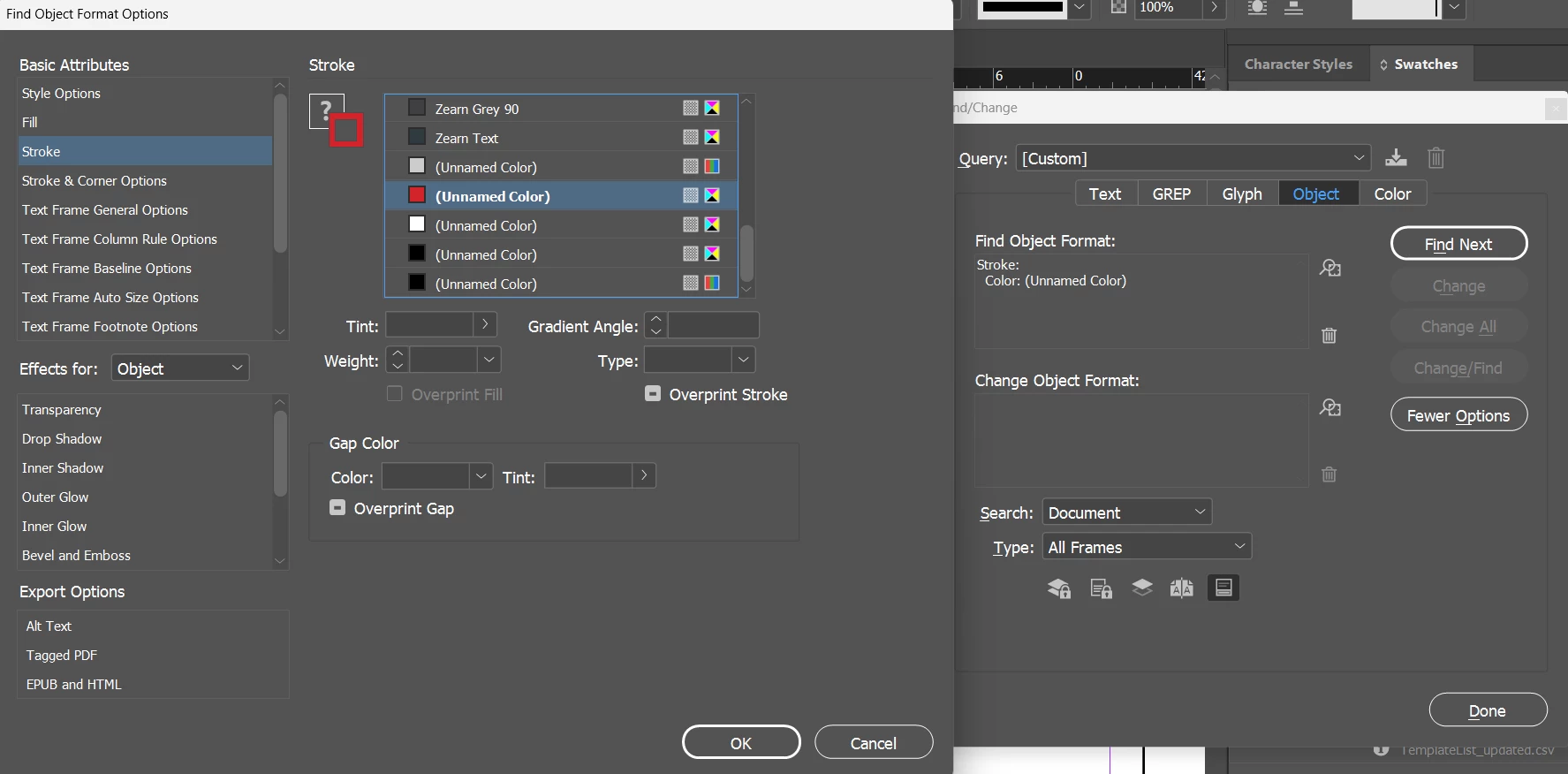
how to find the object with format stroke : "Unnamed Color" with tint 50% in Indesign doc using JS
  • March 10, 2023
  • 返信数 4.
  • 1177 ビュー

how to find the object with format stroke : "Unnamed Color" which is red in color and has color value "(C=11,M=99,Y=96,K=2)" and many Unnamed Color were present in Stroke swatch list. how to find exactly that cmyk red alone and replace its stroke value using indesign javascript

	app.findChangeObjectOptions.objectType= ObjectTypes.ALL_FRAMES_TYPE;	
	app.findObjectPreferences = app.changeObjectPreferences = NothingEnum.NOTHING;
     app.findObjectPreferences.strokeColor == "Unnamed Color";
   //  app.findObjectPreferences.strokeTint =60;            
	var foundItems = app.activeDocument.findObject(true);
	for (var i = 0; i < foundItems.length; i++) {
		foundItems[i].strokeTint =50;    
	}


このトピックへの返信は締め切られました。

返信数 4

Community Expert
March 16, 2023

"Yes unable to change the name on that indesign object stroke panel and also unable fetch the color value of that unnamed color swatch."


Hi @Karthik SG ,

loop the colors collection of the document. Make it an array like that and loop it; read out all name values:

var allDocColorsArray = app.documents[0].colors.everyItem().getElements();

You could filter out the unnamed ones:

allDocColorsArray[n].name == "";

The name "Unnamed Color" you see in the UI is not the right value to look for.


Regards,
Uwe Laubender
( Adobe Community Expert )

Robert at ID-Tasker
Legend
March 11, 2023

Are you unable to change the name in the UI first ?


Karthik SG作成者
Inspiring
March 11, 2023

Yes unable to change the name on that indesign object stroke panel and also unable fetch the color value of that unnamed color swatch.


Robert at ID-Tasker
Legend
March 11, 2023

Can you share the document ? Can be stripped out of most of the contents - but please leave few original objects.


On a different note 😉 You could Export your document as IDML - and edit it there 😉 It's a ZIPped plain text structure of the document.


m1b
Community Expert
Community Expert
March 10, 2023

In the meantime, you can use something like this:

function main() {

    var doc = app.activeDocument,
        colorBreakdown = [11, 99, 96, 2],
        targetColor = getColor(doc.swatches, undefined, colorBreakdown);

    if (targetColor == undefined) {
        alert('Could not find target color swatch with breakdown "' + colorBreakdown + '".');
        return;
    }

    var items = doc.allPageItems;

    for (var i = 0; i < items.length; i++) {
        if (
            items[i].strokeColor == targetColor
            && items[i].strokeTint != -1 // exclude 100% tint
        ) {
            items[i].strokeTint = 50;
        }
    }

}

app.doScript(main, ScriptLanguage.JAVASCRIPT, undefined, UndoModes.ENTIRE_SCRIPT, 'Do Script');

/**
 * Gets a color from `colorItems`
 * with matching name and/or breakdown.
 * @7111211 m1b
 * @version 2023-03-11
 * @9397041 {Swatches|Colors|Array<Swatch|Color>} colorItems - a collection of Swatches or Colors.
 * @9397041 {String} [name] - the name to match.
 * @9397041 {Array<Number>} [breakdown] - the colorValue array to match.
 * @Returns {Swatch|Color};
 */
function getColor(colorItems, name, breakdown) {

    for (var i = 0; i < colorItems.length; i++) {

        var c = colorItems[i];

        if (!c.hasOwnProperty('colorValue'))
            continue;

        if (
            name != undefined
            && name != c.name
        )
            continue;

        if (
            breakdown != undefined
            && !arraysAreEqual(breakdown, c.colorValue)
        )
            continue;

        return c;

    }

};


/**
 * Returns true if both arrays are equal.
 * @9397041 {Array} arr1 
 * @9397041 {Array} arr2 
 * @Returns {Boolean}
 */
function arraysAreEqual(arr1, arr2) {

    if (arr1.length !== arr2.length)
        return false;

    for (var i = 0; i < arr1.length; i++) {
        if (arr1[i] !== arr2[i])
            return false;
    }

    return true;

};

Instead of using findObject, it just iterates over the document's page items. You can adjust the predicates. I set it so it will only change the tint to 50% if the tint isn't 100%.

- Mark

Karthik SG作成者
Inspiring
March 11, 2023

Thanks for the reply, this is also not working for me it thows error as item has multiple graphical properties

m1b
Community Expert
Community Expert
March 12, 2023

Hi @Karthik SG , As Robert suggests you could invoke Add Unnamed Colors menu item. Does this work?


var menuItem =  app.menuActions.itemByID(16403)
if(menuItem.enabled){  
    menuItem.invoke();  
};

var cn = "C=11 M=99 Y=96 K=2"
app.findChangeObjectOptions.objectType= ObjectTypes.ALL_FRAMES_TYPE;
app.findObjectPreferences = app.findObjectPreferences = app.findObjectPreferences = null;	
app.findObjectPreferences.strokeColor = cn;           
var foundItems = app.activeDocument.findObject();
$.writeln(foundItems)


Hi @rob day, a side question... does that script actually work for you? I cannot get it to work, and a search on the forum shows it's an old bug that's been around for many years. See bug report. When I run your code, I get this error: Invalid value for set property 'strokeColor'. Expected Swatch, String or NothingEnum enumerator, but received "C=11 M=99 Y=96 K=2" in VSCode when I run that script. If it works for you, it would be great to know what's different. - Mark

m1b
Community Expert
Community Expert
March 10, 2023

I think there is a bug in the scripting API for app.findObjectPreferences.strokeColor (and fillColor). I have created a bug report, so please vote for it.