


TestriteVisual
Inspiring
July 23, 2024
質問

Javascript error only on a specific computer

  • July 23, 2024
  • 返信数 2.
  • 878 ビュー

Greetings,

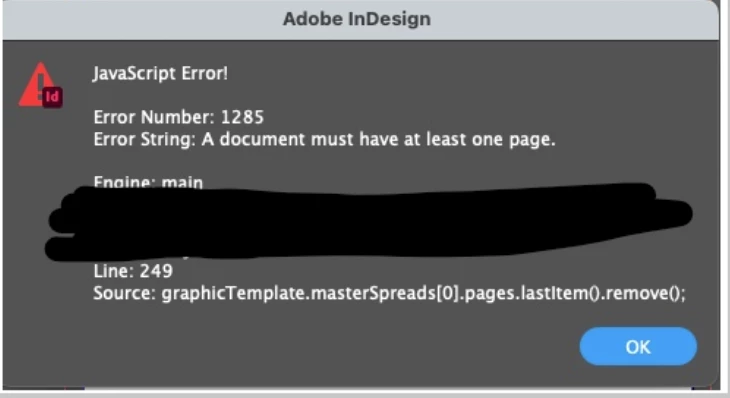
I have a coworker on a Mac using InDesign v19.4 and they are getting the error below when running a script, but other coworkwers on Macs are able to run the script with no problem. I'm on a PC running InDesign v19.5 and the script runs fine for me as well. Any help getting it running on the one Mac would be much appreciated 🙂


Error Number: 1285

Error String: A document must have at least one page.

Line: 249

Source: graphicTemplate.masterSpreads[0].pages.lastitem0.remove();


このトピックへの返信は締め切られました。

返信数 2

rob day
Community Expert
Community Expert
July 23, 2024

Hi @TestriteVisual , I don’t think the error is computer specific—the error would happen on a document setup with Facing pages unchecked. You have to check if the targeted master spread has more than 1 page:


if (app.activeDocument.masterSpreads[0].pages.length > 1) {
	app.activeDocument.masterSpreads[0].pages.lastItem().remove();
}else{
	alert("No pages removed")
}


TestriteVisual
Inspiring
July 23, 2024

Hi @rob day The script generates new pages from scratch, and will run with no documents open. But this problem is only happening on the one Mac, and the person was able to run the script before without error. The script is read-only so I'm not sure what could have changed in InDesign or on the one Mac to start causing the error. Thanks for any more insight.

TestriteVisual
Inspiring
July 23, 2024

But this problem is only happening on the one Mac


When the masterspread only has 1 page, you can’t remove its last page from the UI—the Trash icon is grayed out:


I'm sorry I'm not a programmer, I just know how to cut and paste text where needed. Could you please let me know what exactly needs to be edited? Thanks

Community Expert
July 23, 2024

Hi @TestriteVisual ,

seems that this specific document has only one page in the first parent page.

Maybe that script was executed a second time on the same document.


Regards,
Uwe Laubender
( Adobe Community Expert )