
Known Participant
December 11, 2023
Answered

Script UI issue- Script allows change of W & H of many selected things at once

  • December 11, 2023
  • 4 replies
  • 1822 views

Hello 


I have been working on a script that allows one to select many obects at the same time and change each objects width and height. 
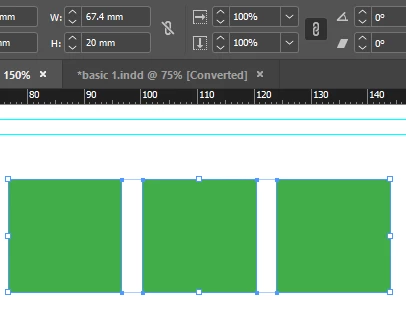
 

As you can see from the sample above ID once you select all objects gives you a width for everything slected - no good if you need to change each of these or more objects , you must do it one by one 


So the below is the script which works but has an UGLY ui 

// Function to change the size of a selected object
function changeSize(selection, newWidth, newHeight) {
for (var i = 0; i < selection.length; i++) {
var item = selection[i];

// Calculate the change from the center
var widthChange = (newWidth - (item.geometricBounds[3] - item.geometricBounds[1])) / 2;
var heightChange = (newHeight - (item.geometricBounds[2] - item.geometricBounds[0])) / 2;

// Set the size of the object while keeping it centered
item.geometricBounds = [
item.geometricBounds[0] - heightChange,
item.geometricBounds[1] - widthChange,
item.geometricBounds[2] + heightChange,
item.geometricBounds[3] + widthChange
];
}
}

// Main function to be executed within app.doScript()
function main() {
var doc = app.activeDocument;

// Check if there is any open document
if (doc !== null) {
// Check if there is any selection
if (doc.selection.length > 0) {
var selection = doc.selection;

// Prompt the user for new width and height dimensions
var newWidth = prompt("Enter the new width for the objects:", "100");
var newHeight = prompt("Enter the new height for the objects:", "100");

// Check if the user clicked Cancel or entered empty values
if (newWidth !== null && newWidth !== "" && newHeight !== null && newHeight !== "") {
// Convert the inputs to numbers
newWidth = parseFloat(newWidth);
newHeight = parseFloat(newHeight);

// Check if the inputs are valid numbers
if (!isNaN(newWidth) && !isNaN(newHeight)) {
// Call the function to change the size of selected objects
changeSize(selection, newWidth, newHeight);
} else {
alert("Invalid input. Please enter valid numbers for the new width and height.");
}
}
} else {
alert("Please select at least one object.");
}
} else {
alert("No open document found.");
}
}

// Use app.doScript() to make the script undoable
app.doScript(main, ScriptLanguage.JAVASCRIPT, [], UndoModes.ENTIRE_SCRIPT, "Change Size");


And I want a UI to look more like the one below 

// Function to change the size of a selected object
function changeSize(selection, newWidth, newHeight) {
for (var i = 0; i < selection.length; i++) {
var item = selection[i];

// Calculate the change from the center
var widthChange = (newWidth - (item.geometricBounds[3] - item.geometricBounds[1])) / 2;
var heightChange = (newHeight - (item.geometricBounds[2] - item.geometricBounds[0])) / 2;

// Set the size of the object while keeping it centered
item.geometricBounds = [
item.geometricBounds[0] - heightChange,
item.geometricBounds[1] - widthChange,
item.geometricBounds[2] + heightChange,
item.geometricBounds[3] + widthChange
];
}
}

// Main function to be executed within app.doScript()
function main() {
var doc = app.activeDocument;

// Check if there is any open document
if (doc !== null) {
// Check if there is any selection
if (doc.selection.length > 0) {
// Create a dialog box
var myDialog = app.dialogs.add({ name: "Set Width and Height" });

// Create a column for the dialog
var myDialogColumn = myDialog.dialogColumns.add();

// Add a row for width
var widthRow = myDialogColumn.dialogRows.add();
widthRow.staticTexts.add({ staticLabel: "Width:" });
var widthInput = widthRow.textEditboxes.add({ editValue: "100", minWidth: 60 });

// Add a row for height
var heightRow = myDialogColumn.dialogRows.add();
heightRow.staticTexts.add({ staticLabel: "Height:" });
var heightInput = heightRow.textEditboxes.add({ editValue: "100", minWidth: 60 });

// Add OK and Cancel buttons
var myResult = myDialog.show({
name: "OKCancel"
});

// Check if the user clicked OK
if (myResult == true) {
// Get the input values
var newWidth = parseFloat(widthInput.editValue);
var newHeight = parseFloat(heightInput.editValue);

// Check if the inputs are valid numbers
if (!isNaN(newWidth) && !isNaN(newHeight)) {
// Call the function to change the size of selected objects
changeSize(doc.selection, newWidth, newHeight);
} else {
alert("Invalid input. Please enter valid numbers for the new width and height.");
}
}
} else {
alert("Please select at least one object.");
}
} else {
alert("No open document found.");
}
}

// Use app.doScript() to make the script undoable
app.doScript(main, ScriptLanguage.JAVASCRIPT, [], UndoModes.ENTIRE_SCRIPT, "Change Size");


I have been having issues as the user input values are not being passed through the UI panel to the script

Any ideas on how to fix would be most appreciated


Many thanks 


Smyth


This topic has been closed for replies.
Correct answer rob day

Here is the full script:


// Wrap the script in app.doScript for a single undoable step
app.doScript(function() {
    // Define the dialog
    var myDialog = app.dialogs.add({name: "Change Object Size"});
    with (myDialog.dialogColumns.add()) {
        with (dialogRows.add()) {
            with (dialogColumns.add()) {
                staticTexts.add({staticLabel: "Width:"});
                staticTexts.add({staticLabel: "Height:"});
            }
            with (dialogColumns.add()) {
                var widthEditbox = measurementEditboxes.add({editUnits:app.activeDocument.viewPreferences.horizontalMeasurementUnits});
                var heightEditbox = measurementEditboxes.add({editUnits:app.activeDocument.viewPreferences.verticalMeasurementUnits});
            }
        }
    }

    // Show the dialog
    if (myDialog.show() == true) {    
        // Get the user input values
     
        var newWidth = UnitValue(widthEditbox.editValue, 'pt').as(app.activeDocument.viewPreferences.horizontalMeasurementUnits);
        var newHeight = UnitValue(heightEditbox.editValue, 'pt').as(app.activeDocument.viewPreferences.verticalMeasurementUnits);

        // Close the dialog
        myDialog.destroy();

        // Get the selected objects
        var selectedObjects = app.activeDocument.selection;

        // Loop through selected objects and change their size from the center
        for (var i = 0; i < selectedObjects.length; i++) {
            var currentObject = selectedObjects[i];

            // Check if the selected object is a valid page item
            if (currentObject.hasOwnProperty("geometricBounds")) {
                // Get the current geometric bounds
                var currentBounds = currentObject.geometricBounds;

                // Calculate the center of the current bounds
                var centerX = (currentBounds[1] + currentBounds[3]) / 2;
                var centerY = (currentBounds[0] + currentBounds[2]) / 2;

                // Calculate the new bounds
                var newBounds = [
                    centerY - newHeight / 2,
                    centerX - newWidth / 2,
                    centerY + newHeight / 2,
                    centerX + newWidth / 2
                ];

                // Apply the new geometric bounds
                currentObject.geometricBounds = newBounds;
            }
        }
    } else {
        // Dialog was canceled
        myDialog.destroy();
    }
}, ScriptLanguage.JAVASCRIPT, undefined, UndoModes.ENTIRE_SCRIPT, "Change Object Size");


Another way to do this is set your scriptingPreferences meaurement units to points, which I’m doing in my sample above—there could be cases where forcing a unit conversion via unitValue fails. See Marc Auret’s post in this thread:


https://community.adobe.com/t5/indesign-discussions/indesign-javascript-document-dimensions-width-and-height-in-pixels-or-any-unit/m-p/14274443#M553125


scriptPreferences has the useful measurementUnit setter


app.scriptPreferences.measurementUnit = MeasurementUnits.POINTS;
        var newWidth = widthEditbox.editValue;
        var newHeight = heightEditbox.editValue;


I think this should also work with any ruler unit (note that I’m resetting the scriptPreference back to AUTO_VALUE at the end):


// Wrap the script in app.doScript for a single undoable step
app.doScript(function() {
    // Define the dialog
    var myDialog = app.dialogs.add({name: "Change Object Size"});
    with (myDialog.dialogColumns.add()) {
        with (dialogRows.add()) {
            with (dialogColumns.add()) {
                staticTexts.add({staticLabel: "Width:"});
                staticTexts.add({staticLabel: "Height:"});
            }
            with (dialogColumns.add()) {
                var widthEditbox = measurementEditboxes.add({editUnits:app.activeDocument.viewPreferences.horizontalMeasurementUnits});
                var heightEditbox = measurementEditboxes.add({editUnits:app.activeDocument.viewPreferences.verticalMeasurementUnits});
            }
        }
    }

    // Show the dialog
    if (myDialog.show() == true) {60    
        // Get the user input values
        app.scriptPreferences.measurementUnit = MeasurementUnits.POINTS;
        var newWidth = widthEditbox.editValue;
        var newHeight = heightEditbox.editValue;
        
        // Close the dialog
        myDialog.destroy();

        // Get the selected objects
        var selectedObjects = app.activeDocument.selection;

        // Loop through selected objects and change their size from the center
        for (var i = 0; i < selectedObjects.length; i++) {
            var currentObject = selectedObjects[i];

            // Check if the selected object is a valid page item
            if (currentObject.hasOwnProperty("geometricBounds")) {
                // Get the current geometric bounds
                var currentBounds = currentObject.geometricBounds;

                // Calculate the center of the current bounds
                var centerX = (currentBounds[1] + currentBounds[3]) / 2;
                var centerY = (currentBounds[0] + currentBounds[2]) / 2;

                // Calculate the new bounds
                var newBounds = [
                    centerY - newHeight / 2,
                    centerX - newWidth / 2,
                    centerY + newHeight / 2,
                    centerX + newWidth / 2
                ];

                // Apply the new geometric bounds
                currentObject.geometricBounds = newBounds;
                
                //reset measurement units
                app.scriptPreferences.measurementUnit = AutoEnum.AUTO_VALUE;
            }
        }

    } else {
        // Dialog was canceled
        myDialog.destroy();
    }
}, ScriptLanguage.JAVASCRIPT, undefined, UndoModes.ENTIRE_SCRIPT, "Change Object Size");


4 replies

Known Participant
December 12, 2023

Hello all thanks for this 

Inspiring
December 12, 2023

Use this

var widthEditbox = measurementEditboxes.add({editUnits:app.documents[0].viewPreferences.horizontalMeasurementUnits});
var heightEditbox = measurementEditboxes.add({editUnits:app.documents[0].viewPreferences.verticalMeasurementUnits});
Known Participant
December 12, 2023

Thank you so much  that worked 

Ugh i have to change so many scripts ha!


// Wrap the script in app.doScript for a single undoable step
app.doScript(function() {
// Define the dialog
var myDialog = app.dialogs.add({name: "Change Object Size"});
with (myDialog.dialogColumns.add()) {
with (dialogRows.add()) {
with (dialogColumns.add()) {
staticTexts.add({staticLabel: "Width:"});
staticTexts.add({staticLabel: "Height:"});
}
with (dialogColumns.add()) {
// Set the measurement units for the edit boxes
var widthEditbox = measurementEditboxes.add({editUnits: app.activeDocument.viewPreferences.horizontalMeasurementUnits});
var heightEditbox = measurementEditboxes.add({editUnits: app.activeDocument.viewPreferences.verticalMeasurementUnits});
}
}
}

// Show the dialog
if (myDialog.show() == true) {
// Get the user input values
var newHeight = widthEditbox.editValue;
var newWidth = heightEditbox.editValue;

// Close the dialog
myDialog.destroy();

// Get the selected objects
var selectedObjects = app.activeDocument.selection;

// Loop through selected objects and change their size from the center
for (var i = 0; i < selectedObjects.length; i++) {
var currentObject = selectedObjects[i];

// Check if the selected object is a valid page item
if (currentObject.hasOwnProperty("geometricBounds")) {
// Get the current geometric bounds
var currentBounds = currentObject.geometricBounds;

// Calculate the center of the current bounds
var centerX = (currentBounds[0] + currentBounds[2]) / 2;
var centerY = (currentBounds[1] + currentBounds[3]) / 2;

// Calculate the new bounds
var newBounds = [
centerX - newWidth / 2,
centerY - newHeight / 2,
centerX + newWidth / 2,
centerY + newHeight / 2
];

// Apply the new geometric bounds
currentObject.geometricBounds = newBounds;
}
}
} else {
// Dialog was canceled
myDialog.destroy();
}
}, ScriptLanguage.JAVASCRIPT, undefined, UndoModes.ENTIRE_SCRIPT, "Change Object Size");


Ah i was too early to reply 

when I input a value that is based on a document unit measurement the script i think is converting it to points but it seems to mess up the size of what i put in so for example 10mms i want changed to 20mms but the result is 56.693 mm or if i am in pixels i would need 10px to become 20px and so on

// Wrap the script in app.doScript for a single undoable step
app.doScript(function() {
    // Define the dialog
    var myDialog = app.dialogs.add({name: "Change Object Size"});
    with (myDialog.dialogColumns.add()) {
        with (dialogRows.add()) {
            with (dialogColumns.add()) {
                staticTexts.add({staticLabel: "Width:"});
                staticTexts.add({staticLabel: "Height:"});
            }
            with (dialogColumns.add()) {
                var widthEditbox = measurementEditboxes.add({editUnits:app.documents[0].viewPreferences.horizontalMeasurementUnits});
                var heightEditbox = measurementEditboxes.add({editUnits:app.documents[0].viewPreferences.verticalMeasurementUnits});
            }
        }
    }

    // Show the dialog
    if (myDialog.show() == true) {
        // Get the user input values
        var newHeight = widthEditbox.editValue;
        var newWidth = heightEditbox.editValue;

        // Close the dialog
        myDialog.destroy();

        // Get the selected objects
        var selectedObjects = app.activeDocument.selection;

        // Loop through selected objects and change their size from the center
        for (var i = 0; i < selectedObjects.length; i++) {
            var currentObject = selectedObjects[i];

            // Check if the selected object is a valid page item
            if (currentObject.hasOwnProperty("geometricBounds")) {
                // Get the current geometric bounds
                var currentBounds = currentObject.geometricBounds;

                // Calculate the center of the current bounds
                var centerX = (currentBounds[0] + currentBounds[2]) / 2;
                var centerY = (currentBounds[1] + currentBounds[3]) / 2;

                // Calculate the new bounds
                var newBounds = [
                    centerX - newWidth / 2,
                    centerY - newHeight / 2,
                    centerX + newWidth / 2,
                    centerY + newHeight / 2
                ];

                // Apply the new geometric bounds
                currentObject.geometricBounds = newBounds;
            }
        }
    } else {
        // Dialog was canceled
        myDialog.destroy();
    }
}, ScriptLanguage.JAVASCRIPT, undefined, UndoModes.ENTIRE_SCRIPT, "Change Object Size");


its something to do to with

var widthEditbox = measurementEditboxes.add({editUnits:app.documents[0].viewPreferences.horizontalMeasurementUnits});
var heightEditbox = measurementEditboxes.add({editUnits:app.documents[0].viewPreferences.verticalMeasurementUnits});


as


var widthEditbox = measurementEditboxes.add(); 
var heightEditbox = measurementEditboxes.add();


seems to work but just show the wrong unit...


RIP 😞 


rob day
Community Expert
Community Expert
December 12, 2023

Hi @SmythWharf , As @Thunder-Lightning  suggests the built in dialog class has the measurementEditbox, which lets the user enter any unit, and converts the unit to Points, so you need to use points in your main script. Here’s an example where I’ve set the default to Inches and set scriptPreferences.measurmentUnit to Points:


var w, h;
makeDialog();
function makeDialog(){
    var d = app.dialogs.add({name:"Dimensions", canCancel:true});
    with(d.dialogColumns.add()){
        staticTexts.add({staticLabel:"Width:"});
        staticTexts.add({staticLabel:"Height:"});
    }
    with(d.dialogColumns.add()){
        w = measurementEditboxes.add({editUnits:MeasurementUnits.INCHES, editValue:360, minWidth:90});
        h = measurementEditboxes.add({editUnits:MeasurementUnits.INCHES, editValue:216, minWidth:90});
    }

    if(d.show() == true){
        w = w.editValue;
        h = h.editValue;
        main()
        d.destroy();
	}
}


function main(){
    app.activate()
    app.scriptPreferences.measurementUnit = MeasurementUnits.POINTS;
    alert("Width: " + w + "  Height: " + h)
    app.scriptPreferences.measurementUnit = AutoEnum.AUTO_VALUE;
}


Known Participant
December 12, 2023

Hello, 


I had a look at the code and will take on board the ideas  thank you, 

Smyth

Community Expert
December 12, 2023

This is not a ScriptUI problem: you're using InDesign's native dialog system.

In the title of your question, please change 'Script UI issue' to 'Script dialog issue'.

Known Participant
December 12, 2023

Cool, thank you

Inspiring
December 12, 2023

Try using 'measurementEditboxes' instead of 'textEditboxes'?

Known Participant
December 12, 2023

Hello, 

Thank you Thunder-lightning for your feedback, I have changed the script accordingly and will post soon


Many thanks 


Smyth