


Participant
September 20, 2017
解決済み

Smart guides not working

  • September 20, 2017
  • 返信数 7.
  • 77912 ビュー

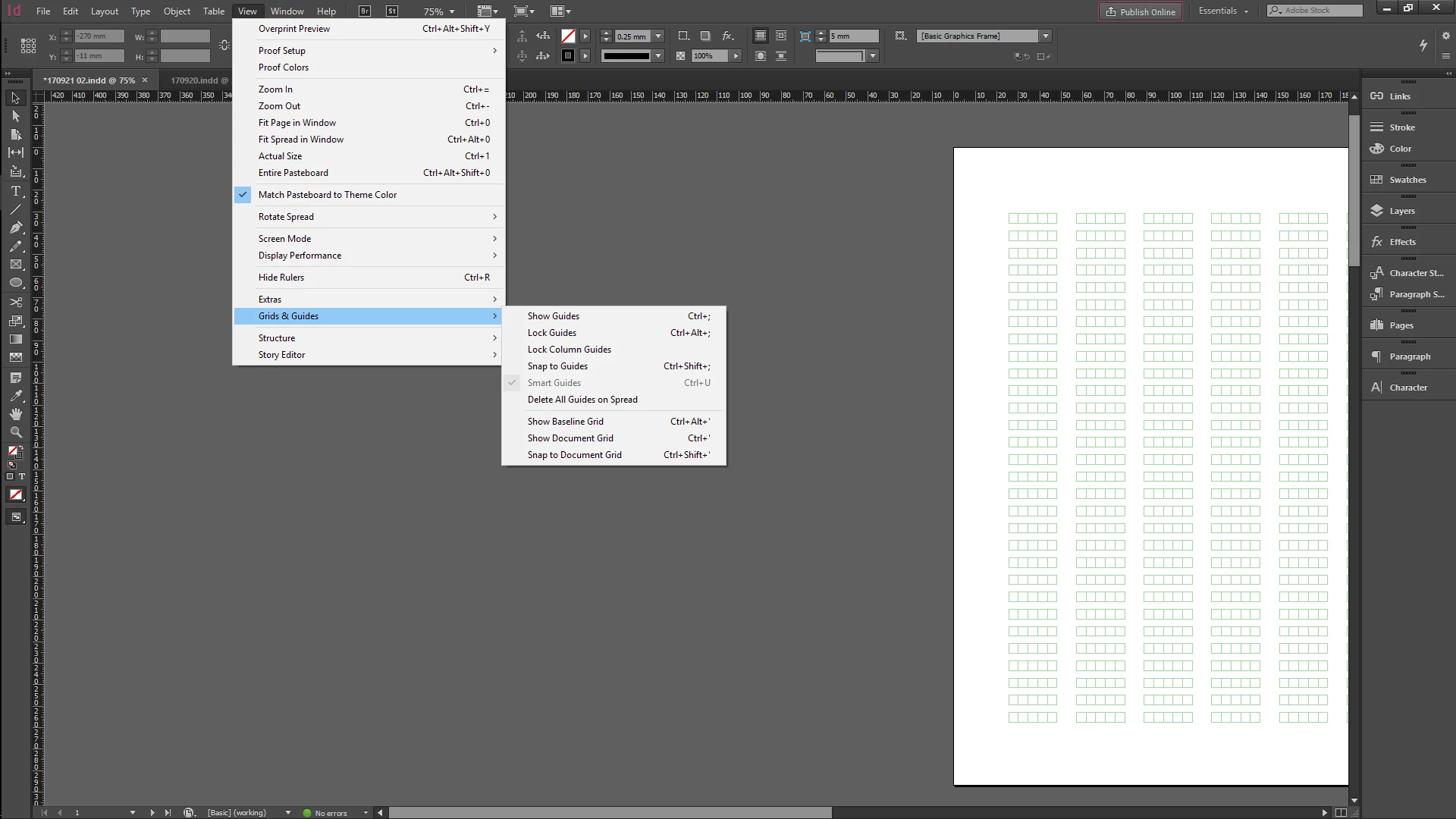
Hello! I have read previous discussions on issues when the smart guides options gets grayed out due to accidental selection of "snap to document grid". I am wondering if there is a possibility for other commands to deactivate my smart guide. I have retrieved an idml layout file from work and it does not work for that file. My smart guides are working for my other indd documents.

I am also curious what the green boxes grids are? Thanks in advance to any help!
    解決に役立った回答 Owen Clay

    I know this an old thread, plus this isn't a solution for the initial issue (based on your screengrab), but I found that I had by mistake checked the "Snap to Document Grid" feature under View > Grids & Guides. This made the Smart Guides option inaccessible.

    Once I'd taken that option off, the Smart Guides started working again.

    返信数 7

    deboraht43520393
    Participant
    September 22, 2020

    Thanks, @Owen_Clay!

    Seems I cannot live without the Smart Guides and you just gave me the solution to a situation. 


    Participant
    November 18, 2021

    There is a button at the bottom of the tool panel. Click on there, and it will show smart guides. If it does not have a tick in the box, it means it is off. Click it, and this will reactivate them. 

    Owen Clay
    Owen Clay解決!
    Participating Frequently
    September 27, 2018

    I know this an old thread, plus this isn't a solution for the initial issue (based on your screengrab), but I found that I had by mistake checked the "Snap to Document Grid" feature under View > Grids & Guides. This made the Smart Guides option inaccessible.

    Once I'd taken that option off, the Smart Guides started working again.

    Participant
    March 26, 2021

    Thank you @Owen Clay!  You've just made my Friday afternoon a lot easier!

    Community Expert
    August 15, 2018

    https://forums.adobe.com/people/yu+jiet15685082  wrote

    … I am also curious what the green boxes grids are? Thanks in advance to any help!

    Hi,

    the green boxes grid is from a Japanese InDesign document, I think.

    Did you open a template document from a Japanese source?

    Regards,
    Uwe

    Participant
    September 24, 2017

    Updates. I am still unable to solve the issue, but I have worked around it by moving the master pages to a new indd document. The green grids should be I type of grid i suppose? When i transferred them to a new document, the converted to the traditional guidelines. Thanks for everyone's help!

    Inspiring
    January 29, 2018

    Hi!

    I'm a photographer who has worked with indesign for years. Right now I'm doing an online training session with lynda.com.

    It appears that I too cannot access smart guides when creating a master page, even after resetting my indesign permissions and restarting my computer. I can, however, access them on other, non master pages. Yes, smart guides are selected in the view menu, and I've tried toggling on and off the snap to document guide feature. So go figure.

    Is this a glitch in the program itself? Given what I've read here, that might be what's going on.

    Inspiring
    January 29, 2018

    Jane: that's weird… I have not seen any problems with Smart Guides appearing on master pages. Have you tried to zoom in or out, so that all the objects you want to align are visible? Are you seeing ANY smart guides as you drag objects around the master page? (For example, do you see the pink ones that say the object is centered on the page?)


    Thanks David, for your quick reply! The only smart (ish) guide that pops up is the vertical center line, which appears in red if I get close to while drawing a box. On other pages, I have no problem seeing the smart guides–only on the master page.

    davidblatner
    Community Expert
    Community Expert
    September 24, 2017

    I'm not entirely sure, but here are some common reasons why InDesign features may be grayed out: https://indesignsecrets.com/why-is-some-feature-grayed-out-in-indesign.php

    cmgap
    Community Expert
    Community Expert
    September 23, 2017

    Can you select the green grids with a text tool? It looks like table cells.

    Participant
    September 23, 2017

    Nope i cannot select it with a text tool!

    Srishti Bali
    Community Manager
    Community Manager
    September 23, 2017

    Hi yu jiet,

    Please try on a new document, if it is still the same, please try resetting preferences.

    Set preferences in Adobe InDesign

    Please update the discussion if the issue is resolved or if you have any further query.

    Regards

    Srishti

    Participant
    September 23, 2017

    Hi Srishti,

    The issue is only of that idml file. Smart guide works alright for all other files and new documents that I have.

    Is there a way to reset preferences for that idml file?

    Best

    Yu Jie