I've used a "brute force" method for this in the past.
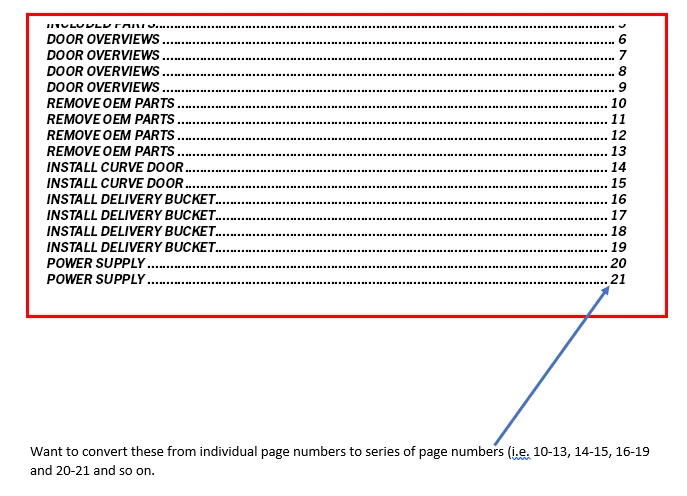
Throughout the document, create and use three styles for each section
SectionHead_Start
SectionHead_Middle (other styles are based on this one)
SectionHead_End
In the TOC, look for the Start and End styles in the documents. (It was a multi-chapter directory.)
Format them to two separate styles in the TOC.
TOC_SectHead_Start
TOC_SectHead_End (based on TOC start)
After the generation of the TOC, I would use a saved GREP query to look for the TOC_SectHead_End text through the tab and replace an En dash. Then replace the TOC_SectHead_Start paragraph return and replace with nothing. (I used a utility to automate the two searches.)
The only downside is that I had to run the search after every TOC update, but it only took a few seconds.
David Creamer: Community Expert (ACI and ACE 1995-2023)
I used to use the following GREP query (coutesy of Peter Kahrel, I believe) to consolidate "Index to Advertiser" lisitings that were really a TOC in a directory:
Find: ^(.+ )([\d, ]+)\r\1([\d, ]+)$
Change: $1$2, $3
As I recall you need to run it until it finds no more matches.
That isn't going to give you your dash separated ranges, but it will set you up to do that manually when you see the consolidations.
And a note on why one might choose to do this with a TOC rather than as an index... You can have as many TOCs as you like in your document, but only one index (unless I've mised a new feature), and you likely wouldn't want to use up that general index capability for something like this.



 AdChoices