Participant
January 18, 2024
解決済み

Wrong output of RTF export

  • January 18, 2024
  • 返信数 3.
  • 506 ビュー

Hi,

I exported the RTF from InDesign and getting very strange ouput.

InDesign Input:

• CLIMIL(7)    THE WEIGHT LIMITED BY AVAILABLE LANDING DISTANCE
• CLIMIL(12)  THE OPERATIONAL LANDING DISTANCE (OpLD)
• CLIMIL(13)  THE FACTORED LANDING DISTANCE


RTF Export Output:

  •   CLIMIL(7)    THE WEIGHT LIMITED BY AVAILABLE LANDING DISTANCE
  •   CLIMIL(12) ?THE OPERATIONAL LANDING DISTANCE (OpLD)

?  CLIMIL(13)??THE FACTORED LANDING DISTANCE

 THE OPERATIONAL LANDING DISTANCE (OpLD)

  •   CLIMIL(13)  THE FACTORED LANDING DISTANCE


Getting ? mark and repeated content for "• CLIMIL(12)  THE OPERATIONAL LANDING DISTANCE (OpLD)" and "• CLIMIL(13)  THE FACTORED LANDING DISTANCE"


Could you please check and get with reason for this kind output, if this is the bug of InDesign please fix it and if there is something wrong in the InDesign file please share the error. 


InDesign file and RTF is attached for review.


Regards,

Furqan
 

このトピックへの返信は締め切られました。
解決に役立った回答 Robert at ID-Tasker

Thank you Mike and Robert for your support.

The RTF you exported from CC2024 is correct.

Currently we are using InDesign CC2019 in our organization. I exported this InDesign file to IDML and saved it again in InDesign CC2023 (as I don't have CC2024 right now). But the result is same, it means this is the bug of  ealier versions of InDesign.


Your last file:


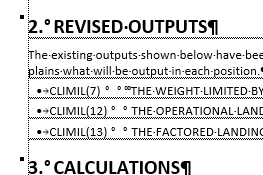
INDD 2024:


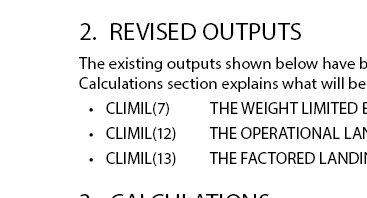
WORD RTF:


IDML - Attached.


返信数 3

Mike Witherell
Community Expert
Community Expert
January 18, 2024

I notice the indd document calls on Times PSMT, an ancient PostScript font?

In fact, when I did a Font/Replace to Minion, and then exported the text to RTF, the text had no ? marks in it.

Mike Witherell
Robert at ID-Tasker
Legend
January 18, 2024

@Mike Witherell is right - attached RTF exported from CC2024.


Participant
January 18, 2024

Thank you Mike and Robert for your support.

The RTF you exported from CC2024 is correct.

Currently we are using InDesign CC2019 in our organization. I exported this InDesign file to IDML and saved it again in InDesign CC2023 (as I don't have CC2024 right now). But the result is same, it means this is the bug of  ealier versions of InDesign.

Robert at ID-Tasker
Legend
January 18, 2024

Exported by me - screen from WORD:


Try IDMLing - this file is from 02 July 2020.


Created in CC2018 / v13 - so it opens in CC2024 as "converted" - and maybe gets fixed?


Robert at ID-Tasker
Legend
January 18, 2024

Same result in WORD:


Will check INDD file in a moment.