



aaronadoty01
Known Participant
November 21, 2016
解決済み

Huge numbers of .idlk files have appeared in my folders - is there a way to stop this?

  • November 21, 2016
  • 返信数 3.
  • 1673 ビュー

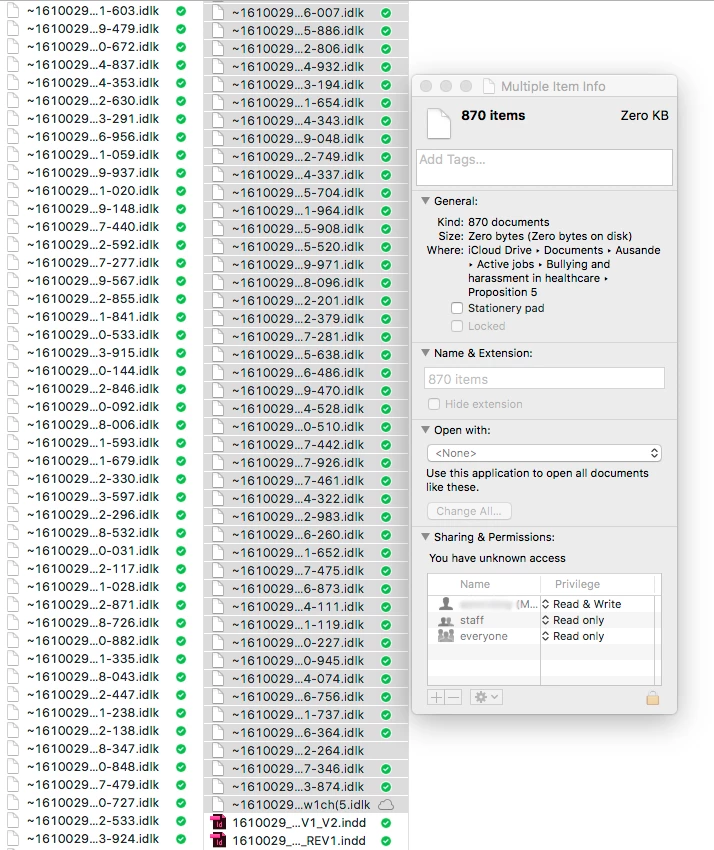
I'm running Adobe CC suite on a late 2013 MacPro (Sierra).  I've recently (over the last few weeks) been plagued by multiple .idlk files.  These appear in growing numbers in all folders containing an InDesign file.  For example, there are currently 870 .idlk files in a folder in which I was working yesterday (see image below).  The folder contains only seven actual inDesign documents. This is becoming increasingly frustrating, as I have to scroll down through these hundreds of files to get at the actual documents in these folders.

Is this normal behaviour for these lock files?  Previously there only seemed to be one at a time. Has anyone else encountered this? Any suggestions as to how to stop them proliferating in my folders?
このトピックへの返信は締め切られました。
解決に役立った回答 Danny Whitehead.

I suspect it's something to do with iCloud Drive. I've had similar problems with lingering idlk files and Dropbox, but not to anything like the extent you're seeing.

返信数 3

Danny Whitehead.
Legend
November 22, 2016

I suspect it's something to do with iCloud Drive. I've had similar problems with lingering idlk files and Dropbox, but not to anything like the extent you're seeing.

aaronadoty01
aaronadoty01作成者
Known Participant
November 22, 2016

Thanks Danny - I'll disable iCloud and see if this makes a difference.

Participating Frequently
November 22, 2016

Any open file creates a lock file. But if they are not deleted it is wrong.

You should upgrade to CC2017 as it works better with Sierra.

aaronadoty01
aaronadoty01作成者
Known Participant
November 22, 2016

Thanks Wilhelm - I've upgraded to CC2017 - I need to assess whether this has made a difference.  I'll report back.

Community Expert
November 22, 2016

Hi Aaron,

that's rather unusual.

1. Are you working extensively with assets from CC Libraries?
That could open windowless temp documents, but they would be closed very soon and would be stored in temp folders and not in the folder of your working documents.

2. Are you working with scripts that would add and save windowless documents perhaps?

The next time you are seeing this while only one document is open, you could run the following ExtendScript script snippet, that would give an alert about the number of opened documents, showing layout windows or not:

// ExtendScript snippet

// Save as text-only-file with suffix: *.jsx and make it accessible through the Scripts Panel of InDesign

alert("Number of currently opened documents:"+"\r"+app.documents.length);

Regards,
Uwe

aaronadoty01
aaronadoty01作成者
Known Participant
November 22, 2016

Hi Laubender

Yes, I'm using stacks of CC libraries assets - I pretty much use them instead of copying and pasting, so I have hundreds!  I'm not using any scripts that I'm aware of.

I've never used ExtendScript before, but I will try that if some of the other suggestions don't bear fruit.