


Participant
October 5, 2019
質問

Beim Lesen dieses Fotos ist in Lightroom ein Problem aufgetreten.

  • October 5, 2019
  • 返信数 10.
  • 4047 ビュー

Bei mehreren Fotos in Lightroom in einem Ordner mit 5000+ Bildern gibt es kein Vorschaubild und es kommt diese Fehlermeldung:
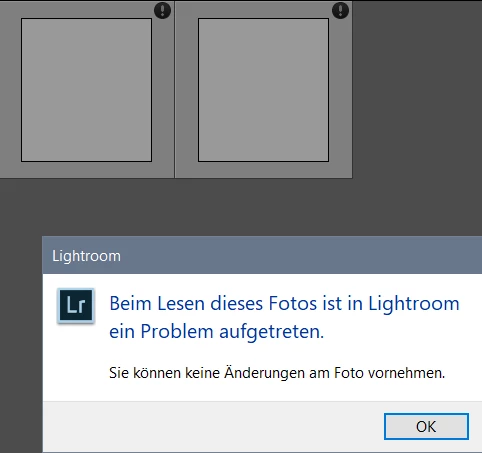


Wie kann ich dieses Problem lösen, ohne alle Bilder erneut zu importieren?
LG

このトピックへの返信は締め切られました。

返信数 10

Participant
November 11, 2023

I have the exact same Problem, has anyone come up with a solution? It cannot be the Lightroom version, I now have the current one. 

giorgiom42768857
Participant
April 29, 2022

Hello, 


i have the same problem now. but only some of my pictures aren't shown. I have a synology nas attched, but also a few pictures from my mac internal hard drive are not working. 


Hope you can help. 

Participant
September 15, 2020

I am having the same issue with photos that were synchronized frim lightroom to lightroom classic. The once I had a closer look at were from my iPhone 8 Plus, if this helps. Others shot with the iPhone are displayed correctly though.

using current versions of the respective programs on iPad and iMac, respectively.

Any idea out there, please,

Many thanks,

Claudio

Participant
September 16, 2020

I could solve the problem by upgrading to the latest Lightroom Classic version 6.14 to get my camera supported. I'm using win10

Participant
November 26, 2019

sorry, used the wrong "Answer" button

GoldingD
Legend
October 7, 2019

Just to be clear


1. What exact version of Lightroom?

2. What Camera Make/Model?


PLEASE USE THE BLUE BUTTON WHEN REPLYING TO POSTS.
Helps to show posts in date/time order, improves visibility (as not hidden in a reply to a reply), and is easyer to use.


Participant
November 26, 2019

Hi,

this Juergen from Germany and I the same issue, see screenshot.

It appears on pictures from my Fuji X100F (.RAF format) which I originally imported with a user preset to add the Fuji film simulation during import. Now I switched my computer from Win7 (64bit) to Win10 (64bit), installed the same LR 6 version and copied back my Leightroom catalogue.

Rob_Cullen
Community Expert
Community Expert
October 7, 2019

Samuel,

A follow-up if you are still watching.

The problem Preview thumbnails are 'Square'. What camera, or device, are they from? Are they a downloaded file? From where?  Just curious to understand the problem.


Regards. My System: Windows-11, Lightroom-Classic 15.1.1, Photoshop 27.3.1, ACR 18.1.1, Lightroom 9.0, Lr-iOS 10.4.0, Bridge 16.0.2 .
Rob_Cullen
Community Expert
Community Expert
October 5, 2019

The files are damaged or corrupt.

Investigate a problem with hard-drive that might be failing.

Try importing these photos to a new catalog.


Regards. My System: Windows-11, Lightroom-Classic 15.1.1, Photoshop 27.3.1, ACR 18.1.1, Lightroom 9.0, Lr-iOS 10.4.0, Bridge 16.0.2 .
Samuel Wolf作成者
Participant
October 6, 2019

Seems like the files are corrupt, but they can still be opened in other programs (explorer, photoshop).

Importing them into a new catalog didn´t work for me, but i managed to group them (to export them and sort and edit them in other programs) by making a filter with unknown shutter speed.

GoldingD
Legend
October 5, 2019
Just Shoot Me
Legend
October 5, 2019

Then maybe the Preview folder is corrupted. Delete it with LR closed and then open LR. That folder will be recreated and new previews will be made as you scroll through your images.


I have no idea what that error says. I don't speak, read, that language.

Samuel Wolf作成者
Participant
October 5, 2019
Translation: A Problem occured while reading this picture. You cannot make any changes.
Just Shoot Me
Legend
October 5, 2019

Do NOT RE-Import. that is the Wrong thing to do.

The Exclamation mark mean the images are missing from where LR is expecting to find them.

Use the Find missing files feature.


Find Missing Photos—how do I fix it? | The Lightroom Queen


Samuel Wolf作成者
Participant
October 5, 2019

Thanks for the quick answer, 
but the Exclamation Mark isn´t the same as for Missing Files.
Actually the pictures are in the folder (in explorer) and Lightroom can also find them via "show in explorer".

Just Shoot Me
Legend
October 5, 2019
If you hover over it or click on it there should be a Pop Up.