

解決済み
Colour Management has disappeared in the Print module of Lightroom Classic
Colour Management has disappeared in the Print Module of Lightroom Classic on my OS Mac using an Epson ET-7750 printer (drivers are up to date)

Colour Management has disappeared in the Print Module of Lightroom Classic on my OS Mac using an Epson ET-7750 printer (drivers are up to date)
OK, the color management area INSIDE of LR is there.
So you're asking about the Epson Print driver yes? That isn't a part of LR whatsoever.
On (one of) my printers, a similar all in one, I can access what I think you're asking about:
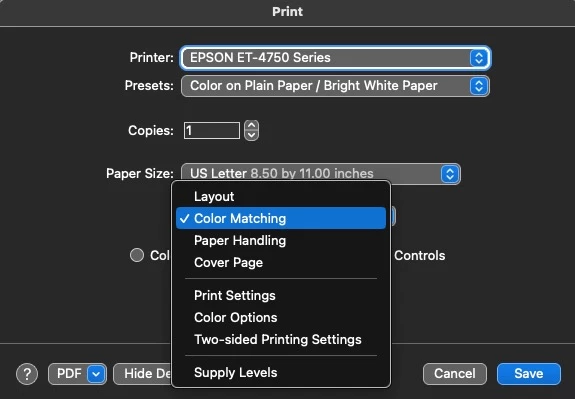
There's nothing 'wrong' in LR but you again may have some incorrect driver and at this point, you need to ask Epson support what's going on.
I uninstalled the printer driver and reinstalled the whole package from the Epson site and the dialog box reappeared. Thanks for all your help.
Enter your E-mail address. We'll send you an e-mail with instructions to reset your password.
 AdChoices